Do I Need to Know SEO for My Online Store to Attract Customers from Google?

You run an online store. You choose products, talk to suppliers, keep track of orders and answer customers’ questions. You want more people to find your store on Google. But when are you supposed to learn SEO as well?

Perhaps an agency has always handled it. They had access to your website, sent you reports and let you get on with running the business. Or perhaps you have been putting SEO off because it sounds complicated and seems to require time and specialist knowledge.

You do not need to become an SEO specialist to improve your store’s presence on Google. You do need to know who will do the work, what they will do and what they will need from you.

What does SEO actually do?

Imagine a customer looking for a frying pan for an induction hob. They have never heard of your store. They search Google for “induction frying pan” or “which frying pan doesn’t stick”.

If they find a suitable product or a helpful buying guide on your website, that could be their first visit to your store.

Search engine optimisation, usually called SEO, means working on your website so it can appear in situations like these. It includes creating useful content and helping search engines understand what your store offers. This is also how Google explains the basics in its beginner’s guide.

For a store owner, the goal is straightforward: reach people who are looking for what you sell, even if they do not yet know your business name.

You can put someone else in charge of the work

Running a business means making decisions across many different areas. It does not mean you have to do every job yourself.

The same applies to SEO. Researching what people search for, choosing pages to improve and preparing content can be handled by an agency, an employee or a properly configured tool with specialist support.

If an agency has handled this until now, it is natural to expect that you will still be able to focus on your business. When considering another solution, it helps to ask:

“What exactly will you handle, and what will still be my responsibility?”

The answer will tell you more about the day-to-day arrangement than a long list of features.

Your knowledge of the store still matters

The person handling SEO may understand search engines. You understand your products and customers.

You know which products you want to focus on, what makes your store different and what shoppers ask before placing an order. You can also spot a description that promises something a product cannot deliver.

Take the frying pan again. Someone has prepared a description saying it is dishwasher-safe. The manufacturer, however, recommends washing it by hand.

Spotting that mistake requires product knowledge. You can check it yourself or ask an employee who knows the range well.

The same is true of business priorities. If you are discontinuing part of your range, tell whoever handles your SEO. That helps keep the work focused on products you actually intend to sell.

How does this work with SEOAssistant PRO?

SEOAssistant PRO helps organise ongoing work on your store’s search visibility. Connecting your website and configuring the platform are part of onboarding: we help you get the service running and establish how the work will be handled. See how getting started works.

The platform analyses your offer and available data, identifies pages that need attention and prepares proposed changes. These can include product descriptions, category content and articles that answer customers’ questions.

You can review, edit or reject suggestions before publication. Content review can be handled by someone on your team, an agency you work with or with support from an SEOAssistant expert. Explore the platform’s workflow.

For a store owner, this creates a clear division of responsibilities: proposed changes are prepared through an agreed process, while your business provides product information, makes business decisions and approves content.

How much of your time will it take?

If an agency has handled everything until now, this is probably one of your first questions.

Agree at the outset who will review suggestions and how often. A small store with a stable range has different needs from a catalogue with thousands of products and frequent changes.

The quality of your product information matters too. Complete, up-to-date details make a draft easier to assess. Missing information needs to be filled in first.

You do not have to write every description yourself. You should know who is responsible for checking and approving it. That division of work helps you plan without adding every SEO task to the owner’s workload.

How can you judge progress without studying reports?

Start with three questions:

  • What work has been completed on my store?
  • Are more people finding the store and visiting it from Google?
  • Are those visits leading to enquiries or orders?

It helps to distinguish completed work from its effects. Publishing new descriptions means a task has been done. Whether it helped attract customers needs to be assessed from the results.

Changes in search take time. Google explains that their effects can appear within hours or take several months, and not every change will have a noticeable impact. Read Google’s explanation.

Visits alone do not guarantee purchases either. Customers still consider the product, price, delivery and whether they trust the store. That is why conversations about progress should come back to what matters to your business.

Where should you start?

You do not need to begin with an SEO course or work out every feature of the application on your own.

Start with a trial of SEOAssistant PRO. Our SEO expert will guide you through onboarding and explain the possibilities for your particular store. Together, you will discuss what work the platform can prepare and where you or your team will need to be involved.

It is an opportunity to see how the arrangement works with your own product range and decide whether it fits the way you run your business.

Two Hours a Week on Ecommerce SEO: What You Do and What the App Does

You run an online store. There are orders, suppliers, customer questions and problems that cannot wait. You know your product and category descriptions need work, and your blog could attract new customers. But when are you supposed to do it?

Another tool does not solve the problem if logging in gives you a task list for the next three weeks.

SEOAssistant is being built to do more of that work, not simply point it out. Our experience across the projects we work on suggests that around two hours of regular work with the app each week can be enough to steadily develop your store’s content and achieve noticeable SEO improvements.

That does not mean writing every description in two hours. It means reviewing and guiding the work the app prepares.

And it does not have to be an SEO specialist. Above all, you need someone who knows your offering and can judge whether the proposed content is factually correct.

Two hours of your time is not two hours of work on your store

Manually optimizing a single description means gathering information, researching keywords, deciding on a structure, writing the text, checking it and publishing it. Then moving on to the next product. And eventually returning to what you have already published.

With a dozen products, that is manageable. With a few thousand, you start running out of time before the work has really begun.

SEOAssistant changes that division of responsibilities. The app uses website data, your offering and analytical sources, helps establish priorities, and prepares proposed content and improvements. Changes belong to specific pages, and fields supported by the integration can be updated after approval.

You do not start with a blank document. You start with a proposal you can assess, edit and approve.

Two hours is the time you spend participating in the process. It is not a limit on the work the system can prepare during that time.

You do not need to know SEO. You need to know your products

The person using the app does not have to research every keyword or design the structure of every text independently. They should, however, be able to answer some much more practical questions:

  • Does this product actually have the features described?
  • Is it suitable for the suggested use?
  • Does the customer receive the listed items in the package?
  • Is any information that customers frequently ask for missing?
  • Does the description match what we actually sell?

Suppose the app prepares a description of a kitchen tap. A team member who knows the range notices that this particular variant does not have a pull-out spout, or adds an important installation detail. That is not an edit “for the algorithm.” It is knowledge a customer needs to choose the right product.

The owner, a product manager or a customer service team member can take on this role. Often, the person answering shoppers’ questions every day knows exactly what the descriptions are missing.

Fluent writing still needs fact-checking. If a claim is uncertain, check the specification or ask someone who knows. Do not approve a sentence just because it sounds convincing.

What could a two-hour working week look like?

The schedule below is an illustrative way to organize the work, not a time measurement for every customer. You can use one block or split it into two shorter sessions each week.

Time Your task Why it matters
20 minutes Review the proposed priorities against your current offering Keep the work focused on pages that matter to the business
70 minutes Check prepared changes, correct facts and approve proposals that are ready Get worthwhile improvements onto the website
20 minutes Add context: customer questions, product features and feedback on content Help future proposals reflect the specifics of your store
10 minutes Check what has been published, what is waiting and whether anything needs attention Maintain continuity and avoid overlooking problems

Most of this time goes into decisions about prepared content, not operating the tool.

You do not have to “clear the entire queue” every time, either. It is better to review the most important proposals carefully than to approve everything just to bring the pending count down to zero. The number of descriptions you can review depends on their length, the quality of the source data and the complexity of the products.

A quick look at results does not mean judging SEO every week based on a few days of traffic. Its main purpose is to spot signals and decide what needs attention next.

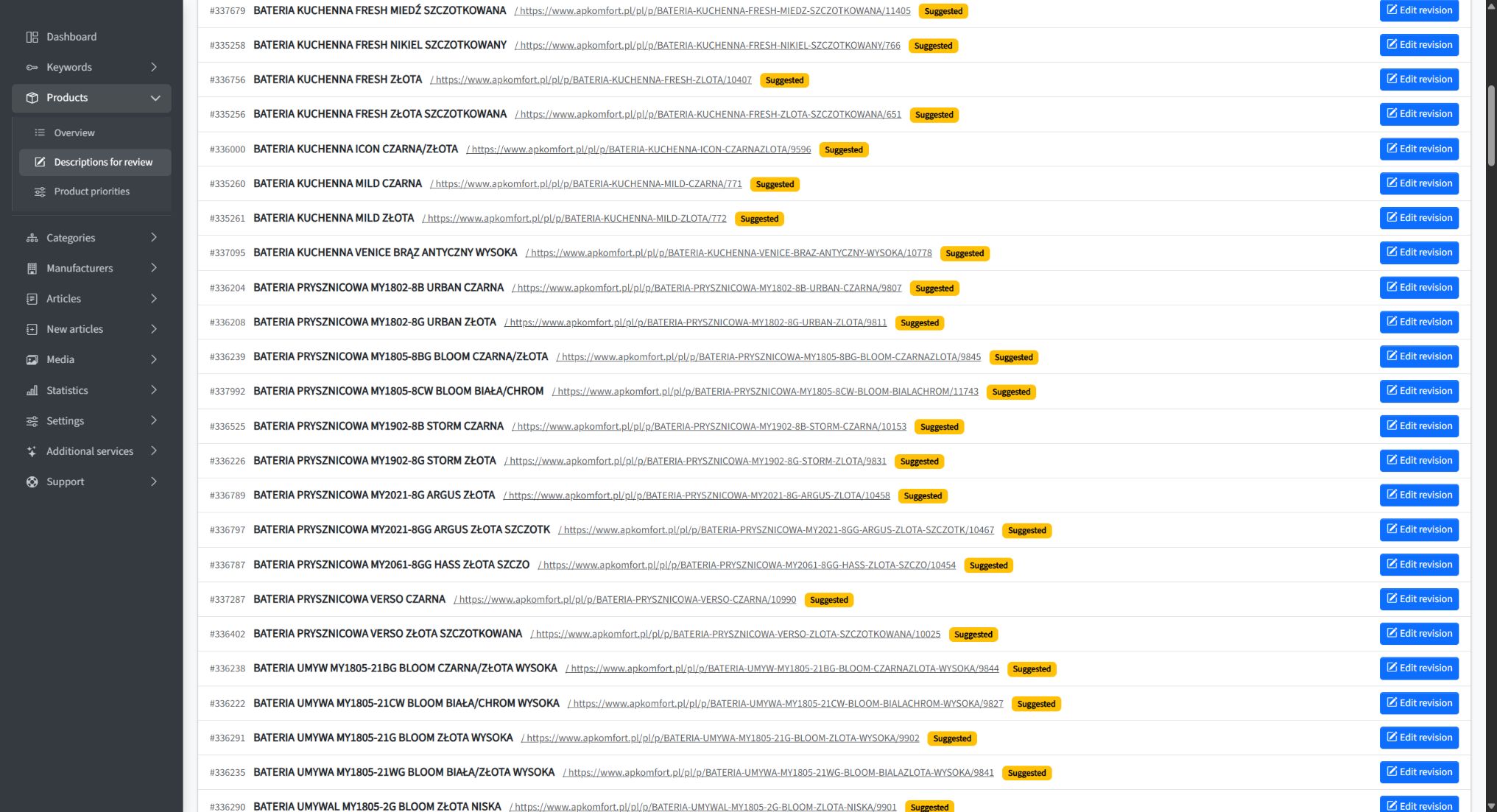
AP Komfort content revision queue in SEOAssistant
An archival view of the AP Komfort revision queue: proposed changes awaiting review. This illustrates the workflow, not the number of changes that can be reviewed in two hours.

A diff makes comparison faster. It does not replace judgment

Reviewing content should not mean opening your store in one tab, a proposal in another, and looking for differences sentence by sentence.

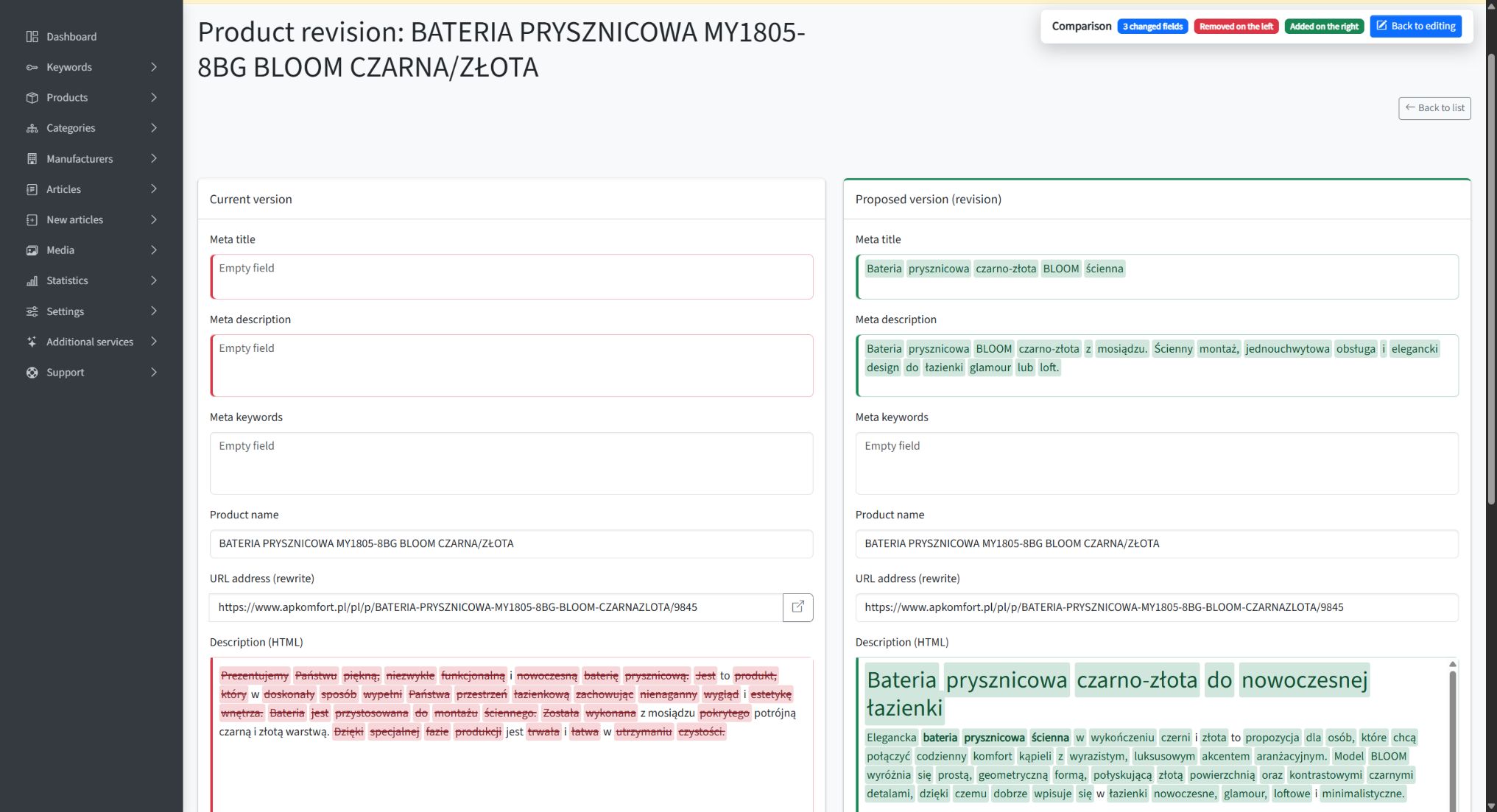
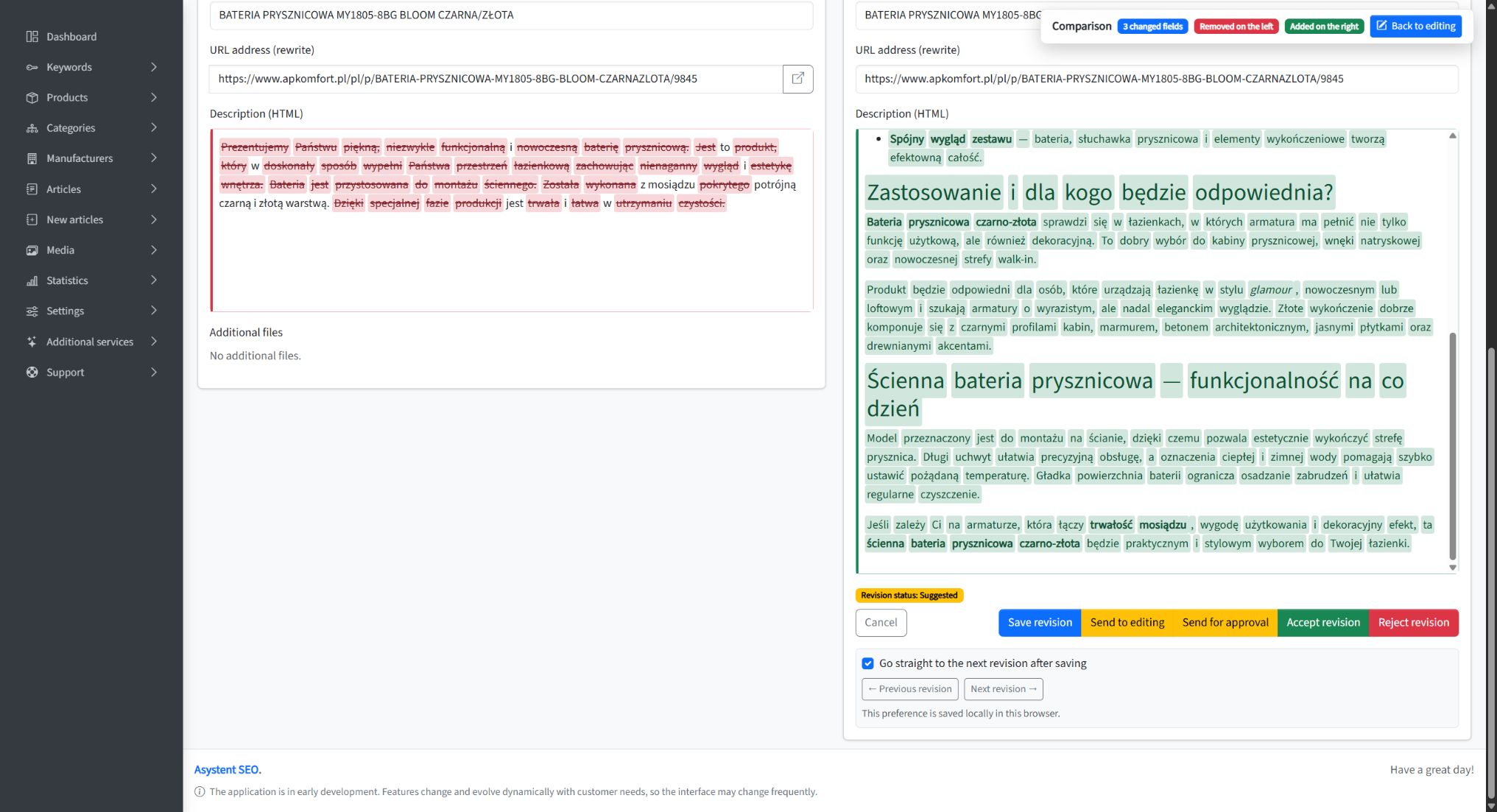
In SEOAssistant, a proposal is saved as a revision. You can compare it with the current content, and the diff highlights added and removed passages. This makes it easier to see whether a product use has been added, important information has disappeared, or the scope of the description has changed.

That is particularly useful when you return to a page that has already been improved. You do not have to work out the entire change from scratch each time.

Color alone does not confirm that a sentence is true. The diff helps you locate what needs attention; someone who knows the offering makes the decision. When a description has been substantially rewritten, it is also worth reading the finished version as a whole.

We show a practical approach in How to Review AI-Generated SEO Content Without Reading Everything Twice.

AP Komfort product description with additions and removals highlighted in the diff view
An AP Komfort product description revision with highlighted changes. The diff helps identify added and removed passages; it does not replace fact-checking.

What did this look like at AP Komfort?

AP Komfort, a kitchen equipment retailer, is a useful example. The project covered a catalog of 1,858 products and 170 categories.

In the published case study, we described the client’s involvement as around one hour of approvals per week and one weekly meeting. SEOAssistant handled publication. This is not a record of exactly 120 minutes of work. It does show how a small, regular human contribution can accompany a much broader scope of activity.

The project published 211 product revisions, 83 category revisions and 20 manufacturer revisions. Comparing two equal, 41-day periods—November 21–December 31, 2025 and January 1–February 10, 2026—showed a 24.19% increase in Google impressions and a 36.73% increase in the number of pages receiving clicks. The details, data sources and scope of work are presented in the AP Komfort case study.

These results are not a promise of identical growth for another store. They demonstrate something more practical: the client did not have to personally write and publish hundreds of revisions for work on the website to move forward.

A greater volume of work than a traditional agency package

Working with a tool yourself does not have to mean a narrower scope than outsourcing SEO. With a well-prepared process, it can mean precisely the opposite.

In September 2026, public agency offers still include packages with a few texts per month and a defined scope of catalog optimization. For example, GBoost lists three pieces of content, optimization of up to 15 products and 1–2 categories per month in its Start package; larger packages increase those limits. KC Mobile lists 4–8 texts per month in its ecommerce package, plus category and product descriptions. These are examples of specific offers, not a statistical average of the entire market. GBoost’s scope, KC Mobile’s scope.

The volume of content work you can set in motion yourself with SEOAssistant can significantly exceed a traditional retainer built around a few texts and a limited number of monthly updates. At AP Komfort, we are talking about 314 published product, category and manufacturer revisions across the documented project—not 314 content ideas or drafts waiting in a folder.

Here, we are comparing the scale of catalog content work, not an agency’s entire service, which may also include technical SEO, link building and analytics. More changes make sense when they are justified, accurate and actually implemented.

For a store owner, the most important question is therefore: how much valuable work reaches my website, not how many people are involved in servicing the account?

SEO agencies need to change their operating model

Our assessment of the market in September 2026 is clear: SEO agencies need a substantial transformation to keep pace with the scale and speed of work that automation makes possible.

Replacing a copywriter with a text generator while leaving the same limited scope of work for the client is not enough. The entire process needs to change: from data analysis and prioritization, through preparing and implementing updates, to evaluating results and making further improvements to existing content.

If a store owner or employee can set work on a substantial catalog in motion with a small, regular contribution, the bar for outsourced services rises. A list of recommendations, a few new articles and a monthly report will find it increasingly difficult to justify their value.

Automation does not lower expectations of SEO. It raises expectations of how much valuable work should get done.

What needs to be in place for this model to work?

Two hours a week refers to regular work with an app that is already set up. Initially, the website needs to be connected, data and content rules configured, and the first proposals reviewed. We help with this stage—it is separate from the ongoing working routine.

The quality of the input information matters, too. If a product has a name and a one-sentence description, while important specifications exist only in a salesperson’s head, someone needs to provide them. Automation should not mean guessing product specifications.

A simple arrangement works best: one person responsible for regular review, access to reliable product information, and clear rules about what gets approved and what needs correction.

Introducing a new product line, sorting out a neglected catalog or working on more specialized content may require more involvement. Similarly, a store migration or a technical issue blocking indexing may need separate specialist work. A two-hour routine does not mean that every website problem fits into the same time allowance.

The first improvements can be noticeable after the first month

Our observations from the projects behind our case studies suggest that the first noticeable improvements can appear after just the first month of regular work. You do not have to assume from the outset that, for six months, another report will be the only visible result of the engagement.

This is an observation from projects we have worked on, not a guarantee of results in 30 days. In the AP Komfort example above, the documented increases in impressions and pages receiving clicks compare two 41-day periods.

The speed at which justified changes reach the website matters. If updates spend weeks waiting to be written, approved or pasted into the store, that time is not yet helping you assess their impact in search. Automation helps shorten the path to publication; it does not set Google’s response time.

Google explains that changes can take anything from hours to months to be reflected, and that it generally makes sense to assess their impact after a few weeks. Not every improvement produces a noticeable result. Source: Google Search Central.

The first increase is the beginning, not the end of the work. What matters is the cycle: choose justified changes, implement them, observe the results and revisit existing content. This is the process we are developing SEOAssistant around, so that further work follows your offering, customer questions and changes in search.

Your contribution is business knowledge, not a second job

The biggest change is not that a person writes faster. It is that they no longer have to carry out every stage of the work themselves.

The app prepares proposals. You or your employee check the facts, add knowledge about your offering and make decisions. That allows even a small but regular contribution to become a steady stream of improvements to your store.

You do not need more hours to write “for SEO.” You need a process that puts your product knowledge into the content without making you create everything from scratch.

An Automated Blog Is Not Automated Ecommerce SEO

A new article every few days. A publishing calendar filled for the month. AI researches topics, writes and publishes. The tool’s website calls it “SEO on autopilot”.

Meanwhile, in your store? The same supplier descriptions. Categories nobody has improved for a year. Existing pages with potential that remains untapped.

You can automate the production of new content and still leave the work on your store unautomated.

We explored this through our own MeetEdward account. We also looked at Soro, GetAutoSEO and Semly. We were not interested in counting features on a landing page. We wanted to know one thing: what happens to an existing page when it needs analysis, an improvement, implementation and another review later?

That is the distinction we are building SEOAssistant.pro around.

“Every keyword becomes an article.” For ecommerce, that is not enough

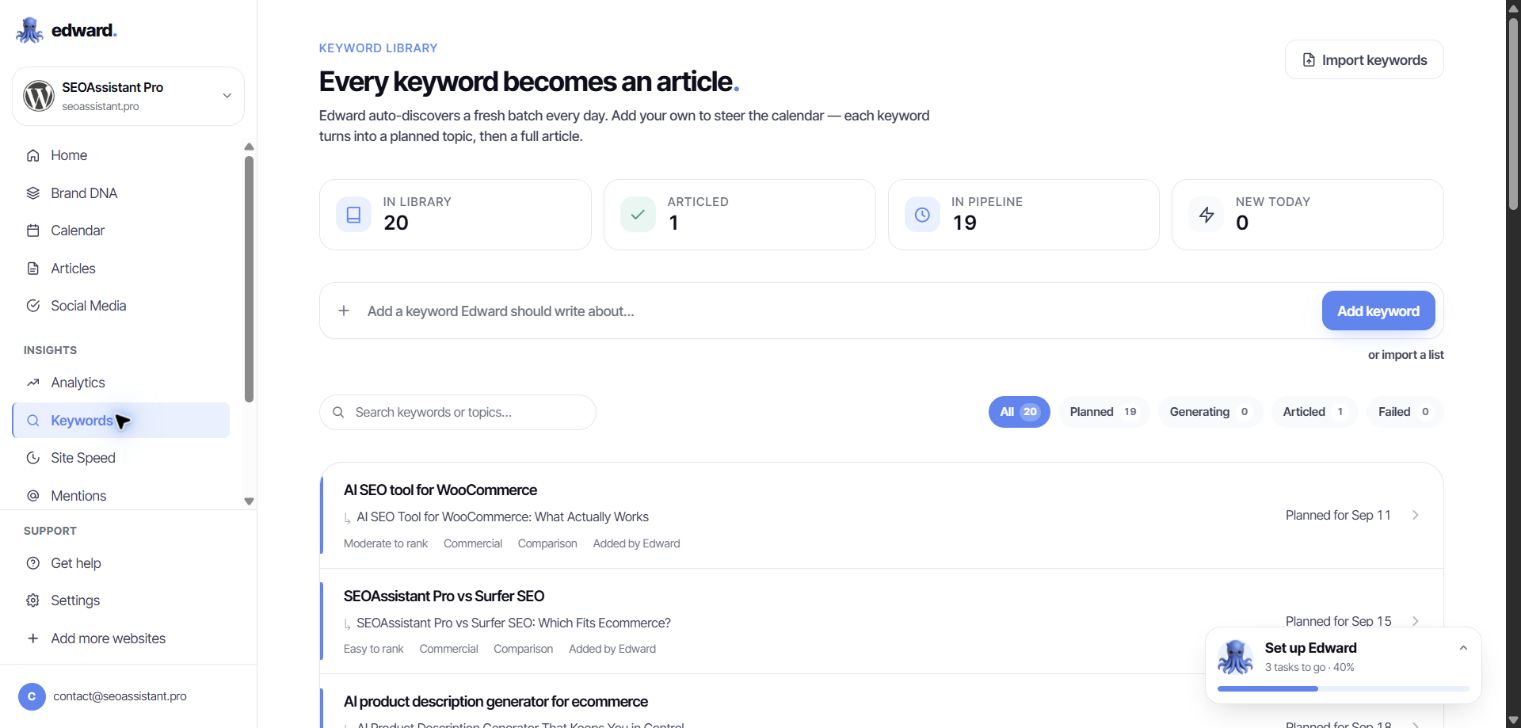
Edward’s Keywords module greets users with a clear statement: “Every keyword becomes an article.” It explains that a keyword becomes a planned topic and then a complete article.

There is no need to interpret the advertising. That is how the application itself describes this workflow.

Edward's Keywords module showing Every keyword becomes an article and topics queued for publication
Our Edward account, September 8, 2026. Keywords feed a queue of article topics.

But not every keyword needs a new article.

If you sell kitchen sinks, a query about a particular product type may call for work on a category you already have: a clearer description, a better explanation of the range and answers to shoppers’ questions. Sometimes the right destination is a product page. Sometimes it is an existing buying guide that needs updating.

Automatically turning more keywords into more posts does not resolve that choice. A system can perform a task very efficiently without that task being your store’s most important priority.

In SEOAssistant, an existing product or category is also a unit of work. Keyword selection supports a specific page and its offer—not just a blog publishing calendar.

We explored Edward’s dashboard. Where do you return to published content?

We went through the keyword library, calendar, article list and editor for an existing draft. The visible workflow runs from an idea to writing and publication. The calendar displays upcoming topics. The editor lets you change the text, publish it, schedule publication or export it.

In the views available to us, we did not find a recurring optimization workflow for existing content: a page’s results → fresh analysis → a recommended change → another revision → an update to that same page.

Being able to edit an article manually is not that workflow. Nor is a Search Console chart a mechanism that draws a conclusion and prepares an improvement.

Edward has analytics, competitor-change monitoring and a technical-audit module. But those tabs do not close the gap between “I can see the data” and “the system helps me improve this specific piece of content”. If you still organize the analysis, page selection and follow-up yourself, that work remains yours.

The provider describes broader SEO changes on its WordPress and Shopify integration pages. A claim on a website does not, by itself, demonstrate an operational improvement cycle for an existing catalog. We did not find that cycle in the dashboard we reviewed; our publishing integration had not yet been connected.

This is a specific gap in the workflow we examined, not an argument about whether AI can write a good paragraph.

A ready-made landing page? Ready to copy and paste

Edward’s Marketing Pages module generated a comparison page for us: headings, sections, a table and a call to action. In the preview, it looked finished.

The next step: copy the code and put it on your website.

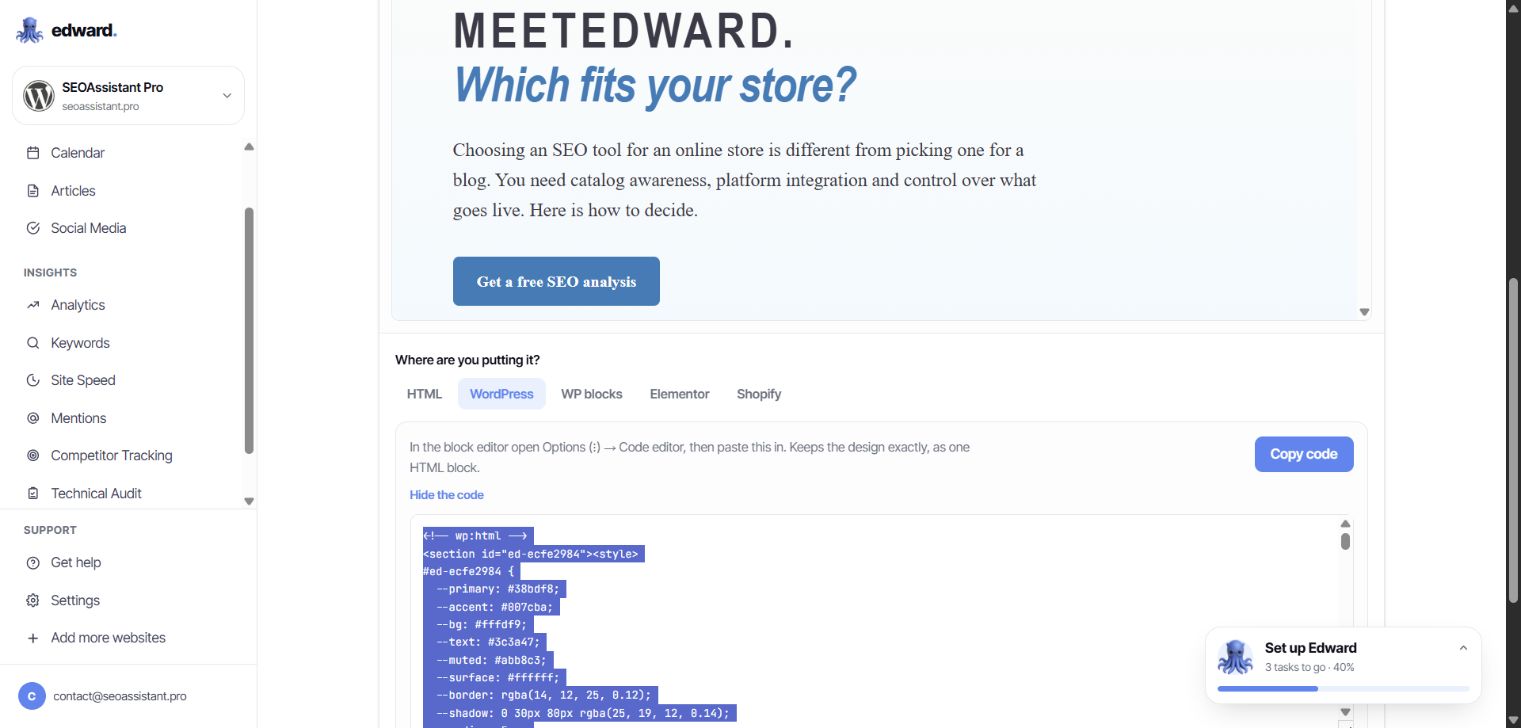
Edward's landing-page export showing WordPress paste instructions and HTML with its own CSS styling
Marketing Pages: the selected WordPress export contains HTML and styling. This module hands the implementation back to the user.

There are several export formats, including WordPress blocks. That does not change the core point: implementation remains the user’s job. You must place the material correctly and check it in your site’s actual template. Code for a standalone landing page does not automatically become an update to a category description.

If another round of manual work awaits after generation, automation has not removed it. It has moved it downstream.

In SEOAssistant, a proposed description change belongs to an existing product or category. The integration sends it to that page’s supported fields. You do not first have to turn a generated page design into content you can use in your catalog.

Soro, GetAutoSEO and Semly: do not mistake one capability for the whole SEO job

These tools differ. But an online-store owner should ask each of them the same question: will this work on my catalog, or add another layer of content alongside it?

Tool What its offer or accessible workflow shows What that alone does not establish
MeetEdward In our account: keywords → topics → articles → publication, with separate analytics and additional modules We did not find a visible path from an existing page’s results to another revision of its content
Soro Research, content creation and automatic article publication in a connected CMS Publishing a post is not the same as updating an existing product or category
GetAutoSEO Article production and distribution, blog integrations and blog hosting Additional posts do not replace analysis and improvements to catalog descriptions
Semly Visibility in AI answers, content creation and refreshes, and claimed access to store data AI monitoring and content refreshes do not, on their own, demonstrate a complete revision and implementation workflow for product and category descriptions

Scope sources: Soro, GetAutoSEO’s integration demo, Semly’s content capabilities and Semly’s integrations. The table distinguishes demonstrated or described scope from work that cannot simply be inferred from it.

A Shopify or WooCommerce logo is not enough. Publishing to a store’s blog, reading product data and updating product descriptions are different integration capabilities.

Likewise, tracking changes on a competitor’s website is not the same as using competitor analysis to prepare a new version of your own category page.

Do not only ask, “Do you have an integration?” Ask, “Show me what you would change in this product—and what you would do with it later.”

SEOAssistant: working on the store, not just its publishing calendar

Imagine a store with several thousand products. Some use supplier descriptions. Some category pages fail to explain the differences between products. Older guides do not reflect the current range.

Publishing another ten articles will not automatically improve any of those descriptions.

SEOAssistant is also built to work on those existing assets: it reads product and category data, prepares changes and sends them back to the connected platform. The supported fields depend on the integration.

SEOAssistant's review queue for revisions to existing AP Komfort products
An archival screenshot from AP Komfort, shared with the client’s permission. These are proposed changes to specific catalog products, not a list of new blog topics.

Product context, not just a topic

Descriptions are prepared in the context of the business’s offer, product or category data and selected keywords. The starting point is not simply “write something about kitchen sinks”.

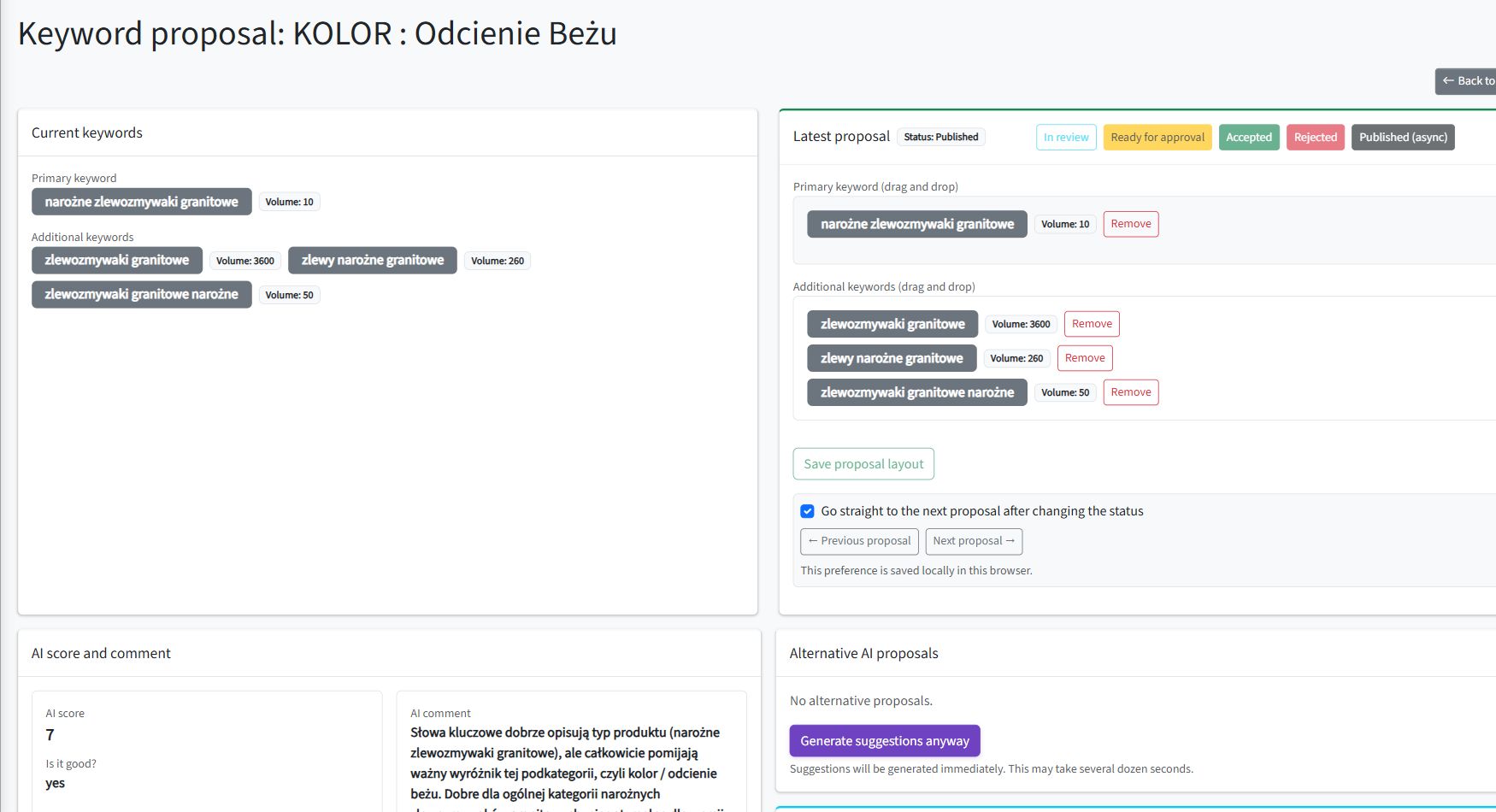
For a category, you can inspect keyword proposals and their roles, then prepare content for the relevant page fields. The analysis and the resulting text relate to a specific place in the store.

A revision, not a document to paste somewhere

Proposed content becomes a revision attached to a product or category. You can see the current and proposed versions, edit the proposal and approve the change.

A diff highlights additions and removals. Instead of comparing two entire texts sentence by sentence, you can immediately see where to focus.

The current product description and proposed revision with additions and removals highlighted
An AP Komfort product revision with the diff enabled. Archival material: red and green highlights identify the content changes.

After approval, the application queues an update to the connected platform. Product-description generation also has an option to send the result to publication automatically.

The distinction matters: a person can contribute knowledge of the offer. They do not have to act as the copy-and-paste connection between systems.

See more examples in our article on reviewing AI-generated SEO content with a diff.

An audit, not the assumption that generated means finished

An appropriate word count and heading structure do not establish whether a description actually represents its category well.

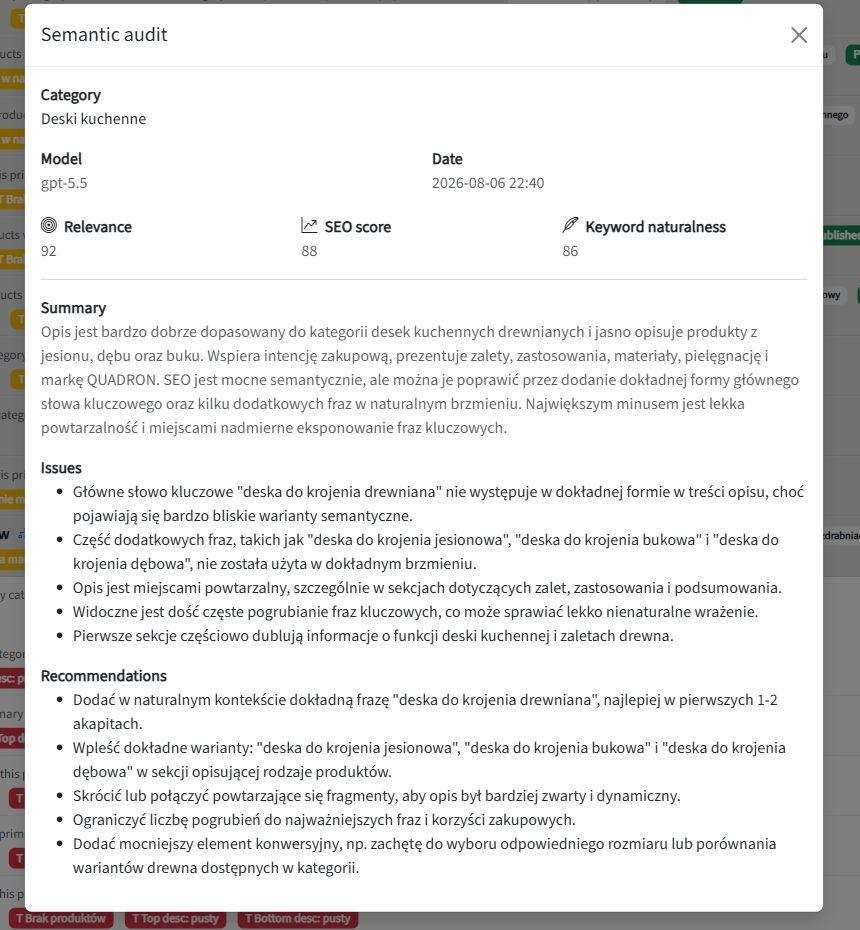
SEOAssistant’s semantic category audit identifies relevance issues and recommendations. You can return to a description with a specific reason to improve it, rather than commission the next article simply because the previous one has been published.

SEOAssistant's semantic category audit with scores, issues and recommendations
An audit of AP Komfort’s “Deski kuchenne” category—an archival example of recommendations for further work. The scores belong to the application, not Google.

SEO needs a cycle, not a production line for new content

Publication does not stop the market changing. Product ranges, customer questions, competitors and search results all evolve. A good description does not automatically become bad—but it should be reassessed when there is a reason.

The right workflow therefore looks like this:

Page analysis → a justified change → implementation → observation → the next decision.

Not: another keyword → another article → another keyword → another article.

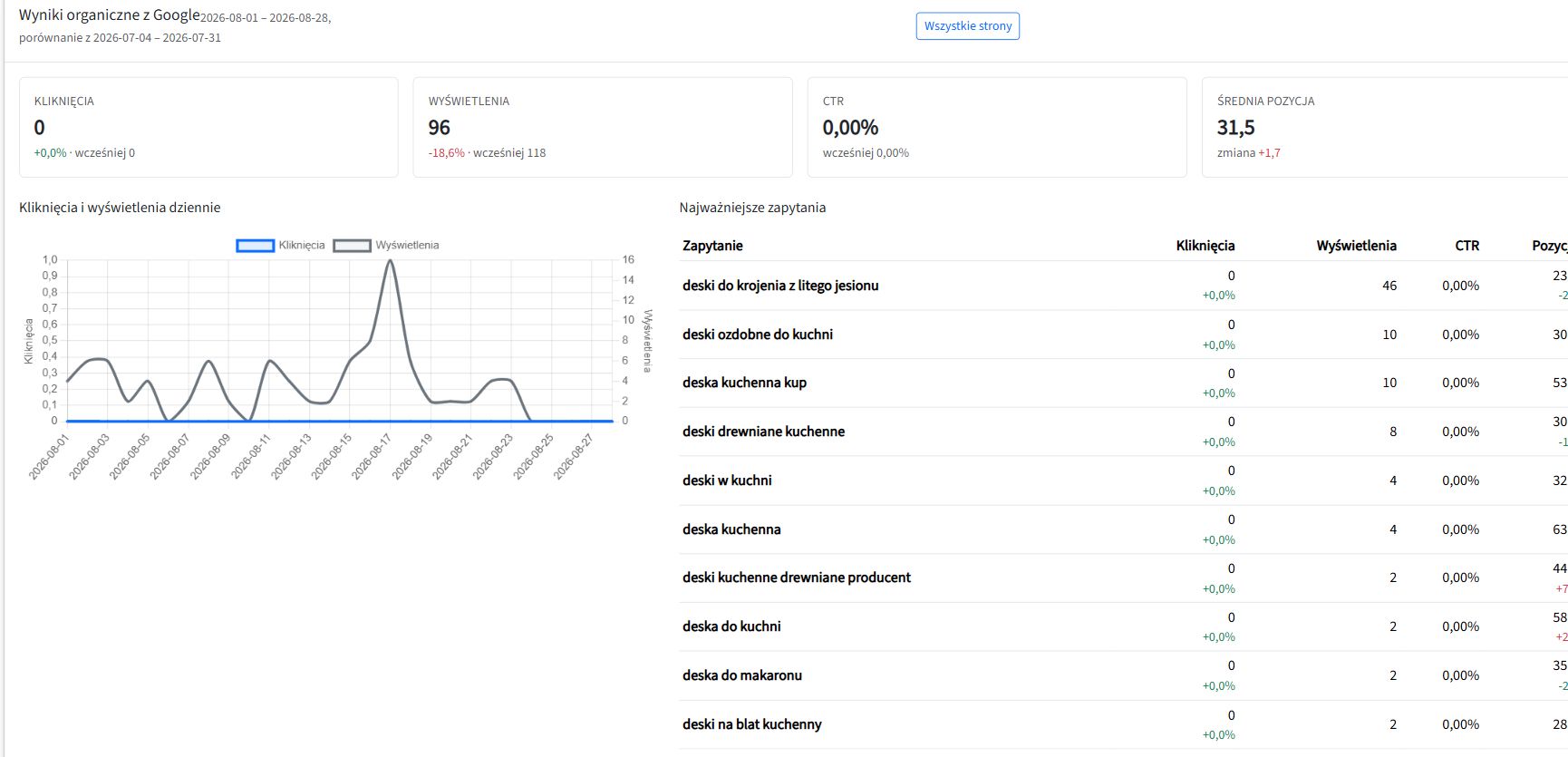
In SEOAssistant, we connect catalog work, revisions, audits and Search Console data associated with a specific category. We are developing this into an increasingly autonomous cycle; which stages run automatically depends on content type and configuration. The aim is better decisions about existing pages, not rewriting everything unconditionally every month.

This way of working allows future changes in the offer, trends and search-engine requirements to inform subsequent decisions. That is the direction of SEO automation that matters to a growing store.

We explain the process in more detail in our article on automating ecommerce category SEO.

A $39 subscription. What about the work left over?

Our Edward subscription cost $39 per month. But a price comparison only makes sense once you compare the scope of the completed job.

If you still have to analyze categories separately, improve products, implement exported pages and organize follow-up work on older content, those tasks have not disappeared from the SEO budget.

A low subscription price does not make the work outside the tool free.

Do not compare only article allowances and monthly fees. Compare how much work on your actual website you no longer have to do manually.

Ask to see an improvement. Not another generated article

During a demo of an ecommerce SEO tool, bring a specific product and category. Ask:

  1. What does the system know about this page, and what does it propose based on that data?
  2. Will it improve the existing content or write a new article alongside it?
  3. Can I see exactly what it changes?
  4. Will it implement the change in the correct store fields?
  5. What enables us to return to that same page after publication?

If the presentation ends at “AI wrote the text”, you have seen a content-generation demo. Not a complete workflow for your catalog’s SEO.

Your store does not just need more content. It needs consistent work on the pages where you sell. That is what we are building SEOAssistant.pro for.


About this comparison: prepared by the SEOAssistant.pro team, based on our review as of September 8, 2026. We used our own Edward account, GetAutoSEO’s public demo, official Soro and Semly materials, and SEOAssistant’s workflows. Our Edward observations concern the features visible in the account we reviewed; we did not run deployments through its connectors. This is not a comparative traffic-growth experiment or a ranking guarantee. AP Komfort screenshots come from previously published materials and are used with the client’s permission.

SEOAssistant.pro vs Semrush, Ahrefs, Surfer SEO and Screaming Frog: From Analysis to Approved Changes

SEO tool comparisons often start with the number of reports, keywords or issues a platform can detect. Those details matter, but they do not answer the most practical question for a business owner:

how much work remains between “this page should be improved” and publishing a good change?

Semrush, Ahrefs, Surfer SEO and Screaming Frog are mature products with different strengths. SEOAssistant.pro is not trying to beat every one of them on database size or report count. It is being built as an operational layer that connects data to an existing website and carries the work forward: from selecting a task to preparing a revision, reviewing it and publishing it.

The short answer

  • Semrush is a broad suite for market, keyword and competitor research, audits, content and monitoring.
  • Ahrefs is especially strong in backlink, visibility and competitor data, while increasingly supporting content work and selected implementations.
  • Surfer SEO focuses on creating and optimizing content based on competing results and recommended topical coverage.
  • Screaming Frog is a flexible crawler for technical and on-page website analysis.
  • SEOAssistant.pro focuses on a repeatable process for a connected website: collect signals, select the right product or category, prepare a change, show the difference, request approval and send the content for publication.

These are not always mutually exclusive products. They often solve different layers of the same problem.

How does the working model differ?

Tool Main focus What the user typically does
Semrush Broad data, analysis, content and monitoring platform Connects output from different modules to an action plan; Content Toolkit can publish to WordPress
Ahrefs Domain, backlink, competitor and visibility research, extended with content tools Interprets the data and chooses the action; Patches deploy selected changes
Surfer SEO Creating and optimizing a selected piece of content Chooses the keyword or page, works in the editor and approves suggestions
Screaming Frog Technical crawling, extraction and recurring reports Configures the crawl, interprets issues and passes them on for implementation
SEOAssistant.pro A workflow for products, categories, manufacturers and articles on a connected site Reviews the diff, verifies business accuracy and approves the prepared revision

The table describes the dominant working model, not every available feature. These products evolve quickly and their capabilities increasingly overlap.

Competing tools do more than produce reports

An honest comparison has to recognize that all four platforms now go beyond simple recommendation lists.

Semrush Content Toolkit supports topic research, briefs, article generation and optimization. Its WordPress integration can send content directly for publication or save it as a draft.

Ahrefs AI Content Helper compares topical coverage with competing pages and supports the writing process. Patches in Site Audit can also publish selected changes directly to a site — currently primarily titles and meta descriptions.

Surfer Content Editor guides users from competitor analysis through writing and optimization to a pre-publication review. Auto-Optimize suggests specific changes that can be accepted or discarded, and finished content can be exported to WordPress.

Screaming Frog SEO Spider can run scheduled crawls, combine crawl data with additional APIs and export recurring reports to files, Google Sheets or Looker Studio.

The difference is not that four tools “only analyze” while the fifth “takes action.” The real difference is their center of gravity and how many steps the user still has to connect into a continuous process.

SEOAssistant.pro is not trying to replace every data source

Semrush and Ahrefs have enormous datasets and mature research ecosystems. Screaming Frog gives specialists deep control over technical crawling. Surfer provides a polished environment for improving individual pieces of content.

SEOAssistant.pro addresses a different problem: how can data be used to improve hundreds of existing pages regularly without manually moving everything between a report, spreadsheet, editor and ecommerce platform?

The system uses data from the connected platform, Google Search Console, external keyword and competitor data sources, and AI models in the background. This does not mean that SEOAssistant integrates with Semrush, Ahrefs, Surfer SEO or Screaming Frog. It means that SEOAssistant does not try to recreate every underlying data source: it takes the relevant signals and converts them into actions for a specific product, category, manufacturer or article.

What does the difference look like for one category page?

Imagine an ecommerce category that is receiving Google impressions but few clicks and is not reaching its full potential.

With a traditional toolset, a specialist may:

  1. identify the opportunity in the data,
  2. research keywords and competitors,
  3. assess the existing content,
  4. decide what should change,
  5. write or commission the text,
  6. move it into the CMS,
  7. record the implementation,
  8. return to the data later and evaluate the page again.

Each stage can be completed with a good tool. The challenge appears when the same process has to be repeated across hundreds of categories and products.

SEOAssistant.pro is being built around a single workflow:

  1. the application synchronizes the page and its current content,
  2. it combines that information with Search Console results and external data,
  3. it selects and prioritizes opportunities,
  4. it proposes keywords or a specific task,
  5. it prepares a content and metadata revision,
  6. it runs structural and semantic checks,
  7. it shows the user a diff — the exact changes made,
  8. after approval, it updates the supported platform,
  9. refreshed data and audits inform the next decision.

The user does not receive only a message saying “this description is weak.” They receive a prepared revision assigned to the correct page.

What works today, and what is the product direction?

SEOAssistant.pro can already:

  • synchronize products, categories, manufacturers and articles from supported platforms,
  • collect and organize Google Search Console data,
  • use external keyword and competitor data,
  • assess content with structural and semantic audits,
  • select category and product tasks using conditions and priorities,
  • prepare content and metadata revisions,
  • display the difference between the current and proposed versions,
  • support approval, rejection and revision history,
  • update content on supported platforms,
  • optionally publish generated product descriptions without final manual approval.

The current level of automation still varies by page type and platform integration. Fully closing the loop — regularly reassessing every previously improved page and automatically opening the next revision — is being developed in stages.

The direction, however, is consistent: SEO is not a one-off optimization. It is a cycle that should respond to new performance data, changes in the offer, competitor activity, content development and search algorithm updates.

The biggest difference is the user’s role

In the traditional model, software helps an SEO specialist perform their work faster.

In the SEOAssistant.pro model, the system is intended to perform an increasing share of the work between analysis and implementation. The human can focus on decisions that should not be delegated blindly:

  • Is the information consistent with the actual offer?
  • Does the description represent the product correctly?
  • Can the company fulfil the promise being made?
  • Should knowledge from sales or customer service be added?
  • Is the proposed change ready for approval?

This means the application can be used not only by an SEO specialist, but also by a business owner, product manager or employee who understands the offer.

Which tool should you choose?

The answer depends on the problem you need to solve:

  • choose Semrush or Ahrefs when you need broad market, domain, backlink, competitor and SEO research,
  • choose Surfer SEO when your main task is creating and optimizing specific content in an editorial environment,
  • choose Screaming Frog when you need a flexible technical crawl and control over analysis and exports,
  • consider SEOAssistant.pro when the main problem is not the absence of another report, but consistently moving from data to approved and implemented changes across an existing website.

For many organizations, the best approach may combine these roles. An analytical platform supplies deep data, a crawler controls technical issues, and an operational layer ensures that insights become work on the right pages.

From knowing about a problem to completing the work

The most useful question is not: “Which platform has the most features?”

A better question is:

what happens after an opportunity is detected — and how many people, exports and manual decisions are required before the improvement actually appears on the website?

SEOAssistant.pro is being developed to shorten precisely that distance. Data is the beginning of the process, not the end.

See what SEOAssistant would do next

Start with a free website analysis or book a demo to see which actions the system would select and prepare for your website.

Competitor features were verified in official documentation on September 7, 2026. Features and plans may change.

Does Google Penalize AI-Generated Content? What the Guidelines Actually Say

Short answer: no. Google does not penalize content simply because artificial intelligence helped create it.

That does not mean every AI-generated page is safe, useful, or likely to rank. Google acts against large-scale content created primarily to manipulate search results while offering little or no value to users.

The most useful question is therefore not:

Was this written by a human or by AI?

It is:

Does this page genuinely help the person who found it?

This distinction matters for companies using AI to improve product descriptions, category pages, guides, landing pages, and older content already published on their websites.

What does Google officially say about AI content?

In its guidance on generative AI content, Google explains that generative AI can be useful for researching a topic and adding structure to original material.

At the same time, publishers are expected to focus on accuracy, quality, and relevance. This applies not only to the visible copy, but also to automatically generated titles, meta descriptions, structured data, and image alternative text.

Using AI is not, by itself, a violation of Google Search policies. The problem begins when automation is used to publish large numbers of pages without adding meaningful value.

The same principle applies to human-written copy. Poor content does not become helpful simply because a person typed it.

Google evaluates the result, not the writing tool

A business can create content in many ways:

  • write it entirely in-house,
  • hire a copywriter or agency,
  • use AI as a writing assistant,
  • generate drafts from company and website data,
  • combine an expert, automation, and editorial review.

The production method alone does not determine quality.

Google says its systems aim to reward helpful, reliable, people-first content. Its helpful content guidance asks publishers to consider whether a page:

  • contains original information, analysis, or insight,
  • covers the subject thoroughly enough to satisfy the reader,
  • adds something beyond an obvious summary of other sources,
  • would be useful enough to save, recommend, or share,
  • is carefully produced and factually reliable,
  • shows genuine knowledge or experience of the subject.

AI-assisted content can meet these criteria. Human-written content can fail every one of them.

When can AI content become a problem?

The biggest risk does not come from a particular language model. It comes from the way automation is used.

Google’s spam policies describe scaled content abuse: producing many pages primarily to manipulate rankings while providing little or no value. Google explicitly says this can involve content created by people, automation, or a combination of both.

Risk increases when a company:

  • publishes a separate page for every possible keyword variation,
  • creates hundreds of nearly identical product or category descriptions,
  • rewrites competitors’ pages without adding its own knowledge,
  • publishes facts that have not been verified,
  • generates content without understanding the products or offer,
  • uses one generic template across unrelated subjects,
  • never analyses or updates pages after publication.

These practices can be problematic whether the content comes from AI, a content farm, freelancers, or an agency.

“Unique” does not automatically mean valuable

Generative AI can produce sentences that do not duplicate any existing page. Technical uniqueness, however, is not the same as usefulness.

A thousand original words can still fail to answer a single important customer question.

A good ecommerce category description should help a buyer understand:

  • which products belong in the category,
  • how the available options differ,
  • which option suits a particular use case,
  • which parameters matter before purchase,
  • what common mistakes to avoid,
  • what customers most often ask before deciding.

A product description should use the real characteristics of that product rather than polished generalities that could be attached to hundreds of other items.

This is why a prompt such as “write an SEO-optimized category description” is not a complete SEO process.

Can content be generated mostly by AI?

Yes. The percentage written by AI is not the decisive criterion.

A largely automated draft can be useful when the system receives trustworthy data, sufficient business context, a clearly defined search intent, and rules that prevent it from inventing information. It may even be prepared more consistently than copy written manually without research.

AI does not automatically know:

  • the actual features and limitations of your products,
  • how your company operates,
  • what your customers ask your sales team,
  • which claims your business can support,
  • what changed recently in your range or industry.

Value is not created merely by generating fluent sentences. It comes from selecting the right data, understanding the user’s intent, and keeping the text aligned with reality.

How SEOAssistant approaches AI-assisted content

SEOAssistant is not designed to produce the highest possible number of disconnected articles.

The system is being developed around the context of a specific website: its products, categories, existing pages, Google visibility, Search Console data, selected keywords, and competitive environment.

The intended workflow is:

  1. Analyse the current page and its search-performance data.
  2. Select a topic and query that belong to that particular page.
  3. Use the website’s products, categories, offer, and existing knowledge as context.
  4. Prepare a page-specific revision rather than generic copy.
  5. Check the semantic scope and important missing subjects.
  6. Show a diff between the current and proposed version.
  7. Allow the change to be reviewed or, where the workflow permits it, move through subsequent stages automatically.
  8. Return to published pages as their results, competition, and search demand change.

We are working toward an increasingly complete cycle in which content is not generated once and forgotten. It should evolve with the business, the search market, user behaviour, competitors, and future changes in search systems.

Automation does not have to replace knowledge of the business. It can help apply that knowledge consistently across far more pages and revisit content that would otherwise remain unchanged for years.

Why a simple AI writer is not enough

A language model can produce a plausible article in seconds. That is only one small part of SEO work.

The process also requires:

  • choosing the right page,
  • understanding its current visibility,
  • identifying the search intent,
  • selecting meaningful topics and queries,
  • comparing the page with competing results,
  • finding genuinely missing information,
  • keeping claims consistent with the real offer,
  • updating previously published content,
  • measuring what happens after implementation.

Without these steps, AI merely makes it faster to publish average content. With them, it can help scale a well-designed SEO process.

Should you use an AI content detector?

AI detectors estimate authorship from statistical language patterns. Their scores are not proof of who wrote a text and they are not a measure of content quality.

A peer-reviewed study, “GPT detectors are biased against non-native English writers”, found serious false-positive problems when detectors evaluated English essays written by non-native speakers.

A separate practical evaluation of AI-generated text detectors found that performance can fall substantially across different models, domains, and relatively modest changes to the text.

A “98% human” result does not prove that a person wrote the content. A “98% AI” result does not prove that the page is spam or that Google will rank it poorly.

You can create a useless article that passes as human. You can also publish a genuinely useful page that a detector labels as AI.

Instead of optimizing for detector scores, check whether the content is accurate, relevant, specific to the business, meaningfully different from competing pages, and useful to the reader.

Do you have to disclose the use of AI?

Google suggests considering an explanation of how automation was used when readers could reasonably be expected to care about the production process. This is not the same as a universal requirement to label every sentence assisted by AI.

Context matters. Transparency is particularly valuable for medical or financial advice, original research, product testing, and other subjects where authorship, expertise, and methodology affect trust.

For a category description, the most important questions will usually be whether the information is correct and whether it helps customers choose.

Other Google services, including Merchant Center, may have separate rules. Organic Search guidance should not automatically be treated as a policy for advertising, product feeds, or generated images.

A practical pre-publication checklist

  1. Does the page answer a real user need?
  2. Are its claims consistent with the actual offer?
  3. Does it use knowledge specific to this company, service, or product?
  4. Does it add something beyond generic information already available elsewhere?
  5. Would a subject-matter expert consider it accurate?
  6. Does it avoid invented specifications, data, and promises?
  7. Does it match the search intent?
  8. Does it help the visitor solve a problem or make a decision?
  9. Is it published on the right page?
  10. Will its results be monitored and the content revisited?

If the answers are positive, the tool used to prepare the first draft becomes a secondary question.

Does Google penalize AI content? The conclusion

Google does not prohibit the use of artificial intelligence in content creation. Nor does it guarantee rankings because a text is long, technically unique, or written entirely by a person.

The risk begins when automation is used to mass-produce pages with little real value, primarily to capture search traffic.

Used well, AI can help analyse data, improve existing pages, organise company knowledge, and create content grounded in the context of a real business.

So the right question is not whether Google likes AI content.

Can AI help us create and continuously improve content that genuinely serves users?

If the answer is yes, artificial intelligence is not a shortcut around SEO work. It becomes a way to perform that work more consistently and at greater scale.

See what SEOAssistant would do next

SEOAssistant analyses existing pages, search visibility, keywords, and development opportunities. It then proposes concrete changes that can be reviewed before publication.

See how to review AI-generated SEO content or start with a free website analysis.

SEO vs Google Ads Over 24 Months: What a Fixed Budget Can Buy

Google Ads and SEO can use the same monthly budget and produce completely different financial curves.

Paid search is usually faster. Once a campaign is active, it can start buying visits immediately. SEO normally begins slowly—especially when a website has little authority, limited content and almost no existing organic visibility.

But the difference becomes more interesting over time.

With Google Ads, the budget mainly buys access to traffic now. With SEO, the budget should improve an asset that can continue attracting traffic later: your website.

That is why the important comparison is not only what happens this month, but what happens after 12 or 24 months of consistent investment.

A simplified 24-month example

Let us give each channel the same budget: EUR 2,000 per month.

To keep the example readable, we will assume:

  • the Google Ads campaign pays an average of EUR 1 per click and therefore generates 2,000 visits each month;
  • both channels have the same 2% conversion rate;
  • the average revenue per conversion is EUR 200;
  • the advertising campaign maintains the same cost and performance;
  • the SEO programme begins with almost no organic traffic and gradually improves the site.

Under these assumptions, 2,000 visits produce 40 conversions and EUR 8,000 in monthly revenue.

Google Ads reaches that level immediately and stays there. SEO starts close to zero, reaches the same monthly revenue around month seven, and then continues growing while the monthly budget remains unchanged.

This is an illustration, not a forecast. Real CPCs, conversion rates, order values and SEO growth curves vary enormously. The point is to show the economic mechanism.

In this example, Google Ads generates more revenue during the first year: EUR 96,000 compared with EUR 84,600 from SEO. After 24 months, however, the cumulative figures look very different: EUR 192,000 from paid search and EUR 370,200 from organic search—with the same EUR 48,000 total investment in each channel.

Why does the Google Ads line stay flat?

If CPC, conversion rate and budget remain stable, paid traffic is relatively predictable.

Spend EUR 2,000, receive approximately 2,000 clicks. Stop spending and most of that traffic stops too.

That is not a weakness. It is the reason Google Ads is so useful when a business needs speed, control or immediate demand. A campaign can target a specific product, location or offer and begin collecting data quickly.

But a fixed budget also creates a ceiling. If you want materially more clicks, you will usually need a larger budget, a lower CPC or a more efficient campaign.

Why can the SEO line keep rising?

SEO works differently because each month of useful work can strengthen what was created before.

A better category page can rank for more relevant searches. Improved product descriptions can attract additional long-tail traffic. A useful article can support commercial pages through internal links. Search Console data can reveal queries that were not visible when the page was first written.

One page begins generating information that helps improve another. More queries, pages and rankings become inputs for the next optimization cycle.

The monthly budget is no longer paying only for this month’s visits. It is also paying to expand and improve an owned source of future traffic.

The rising SEO curve is not automatic

This is the condition that matters most: SEO only becomes cheaper over time if organic traffic actually grows.

A company cannot assume that publishing a few articles every month will produce the curve shown above.

If an agency creates new texts but does not improve product pages, develop category content, revisit older articles or respond to changes in competitors and search results, growth may be slow—or stop completely.

Good SEO requires more than selecting a keyword and ordering a text. The opportunity, intent, current results, competing pages and business value all need to be analyzed properly.

What should be reviewed every month?

A compounding SEO process repeatedly examines both new and existing work:

  • queries and landing pages already visible in Google Search Console;
  • product and category pages with commercial potential;
  • older content that is losing traffic or no longer answers the search intent well;
  • pages competing with each other for the same queries;
  • changes made by competitors;
  • new topics and gaps in the current site structure;
  • internal linking, indexation and technical obstacles;
  • the relationship between organic traffic and real conversions.

The goal is not to produce the same number of texts every month. The goal is to make the website more useful, more complete and better aligned with real search demand every month.

That may mean creating something new. It may also mean rewriting a category description, expanding a product page, consolidating two weak articles or improving a page that is already close to a valuable position.

SEO or Google Ads? Often, the answer is both

Google Ads buys speed. SEO builds compounding visibility.

During the first few months, paid campaigns can generate demand and provide useful information about which offers and search terms convert. SEO can use those insights to prioritize the parts of the website worth developing.

Later, as organic traffic grows, the company becomes less dependent on buying every visit. Paid search can then focus on launches, seasonal campaigns, high-value queries or areas where organic visibility is still weak.

The better question is therefore not simply “Which channel is cheaper?” It is:

Do we need to buy traffic now, build a source of traffic for later, or do both in the right proportions?

For a broader comparison of speed, control and long-term value, read SEO vs Google Ads: Which Should You Invest In First?.

The real advantage comes from the process

SEO can become significantly more cost-effective over a one- or two-year horizon, but only when the work creates measurable growth.

That requires a continuous cycle: analyze demand, prioritize the right pages, implement improvements, measure the result and return to both new and existing content.

The chart does not promise that every website will follow the same curve. It shows what becomes possible when the SEO budget builds on previous work instead of repeatedly starting from zero.

Want to see where that process could begin on your website? Start with a free website analysis.

SEO vs Google Ads: Which Should You Invest In First?

Should your next marketing budget go into SEO or Google Ads?

The tempting answer is that Google Ads delivers traffic now, while SEO delivers “free” traffic later. That comparison is simple, memorable and incomplete.

Google Ads and SEO solve different problems.

Paid search can place an offer in front of potential customers quickly and give the advertiser substantial control over budget, targeting and timing. SEO improves the website’s ability to be discovered in organic search and builds pages that can continue attracting relevant visitors over time.

For many businesses, the right answer is not choosing one channel forever. It is deciding which job each channel should perform and which one deserves priority now.

SEO vs Google Ads: the short answer

Choose Google Ads first when you need speed, controlled testing or support for a time-sensitive offer.

Choose SEO first when relevant search demand already exists, the offer is stable and you want to develop a long-term source of visibility.

Use both when you need customers today while building a stronger organic position for the future.

Area SEO Google Ads
Initial visibility Usually develops gradually Can begin soon after a campaign is launched
How traffic is funded Investment in research, pages, content, technology and execution Advertising budget, often charged per click, plus campaign management
What happens when spending stops Improved pages and existing organic visibility remain, although performance can change The campaign stops generating new paid clicks
Control over timing and targeting Limited High
Best suited to Building sustained organic discovery Immediate reach, testing and time-sensitive campaigns
Main uncertainty Search engines decide how pages are ranked Auction costs and campaign performance can change
Long-term asset Website content, structure, authority and search data Campaign data, tested messages and conversion insights

Neither channel guarantees profitable customers. Both depend on demand, competition, the offer, the website and the quality of execution.

How does Google Ads work?

Google Search campaigns can display ads near search results when a person searches for terms related to the advertiser’s targeting. Depending on campaign settings, ads may also appear in places such as Google Maps, Shopping, Images and search partner websites. Google describes these placements in its Search Network documentation.

Many advertisers begin with cost-per-click bidding, which means they pay when someone clicks the advertisement. Google Ads explains CPC bidding here.

This gives a business something SEO cannot offer in the same way: the ability to allocate a budget and begin testing selected searches, locations and offers relatively quickly.

The business can learn:

  • which phrases generate clicks;
  • which messages attract attention;
  • which landing pages convert;
  • how much a lead or sale costs;
  • whether demand changes by location, device or season.

However, buying a click does not make that click profitable. A campaign can spend money quickly if the targeting, offer, tracking or landing page is weak.

Google Ads provides distribution. It does not repair the business proposition.

How does SEO work?

SEO improves the website so search engines can understand its pages and potential customers can discover them through unpaid search results.

That may involve:

  • selecting relevant topics and searches;
  • creating or improving appropriate pages;
  • strengthening website structure;
  • resolving technical obstacles;
  • adding useful product, service and business information;
  • connecting related pages through internal links;
  • measuring visibility and refining the work.

A business does not pay Google for each organic click. It invests in the people, systems and improvements required to earn and maintain visibility.

Organic positions cannot simply be purchased, and they are not permanent. Search results change as competitors, websites, search behaviour and Google’s systems evolve.

Google explicitly states that there is no secret capable of automatically ranking a website first and no guarantee that a particular optimization will produce a noticeable result. Its guidance instead focuses on making websites useful, accessible and understandable. See Google’s SEO Starter Guide.

SEO therefore exchanges some of the speed and control of advertising for the possibility of building a more durable source of discovery.

Choose Google Ads first when you need results quickly

A new campaign still requires preparation, tracking and optimization, but it can begin generating traffic much sooner than a new website can normally establish broad organic visibility.

That makes Google Ads particularly useful when:

  • a new business needs its first enquiries;
  • a company is entering a new location;
  • an ecommerce store is launching a promotion;
  • demand is strongly seasonal;
  • the offer has a fixed deadline;
  • the business needs data before making a larger investment.

If the question is “How can we place this offer in front of potential customers this week?”, advertising is usually the more appropriate starting point.

SEO may still begin at the same time, but it should not carry responsibility for an immediate sales target.

Choose Google Ads when you need to validate an offer

Suppose a company wants to introduce a new service but does not yet know which message, audience or price will work.

Building a large set of organic landing pages before validating the offer creates risk. The company may spend months optimizing a proposition that customers do not want.

A controlled advertising test can provide earlier evidence.

It can help answer:

  • Do people click on this offer?
  • Which problem statement receives the strongest response?
  • Does the landing page generate enquiries?
  • Are those enquiries commercially valuable?
  • Which searches appear to carry buying intent?

Google’s Keyword Planner can also provide keyword ideas and estimates for searches, costs, clicks and conversions based on campaign assumptions. These remain forecasts, not promised results, but they can support the initial evaluation. Google explains Keyword Planner forecasts here.

Once the offer is better understood, SEO can build on more reliable business information.

Choose Google Ads for temporary demand

Paid advertising fits campaigns with a clear beginning and end.

Examples include:

  • a limited promotion;
  • an event;
  • seasonal stock;
  • a new-store opening;
  • a recruitment campaign;
  • demand linked to a particular date.

SEO may support recurring seasonal demand, but it is rarely the best standalone channel for a one-time opportunity that expires soon.

Advertising lets the business decide when the campaign starts, when it stops and how much it is prepared to spend during that period.

Choose SEO when customers search throughout the year

SEO becomes more attractive when search demand is persistent.

A plumbing company may need local enquiries every month. An accountant may repeatedly answer the same questions about services and regulations. An ecommerce store may sell the same product categories across many seasons.

In these situations, continuously paying for every visit may create long-term dependence on advertising.

SEO cannot remove marketing costs, but it can diversify acquisition. The company develops organic entry points through useful product, category, service and informational pages.

As those pages gain visibility, they may generate visits without a separate media charge for each click. The company must still maintain and improve them, but the work contributes to an asset it controls: its own website.

Choose SEO when the website contains many commercial opportunities

SEO can become especially valuable for a business with a broad but structured offer.

An ecommerce store may contain thousands of products, product variants, categories, manufacturers, use cases and customer questions.

A B2B or service website may serve several industries, multiple locations, different customer problems, specialist applications and various stages of the buying process.

Advertising for every relevant search may become expensive or difficult to manage. SEO allows the website to develop appropriate pages for different needs.

The challenge is scale. The business must decide which pages deserve attention, which searches match them and which improvements should happen first.

This is why ecommerce SEO should not mean generating thousands of interchangeable descriptions. It requires a controlled process connecting demand, products and page quality. We describe that process in How to Automate Ecommerce Category SEO Without Losing Control.

Choose SEO when expertise influences the purchase

Some customers are not ready to buy after seeing one advertisement. They need to understand the problem, compare possible solutions and decide whether they trust the provider.

This is common in B2B services, professional services, specialist manufacturing, complex home improvements, expensive products and other high-consideration markets.

Useful organic content can support this research.

A potential customer may first discover an explanation, later visit a service page and finally return through a branded search or another channel. SEO contributes to the journey even when it does not receive credit for the final click.

Advertising can also support complex decisions, but educational organic visibility gives the company more ways to demonstrate knowledge before a sales conversation begins.

When should you use SEO and Google Ads together?

SEO and Google Ads are often strongest when they have separate but complementary roles.

Google Ads can provide faster market feedback

Campaign data can reveal which searches, offers and pages generate meaningful actions. This can help the company prioritize organic opportunities using evidence rather than search volume alone.

Advertising should not dictate the entire SEO strategy: paid and organic results behave differently. However, conversion data can help identify commercially important customer language.

SEO can strengthen the website behind the campaigns

SEO improvements often require clearer pages, stronger information and better alignment between a search and its destination.

Those improvements may also create better landing experiences for visitors arriving from advertisements, even if dedicated advertising pages remain necessary.

Advertising can cover gaps while organic visibility develops

A business can use paid search for priority services while improving the corresponding organic pages. As organic visibility changes, the company can reassess where advertising still adds value.

The goal does not need to be eliminating Google Ads. It can be using paid traffic more selectively instead of depending on it for every relevant visit.

Both channels produce useful data

Google Ads can provide campaign, cost and conversion information. Google Search Console shows the organic queries and pages generating impressions and clicks.

Together, those sources provide a broader picture of how customers use search.

Four practical examples

A new local service business

The company needs enquiries but its website has little history and limited visibility.

A sensible approach may be to use Google Ads to reach local customers and test the offer, improve the main service and location pages, develop local organic visibility in parallel and measure which enquiries become real customers.

Initial priority: Google Ads, with SEO starting alongside it.

An established local company relying on advertising

The company already knows which services convert, but most enquiries disappear whenever advertising is paused.

It has validated demand and useful campaign data. The next opportunity is reducing dependence on a single paid channel.

Initial priority: SEO, while retaining profitable campaigns.

An ecommerce store with hundreds of products

The store uses Shopping or Search campaigns but has weak category pages and limited organic visibility.

Advertising can continue supporting priority products and promotions. SEO can organize categories, improve product information, develop internal linking and capture a broader set of relevant searches.

Initial priority: both, with separate budgets and responsibilities.

A completely new product category

Potential customers do not yet know the product name and search volume is minimal.

Trying to rank for a term nobody uses will not create awareness on its own. The business needs channels capable of introducing the product and communicating the problem it solves.

SEO may focus on existing problem-related searches, but broader advertising and education should come first.

Initial priority: advertising and demand creation.

Do not compare channels using traffic alone

A paid click and an organic click are not automatically worth the same amount.

The visitor may have used a different search, arrived at a different page, been at a different buying stage, encountered a different message or converted at a different rate.

A useful comparison should consider:

  • qualified enquiries or sales;
  • cost per acquired customer;
  • contribution margin;
  • customer lifetime value;
  • assisted conversions;
  • time required to achieve the result;
  • the website assets created in the process;
  • the risk of depending on one channel.

The objective is not obtaining the cheapest click. It is acquiring customers profitably and building a resilient source of demand.

Common SEO vs Google Ads mistakes

“SEO is free”

Google does not charge for organic clicks, but research, content, implementation, technical work and monitoring still require resources.

“Google Ads is guaranteed”

Advertising can generate visibility, but it does not guarantee profitable traffic. Campaigns still compete in an auction and depend on targeting, budget, the offer and the landing page.

“SEO will replace every paid campaign”

Ads may remain valuable for promotions, competitive searches, new products and precise targeting even when the website performs strongly in organic search.

“We should wait for SEO before testing the offer”

If the offer itself is uncertain, faster feedback may prevent the company from investing in the wrong pages and topics.

“We ran SEO once”

SEO is not a one-time website configuration. Search behaviour, competitors, algorithms and the business itself continue to change.

Existing pages need to be measured and improved. New opportunities need to be evaluated. Work that produced results last year may not remain the highest priority this year.

A simple decision framework

1. How quickly do we need a result?

If the deadline is measured in days, prioritize advertising or another immediate channel. If the company is building acquisition over months and years, SEO deserves consideration.

2. Is there existing search demand?

If people already search for the offer or problem, both channels may work. If the market does not yet recognize the category, begin with demand creation and testing.

3. Is the offer proven?

A proven offer gives SEO a stable target. An uncertain offer benefits from faster experiments before large-scale content or page development.

4. Do the economics work?

Compare acquisition costs with contribution margin and customer value. Avoid judging either channel only by traffic volume or rankings.

5. What happens if one channel disappears?

If turning off ads would remove nearly all incoming demand, SEO may be valuable as diversification. If organic traffic is strong but unpredictable, paid campaigns may provide additional control.

For a deeper readiness check, see When Is SEO Worth It for Your Business?.

Where does SEOAssistant PRO fit?

SEOAssistant PRO focuses on the organic side of this decision.

It helps turn search and website data into prioritized work, prepares proposed improvements and supports a repeatable path from opportunity to implementation. Changes remain reviewable, allowing the business to confirm facts and control what reaches the website.

The objective is not to produce another report explaining that SEO should be improved. It is to help complete more of the work required to improve it.

This makes SEO easier to run alongside paid advertising. Google Ads can continue handling immediate and campaign-specific demand while SEOAssistant PRO develops the website’s longer-term organic potential.

SEO or Google Ads: which should come first?

Choose Google Ads first if:

  • you need visibility quickly;
  • you are testing a new offer;
  • demand is temporary or seasonal;
  • precise campaign control is essential.

Choose SEO first if:

  • customers search for your offer consistently;
  • the business and proposition are established;
  • the website has valuable pages that can be improved;
  • you want to build visibility and reduce dependence on paid traffic.

Choose both if:

  • you need customers now;
  • you also want to build a stronger acquisition channel for the future;
  • you can give each channel a clear role and measure it properly.

Before deciding how to divide the budget, establish whether the website contains a realistic organic opportunity.

Start with a free website analysis and see what SEOAssistant PRO would prioritize first.

When Is SEO Worth It for Your Business?

If you own a website, you have probably heard that you “need SEO.” That does not necessarily mean SEO should be your next investment.

SEO is valuable when it supports a real business opportunity: people search for what you offer, those visitors can become profitable customers, and your company is prepared to improve the website consistently. If one of these conditions is missing, another marketing activity may deserve priority.

The useful question is therefore not simply:

Can this website rank in Google?

It is:

Is there enough relevant demand, business value and execution capacity to make SEO worth pursuing?

What are you actually investing in when you invest in SEO?

SEO helps search engines understand your website and helps potential customers discover it when they search for relevant information, products or services. Google does not charge websites for appearing in organic search results, but developing that visibility still requires work.

That work may include:

  • researching how customers search;
  • improving service, product and category pages;
  • fixing technical obstacles;
  • creating genuinely useful content;
  • strengthening the structure and internal linking of the website;
  • measuring performance and improving pages over time.

Unlike an advertising campaign, SEO normally leaves you with an improved website. The pages, content, structure and accumulated search data remain part of the business.

This does not make organic traffic “free.” It means the investment goes into building and improving your own digital asset instead of paying separately for every visit.

SEO is worth considering when people already search for what you sell

The clearest opportunity exists when potential customers are already searching for your products, services or the problems you solve.

A bathroom retailer may find searches for specific product types, sizes, materials and brands. An accountant may find searches related to company formation, tax services and local accounting support. A specialist B2B supplier may discover smaller numbers of searches, but each relevant enquiry may carry substantial value.

Demand does not need to consist of one large, obvious keyword. It is often distributed across hundreds or thousands of more specific searches.

That is why the first step should be research rather than writing random articles. Useful inputs include:

  • the queries already visible in Google Search Console;
  • the products and services generating the best customers;
  • questions asked during sales conversations;
  • competitor visibility;
  • estimated search demand;
  • the commercial relevance of each topic.

Search volume alone is not enough. A phrase searched 50 times per month by the right buyers may be more valuable than a broad phrase searched 5,000 times by people who are unlikely to purchase anything.

SEO makes more sense when a conversion has measurable value

Traffic is not the final objective. The website needs to turn at least some of that traffic into enquiries, bookings, purchases or another meaningful business result.

A simple way to begin evaluating the economics is:

Monthly SEO investment ÷ contribution margin from one conversion = additional conversions needed to cover the investment

For example, if a company invests €1,000 per month and earns an average contribution margin of €250 from a new customer, it needs four additional customers to cover that monthly investment.

This is not an SEO forecast. It does not predict rankings or guarantee four customers. It simply shows whether the commercial opportunity is realistic enough to investigate.

The calculation becomes especially useful when combined with current organic traffic, existing conversion rates, average order value, customer lifetime value, profit margin and the size of the available search market.

Businesses with high-value enquiries may justify SEO with relatively few additional conversions. Ecommerce businesses with lower margins may need more transactions, but they can often develop visibility across a much larger set of products and categories.

SEO is a better fit when the offer is already proven

SEO tends to work best when the business already understands what it sells, who buys it and why customers choose it.

A stable offer makes it easier to select commercially relevant searches, create accurate landing pages, answer real customer questions, prioritize valuable products or services and measure whether the resulting traffic supports the business.

If the company is still changing its product, pricing and target customer every few weeks, a faster feedback channel may be more useful initially. Paid advertising, direct outreach or customer research can help validate the proposition before the company commits to a larger organic search programme.

SEO can support a young business, but it should not become a substitute for confirming that customers actually want the offer.

SEO is worth it when you can think beyond the next few days

SEO is usually a poor response to an emergency sales target.

Some changes can influence search performance relatively quickly, particularly when a website already has authority and relevant pages. Other improvements take much longer to be discovered, assessed and reflected in search results.

Google itself explains that the effect of website improvements may become visible within days in some cases, while broader changes can take several months. It also makes clear that no particular result is guaranteed. Google Search Central explains how long improvements may take.

That makes SEO better suited to companies that want to build a source of demand over time.

The value comes from repeated cycles:

  1. Identify an opportunity.
  2. Improve the appropriate page.
  3. Allow search engines and users to respond.
  4. Measure what happened.
  5. Refine the page or move to the next priority.

A single optimization may or may not create a noticeable result. A disciplined process across the right pages can gradually expand the website’s overall search presence.

Your website must be capable of becoming a better answer

SEO cannot create a strong business proposition where none exists.

Before investing heavily, consider whether the website can genuinely become one of the most useful results for the searches being targeted.

That may require:

  • clearer descriptions of products and services;
  • accurate specifications and business information;
  • stronger category pages;
  • original expertise and examples;
  • transparent delivery, pricing or service information;
  • helpful comparisons and buying guidance;
  • a better mobile experience;
  • faster and more intuitive navigation.

Google’s own guidance emphasizes useful, reliable, people-first content rather than pages created primarily to manipulate rankings. The SEO Starter Guide also notes that helping visitors find, understand and evaluate your content is central to SEO.

In practical terms, the page should deserve to be found. Optimization helps connect that page with the right demand; it does not remove the need to provide real value.

SEO becomes particularly valuable as a website grows

The opportunity often increases with the number of meaningful pages a business can develop.

An ecommerce store may have product pages, product categories, manufacturers, buying guides, comparisons and answers to recurring customer questions.

A service business may have separate pages for individual services, industries, customer problems, locations, case studies and specialist questions.

This does not mean every possible page should be created. It means a larger, well-structured offer can provide more legitimate entry points from search.

The difficulty is choosing what to work on first. Creating hundreds of low-value pages is not a strategy. The business needs to connect search demand with its offer, identify gaps and prioritize pages with realistic commercial potential.

When should SEO not be the first priority?

There are several situations in which SEO may still matter eventually, but should not receive the next available marketing budget.

You need customers immediately

If the company needs leads this week, SEO alone is unlikely to be the right response. Paid campaigns, direct sales or communication with an existing audience can generate faster feedback.

SEO may begin in parallel, but it should not be presented as an instant source of revenue.

Nobody is searching for the product yet

A genuinely new category may have little existing search demand. Potential customers cannot search for a solution they do not yet know exists.

The company may first need to create awareness through advertising, partnerships, social media, events or direct outreach. SEO can then capture searches around the problem and support the category as awareness grows.

The offer has not been validated

If visitors arrive but consistently reject the proposition, increasing traffic will not resolve the underlying issue. Pricing, positioning, credibility or the product itself may require attention first.

The website does not convert

A confusing website can waste both organic and paid traffic. Before expanding visibility, the company may need to improve calls to action, navigation, trust signals, forms or checkout, product information and mobile usability.

The opportunity is temporary

A one-off event or extremely short promotion may end before SEO has time to influence visibility. Paid distribution is normally a better fit for a fixed, immediate deadline.

There is no capacity to implement improvements

An audit has little value if nobody can act on it.

SEO requires execution: pages need to be improved, content reviewed, technical issues addressed and results monitored. If every recommendation waits indefinitely, the business is buying analysis rather than progress.

A practical SEO readiness checklist

SEO is likely worth investigating if you can answer “yes” to most of these questions:

  • Do potential customers use Google to find products, services or information connected with the offer?
  • Is the offer already generating satisfied customers?
  • Does a new customer or sale have enough value to justify acquisition costs?
  • Can the website be improved with better information, pages or structure?
  • Can the company wait for results to develop rather than expecting immediate sales?
  • Can someone confirm business facts and approve important changes?
  • Can the organization implement and measure work consistently?

A “no” does not automatically disqualify SEO. It identifies the condition that may need to be resolved first.

How should a business start with SEO?

A sensible first step is not ordering 20 articles or optimizing every page at once. Start by establishing the opportunity.

1. Understand current visibility

Connect Google Search Console and identify which searches already generate impressions, which pages receive clicks, where relevant visibility is changing and which pages appear close to more valuable positions.

Existing search data can reveal opportunities faster than starting with assumptions.

2. Define the relevant search market

Build a set of topics and phrases that match the actual offer. Remove searches that attract the wrong customer, even if their reported volume looks attractive.

3. Match demand with the correct pages

Determine whether each opportunity belongs to an existing service page, a product or category, an article, a new landing page or a page that should not be created at all.

This prevents several pages from competing for the same purpose and reduces unnecessary content production.

4. Prioritize by business impact

Do not simply start with the keyword showing the largest volume. Consider commercial fit, current visibility, competition, page quality and the effort required to create a useful result.

5. Implement, measure and repeat

SEO is not completed when a recommendation is written. The improvement needs to reach the website, remain measurable and become an input into the next decision.

That continuous workflow is what we mean by SEO on autopilot: not uncontrolled publishing, but a process that keeps identifying and completing useful work.

If you are choosing between building organic visibility and buying immediate search traffic, read SEO vs Google Ads: Which Should You Invest In First?.

Where does SEOAssistant PRO fit?

SEOAssistant PRO is designed to reduce the operational gap between discovering an SEO opportunity and implementing it.

The platform analyzes website and search data, helps prioritize relevant work, prepares proposed improvements and keeps changes available for review before publication. Instead of leaving the website owner with another list of recommendations, it helps move the work through a repeatable cycle.

The owner does not need to become an SEO specialist. Their role is to confirm important business facts, define boundaries and decide what is ready to go live. The repetitive analysis and preparation can increasingly be handled by the system.

So, is SEO worth it for your business?

SEO is worth serious consideration when:

  • people search for what you sell;
  • those searches can lead to profitable customers;
  • your offer is proven;
  • your website can provide a genuinely useful answer;
  • you are prepared to build visibility over time;
  • there is a process for implementing improvements.

If those conditions are present, SEO can become more than another marketing expense. It can build a stronger website and a growing source of relevant demand.

If they are not present, the right decision may be to improve the offer, website or acquisition strategy first.

Not sure which situation applies to your company?

Start with a free website analysis and see where the strongest opportunities may be.

How to Automate Ecommerce Category SEO Without Losing Control

Automating category SEO should not mean publishing hundreds of generic descriptions. It should mean making a sequence of SEO decisions faster, more consistent and easier to verify.

Category pages have an unusually important role in ecommerce. They help shoppers browse a product range, connect the site’s navigation with individual products and give search engines context about how the catalogue is organised. Google explains that it uses the relationships created by menus and internal links to understand ecommerce site structure and the relative importance of pages.

That makes category optimisation a good candidate for automation—but also a risky place to automate only the writing.

If a system generates a description before it understands the category, its products and the search intent, it simply produces weak content faster. A useful workflow needs to separate keyword selection, content generation, review, publication and quality control.

This article shows how that staged process works in SEOAssistant, where human approval fits and how the workflow can develop into an increasingly autonomous optimisation cycle.

The examples below come from a live workflow used for AP Komfort, an ecommerce store specialising in kitchen and bathroom equipment. The screens are shared with the client’s permission.

Category SEO is not a copywriting task

A category page is not a miniature blog article.

Its primary job is to help a visitor understand what is available and move towards the right product. The SEO layer should reinforce that job by clarifying the category’s subject, supporting relevant commercial searches and connecting the page with the products and subcategories below it.

Before generating any content, a system therefore needs context such as:

  • the category name and its position in the category tree;
  • the products assigned to the category and its descendants;
  • the existing top and bottom descriptions;
  • the current metadata;
  • the website’s accepted keyword set;
  • any keyword already assigned as the primary target of another page;
  • the minimum catalogue size or other business rules required before optimisation.

This is the first difference between content generation and category SEO automation. The input is not simply a keyword and an instruction to “write 800 words.” The input is a structured view of what the category actually represents.

Step 1: start with an approved keyword pool

SEOAssistant does not begin category optimisation by asking a language model to invent phrases from scratch.

The current workflow starts with keywords that have already been accepted for the website. From that controlled pool, it excludes phrases already used as primary targets and searches for candidates that are semantically close to the category’s context.

That context includes the category path, the existing description and a sample of products from the category and its subcategory tree. The system first retrieves a shortlist of candidates and then asks the model to select:

  • one main keyword;
  • three supporting keywords.

A second evaluation checks the proposed set and records a score, a short explanation and possible alternatives. The result is saved as a proposal, not applied directly to the category.

This distinction matters. Semantic similarity can identify plausible phrases, but it does not know every merchandising decision, margin priority or naming convention used by the business. The system narrows the decision. A person can still verify whether the category is the right destination for that search intent.

A category keyword proposal in SEOAssistant with the primary keyword, supporting phrases, search volumes, workflow status and AI evaluation

A live category keyword proposal for AP Komfort. The reviewer can see the current assignment, search volumes, workflow status and the model’s explanation in one place.

Step 2: review the keyword decision before generating content

Keyword selection deserves its own review stage because a wrong primary keyword affects every step that follows.

In the category keyword proposal view, the reviewer can compare the category’s current assignments with the proposed set. The interface exposes the main and supporting roles, available search-volume data, the model’s evaluation and any suggested alternatives.

The reviewer can:

  • replace the main keyword;
  • add or remove supporting phrases;
  • search the website’s keyword database;
  • add a new candidate when necessary;
  • send the proposal for review or approval;
  • accept or reject it;
  • continue to the next proposal in the queue.

Once accepted, the proposal is applied to the category and becomes the input for later analysis and content generation.

The benefit is not that AI makes the final decision. The benefit is that it reduces a large keyword database to a small, explainable choice that can be reviewed in context.

Step 3: generate a versioned category revision

After the category has enough context, SEOAssistant can prepare a content revision.

The generation process can use the category tree, products from the category and its descendants, producer information, the selected keywords, existing descriptions and website-level content instructions. It prepares separate fields for:

  • the short or top description;
  • the longer bottom description;
  • the SEO title;
  • the meta description.

Most importantly, the generated content is stored as a revision. It does not silently overwrite the live category.

That gives the workflow a clear baseline and proposal:

Current category → proposed revision → review decision → platform update

The automation settings can also limit which categories enter the process. For example, the system may focus on categories that have an assigned keyword, lack a description, do not contain an H2 heading or exceed a configured product threshold.

This is a more useful definition of automation than “generate content for every category.” Eligibility rules determine where the work is needed before the model is asked to write anything.

Step 4: review the actual change, not two complete documents

The category revision uses the same principle as the product workflow described in How to Review AI-Generated SEO Content Without Reading Everything Twice.

The reviewer should be able to see:

  • which fields changed;
  • what text was removed;
  • what was added;
  • whether the category name and URL remained outside the change;
  • whether metadata and on-page content still describe the same catalogue section.

A visual diff makes the decision faster because attention is directed to the intervention rather than the entire page. The reviewer can edit the proposal, send it for approval, accept it or reject it.

Only an accepted revision is sent to the connected ecommerce platform. After a successful update, the revision receives a published status and remains available as a record of what happened.

Step 5: audit structure and meaning separately

Publishing a syntactically correct description does not prove that the page is useful. SEOAssistant therefore separates two kinds of quality checks.

Structural SEO audit

The rule-based audit checks signals that can be measured directly, including:

  • whether the top and bottom descriptions are empty or too short;
  • whether headings, lists and internal links are present;
  • whether the selected keywords occur in relevant headings;
  • how many products are connected with the category;
  • whether links or images in the content appear invalid.

These checks are deterministic. They are useful for finding missing elements and enforcing consistent minimum standards across a large catalogue.

Semantic audit

The semantic audit asks a different set of questions:

  • Is the description genuinely about this category?
  • How relevant is it to the selected keywords?
  • Does it support SEO without forcing the phrases unnaturally?
  • Does it contain useful commercial or purchasing context?
  • What problems and recommendations should a reviewer see?

The result includes relevance, SEO and keyword-naturalness scores together with a summary, issues and recommendations. These signals appear in the category list and can be opened as a more detailed audit view.

The two layers complement each other. A page can contain an H2, a list and enough characters while still being generic. It can also be semantically relevant while missing basic structure or containing a broken internal link.

A semantic category audit in SEOAssistant showing relevance, SEO and keyword-naturalness scores, issues and recommendations

The semantic audit turns a broad quality judgment into a reviewable result: three scores, a summary, detected issues and concrete recommendations for the next revision.

From a staged workflow to an improving cycle

The category workflow connects the main operational stages:

  1. find a category that meets the automation rules;
  2. propose suitable keywords;
  3. review and apply the keyword assignment;
  4. create a versioned content proposal;
  5. review and publish the revision;
  6. run structural and semantic quality checks.

These stages are not intended to form a one-off project. Category SEO works best as a cycle that returns to the page after publication and asks what should happen next.

The next analysis may be triggered by a schedule, a material catalogue change, new Search Console data or a change in the quality rules used by the website. A recurring loop can then:

  • run a fresh structural and semantic audit after publication;
  • repeat the analysis after an appropriate interval or a material catalogue change;
  • compare the new result with the previous one;
  • combine content quality with Search Console performance;
  • decide whether the page needs another revision or can remain unchanged;
  • create that revision without overwriting the live version;
  • keep the next publication subject to the website’s chosen approval policy.
Google Search Console data inside an SEOAssistant category view, including impressions, average position and the most important search queries

Search Console data adds another feedback signal. Query-level impressions and positions help the next analysis respond to how the category is actually appearing in search—not only to what its description contains.

This orchestration matters because neither category pages nor the environment around them remain static. Products are added or removed, terminology changes, internal links break, search demand moves and a previously good description can become incomplete.

The cycle can also absorb future improvements without requiring the entire process to be redesigned. New ranking signals, better keyword-selection logic, updated content requirements, changes in search behaviour and improvements to the models can all influence the next analysis and the next proposal.

Because each change remains versioned, the system does not have to treat any description as final. It can analyse the current state again, apply the latest rules and prepare the next justified improvement. SEOAssistant is being developed around this model: the workflow becomes more connected over time, while the website keeps control over which decisions require human approval.

The target model: controlled autonomy

The goal is not necessarily to keep manual approval forever.

A mature workflow can reduce review when the category type, generation rules and source data have produced consistently reliable results. For example, a website might allow low-risk metadata improvements to publish automatically while continuing to review long category descriptions.

The decision should depend on evidence and risk:

  • Is the source catalogue reliable?
  • Are the selected keywords already approved?
  • Has this content template produced acceptable revisions before?
  • Does the category contain regulated, technical or safety-sensitive products?
  • Can every published change be traced and reversed?
  • Will the page be analysed again after publication?

This is controlled autonomy: automation performs more of the repeatable work, while the business chooses where human approval remains mandatory.

A practical category SEO operating model

Teams can use the same structure to build an optimisation cycle that becomes more capable over time.

1. Define eligible categories

Exclude empty, inactive or strategically irrelevant categories. Decide whether a minimum number of products is required.

2. Maintain an accepted keyword pool

Research and approve the phrases that are genuinely relevant to the website. Treat automated matching as assignment, not unrestricted keyword invention.

3. Review keyword proposals separately

Confirm the search intent and prevent two pages from targeting the same primary topic before generating content.

4. Generate versioned changes

Keep the live category and the proposal separate. Include metadata and both visible description areas in the same revision.

5. Review through a diff

Focus on changed fields and risky claims. Preserve an explicit accept, reject and return-to-editing workflow.

6. Audit structure and semantics

Use deterministic checks for measurable elements and semantic evaluation for relevance, usefulness and natural language.

7. Schedule reanalysis

Define when the page should be checked again: after publication, after a catalogue update, after a fixed interval or when search performance changes materially.

Automation should reduce uncertainty, not hide it

The most useful category SEO system is not the one that produces the largest number of descriptions. It is the one that makes every important decision visible:

  • why this category was selected;
  • why these keywords were proposed;
  • what content changed;
  • who approved it;
  • what was published;
  • whether the result still meets the quality standard.

SEOAssistant brings these stages into one reviewable workflow and continues to develop the connections between post-publication analysis, prioritisation and revision generation. This allows category optimisation to follow changes in the catalogue, search behaviour, algorithms and content standards instead of remaining a one-off exercise.

That is the difference between automated writing and SEO automation: writing creates a document; automation manages the decision before it, the change itself and the quality checks that follow.

For the broader operating model, read What “SEO on Autopilot” Actually Means.

Sources

How to Review AI-Generated SEO Content Without Reading Everything Twice

AI has made drafting content faster. It has not automatically made approving content easier.

When a system can prepare hundreds of product descriptions, metadata updates or category revisions, the bottleneck moves. The question is no longer only, “How do we create this content?” It becomes, “How do we decide whether this specific change is accurate, useful and safe to publish?”

That distinction matters. Google’s current guidance does not treat the use of generative AI as an automatic problem. It asks website owners to focus on the accuracy, quality and relevance of automatically generated content. At the same time, Google’s spam policies warn against producing large volumes of unoriginal pages that add little value, regardless of whether they were created by AI, people or both.

The practical conclusion is simple: automation needs a quality-control system, not just a text generator.

The bottleneck moved from writing to deciding

Imagine an ecommerce team with 200 product revisions waiting for review.

If each reviewer has to open the existing page, read it from the beginning, open the proposed version, read that from the beginning and mentally compare both, the workflow does not scale. AI may have saved time during drafting, but the team pays much of it back during approval.

This is a common failure mode in AI content projects:

  1. generation becomes fast;
  2. the number of drafts increases;
  3. review remains document-based and manual;
  4. the approval queue grows;
  5. changes become stale before they reach the website.

The solution is not to remove review immediately. It is to redesign review around decisions rather than documents.

What should an SEO review screen answer?

A useful review interface should help a person answer four questions quickly:

  1. What changed? Which fields and fragments are different?
  2. What stayed unchanged? Were the product identity, URL and source facts preserved?
  3. Is the proposal credible? Does it match the product, business and search intent?
  4. What happens next? Can the reviewer accept, reject, edit or escalate the revision without leaving the workflow?

This is why a side-by-side comparison and a visual diff are operational features rather than cosmetic ones.

The current version provides the baseline. The proposed version shows the intended outcome. Red highlighting identifies removals, green highlighting identifies additions, and unchanged fragments remain visually neutral. The reviewer can focus attention on the actual intervention instead of rediscovering the entire page.

A real product revision from AP Komfort

AP Komfort is a Polish ecommerce store specializing in kitchen and bathroom equipment. Its SEOAssistant workspace provides a useful example because the review process is being applied to real product data at meaningful scale.

The revision below concerns a black-and-gold BLOOM shower tap available from AP Komfort. SEOAssistant identifies three changed fields:

  • the previously empty meta title receives a focused proposal;
  • the previously empty meta description receives a product-specific summary;
  • the short existing description is replaced with a more structured product description.

The product name and URL remain unchanged. That is visible without opening another system or comparing two browser tabs.

Side-by-side AP Komfort product revision with removed text in red and additions in green

A real AP Komfort product revision in comparison mode. Empty metadata fields are filled on the right, while the existing and proposed descriptions are compared directly.

The comparison is also read-only. Diff highlighting does not become part of the content, and a reviewer can return to editing when a change is required. This separation is important: the comparison layer should support a decision without silently modifying the proposal.

Use a two-pass review instead of rereading everything

A visual diff becomes most useful when the team has a repeatable way to read it. We recommend separating the review into two passes.

Pass 1: verify the scope of the change

Start with structure, not prose.

Check:

  • which fields changed;
  • whether the product name and URL stayed stable;
  • whether new headings or sections were added;
  • whether the proposal removes important source information;
  • whether metadata and on-page content still describe the same item;
  • whether the size of the rewrite is appropriate for the task.

This first pass should reveal unexpected scope. A request to improve a meta description should not quietly rewrite a product specification. A content expansion should not rename a product or change its canonical URL unless that was explicitly intended.

Pass 2: verify the risky claims

Next, review the fragments that can affect trust, conversion or compliance.

For ecommerce content, these usually include:

  • materials and construction;
  • measurements and compatibility;
  • included accessories;
  • installation method;
  • warranties, certifications and standards;
  • availability, delivery or price claims;
  • claims about durability, safety or performance;
  • the intended use of the product.

In the AP Komfort example, the reviewer can see that the proposal retains source facts such as brass construction, a black-and-gold finish and wall installation. The review can therefore focus on whether the newly added benefits and use cases are supported, rather than checking every unchanged word.

This is where human judgment still matters. A diff can show that a claim is new. It cannot prove that the claim is true.

Review the purpose, not only the wording

Good AI content review is not a grammar check.

A text may be fluent and still fail because it:

  • targets the wrong search intent;
  • repeats generic phrases that could describe any product;
  • introduces unsupported claims;
  • overuses a keyword;
  • hides important purchasing information;
  • conflicts with the brand’s preferred terminology;
  • adds length without adding value.

This aligns with Google’s emphasis on helpful, reliable and people-first content. Google explicitly recommends focusing on accuracy, quality and relevance when generative AI is used, including for titles, descriptions, structured data and image alt text. Its scaled-content policy is concerned with pages created primarily to manipulate search visibility without helping users—not with the mere presence of AI in a workflow.

The reviewer should therefore ask: Does this revision make the page more useful to the person considering this product?

That question is more valuable than asking whether the copy “sounds AI-generated.”

Approval states make responsibility visible

Review is not one universal action. A useful workflow needs more than an Accept button.

In SEOAssistant, the reviewer can:

  • save a revision;
  • send it back to editing;
  • send it for approval;
  • accept it;
  • reject it;
  • continue directly to the next revision.
AP Komfort revision with editing, approval, acceptance and rejection actions

The decision layer remains attached to the proposal: edit, escalate, accept, reject or continue to the next revision.

These states separate different responsibilities. A content specialist can improve the proposal without publishing it. A person responsible for the account can approve it. A rejected revision remains a visible decision rather than disappearing into email or chat.

This matters when several people participate in the process—and it becomes essential when automation performs the first draft.

At scale, review must operate as a queue

One well-designed comparison screen solves the single-document problem. It does not yet solve the volume problem.

At the time of capture, the AP Komfort workspace contained 222 suggested product revisions waiting in the review queue. Each item had a visible status and a direct route into its revision.

AP Komfort queue containing product revisions ready for review

A review queue turns generated drafts into managed work. Each revision has a visible status and a direct editing path.

A queue adds the operational layer:

  • the team knows how much work is waiting;
  • revisions can be filtered by status;
  • audit modes can support different review perspectives;
  • reviewers can move through items without rebuilding their context;
  • no proposal needs to be tracked in a separate spreadsheet.

The queue also exposes an important planning signal. If suggestions accumulate faster than they are approved, the answer may be better prioritization or more selective generation—not simply generating even more content.

When can the final review become optional?

The long-term goal does not have to be permanent manual approval for every field on every page.

Review can become lighter when a workflow has earned trust. That usually means:

  • source data is structured and reliable;
  • the same content type has produced consistently acceptable revisions;
  • the generation rules and templates are stable;
  • the affected fields are low risk;
  • every change remains traceable;
  • published results are monitored;
  • the team can still sample completed work and intervene when needed.

For example, a business may eventually allow proven metadata updates to publish automatically while continuing to review full descriptions. Another may automatically process low-risk products but require approval for regulated categories or pages containing technical claims.

Full review should usually remain in place when:

  • a new prompt, model, template or data source is introduced;
  • the system starts working with a new content type;
  • the page includes legal, medical, financial or safety-sensitive information;
  • claims depend on facts that are missing from structured data;
  • the brand voice or merchandising strategy is changing;
  • the cost of an incorrect publication is high.

This is controlled autonomy: reduce human intervention where the evidence supports it, while keeping stronger controls where risk remains.

A lightweight operating model for AI SEO review

Teams can implement the process in five stages:

1. Define what the system may change

Specify the eligible page types, fields, source data and prohibited claims before generating revisions.

2. Generate proposals as versioned changes

Keep the current version and the proposal separately. Never overwrite the source page merely because a draft exists.

3. Review through scope and risk

Use the first pass to check what changed and the second pass to validate the facts and business impact.

4. Record the decision

Acceptance, rejection and return-to-editing should remain visible as workflow states rather than informal messages.

5. Earn automation gradually

Use review outcomes to identify repeatable, low-risk actions. Automate those actions selectively and continue sampling their quality.

The goal is fewer blind decisions, not fewer people

AI content automation works best when it reduces repetitive effort without hiding responsibility.

The person reviewing a revision should not need to recreate the draft, manually compare two documents or wonder which version was published. The system should prepare the proposal, expose the exact changes, preserve the current version and make the available decisions explicit.

That is how human review stops being a permanent bottleneck. It becomes a configurable quality-control layer—strong where risk is high, lighter where the process is proven and optional where the customer deliberately chooses automation.

For the broader workflow behind this model, read What “SEO on Autopilot” Actually Means.

Sources