

A growing number of non-indexed URLs does not automatically mean your website has an SEO problem. Google does not need to index every URL it discovers. The practical goal is to ensure that valuable canonical pages can be crawled, understood and selected for indexing, while duplicate, redirected or intentionally blocked URLs remain excluded. The Google Search Console indexing report helps you make that distinction and identify the issues that deserve attention. Google Search Console Help
This guide explains how to interpret common statuses, investigate Google Search Console page indexing problems and validate technical fixes. If you are new to the platform, begin with our beginner’s guide to Google Search Console before working through the diagnostics below.
What the Google Search Console Page Indexing Report Tells You
The Page indexing report shows the indexing status of URLs Google knows about within your Search Console property. Its summary separates indexed URLs from URLs that are not indexed and groups affected pages by the reason Google assigned to them. Selecting a reason opens a detailed view with example URLs and historical data. Google Search Console Help
The report helps you answer three practical questions:
- Are the important canonical pages on your website indexed?
- Are valuable pages being excluded because of a technical or content-related issue?
- Are large groups of unwanted, duplicate or low-value URLs consuming unnecessary crawling attention?
Do not treat the indexed-page count as a target by itself. Search Console may know about filter URLs, tracking parameters, redirects, duplicate versions, expired pages and other URLs that should not appear independently in search results. The useful comparison is between your intended indexable inventory and Google’s reported decisions.
Search Console also does not guarantee that an indexed page will appear for a particular query. Indexing makes a page eligible to appear, but visibility still depends on factors such as relevance, search context and Google’s ranking systems. Google Search Console Help
Indexed, Not Indexed and Excluded Pages Explained
An indexed URL has been processed and added to Google’s index. It may be eligible to appear in search results, although indexing alone does not guarantee impressions, clicks or rankings. A page can also be indexed while having separate enhancement or structured-data issues. Google Search Console Help
A not indexed URL has not been added to the index. This can indicate a genuine problem, but it can also reflect an intentional or appropriate outcome. Examples include redirects, duplicate pages, alternate versions, pages carrying a noindex directive and URLs blocked from crawling.
The word excluded is commonly used to describe known URLs that Google has not indexed. In the current report, focus on the specific reason under the Not indexed status rather than assuming that every exclusion requires a fix. Google explicitly advises against expecting complete indexing coverage because only canonical pages generally need to be indexed. Google Search Console Help
A healthy report can therefore contain many non-indexed URLs. What matters is whether each URL group matches your intended indexing rules.
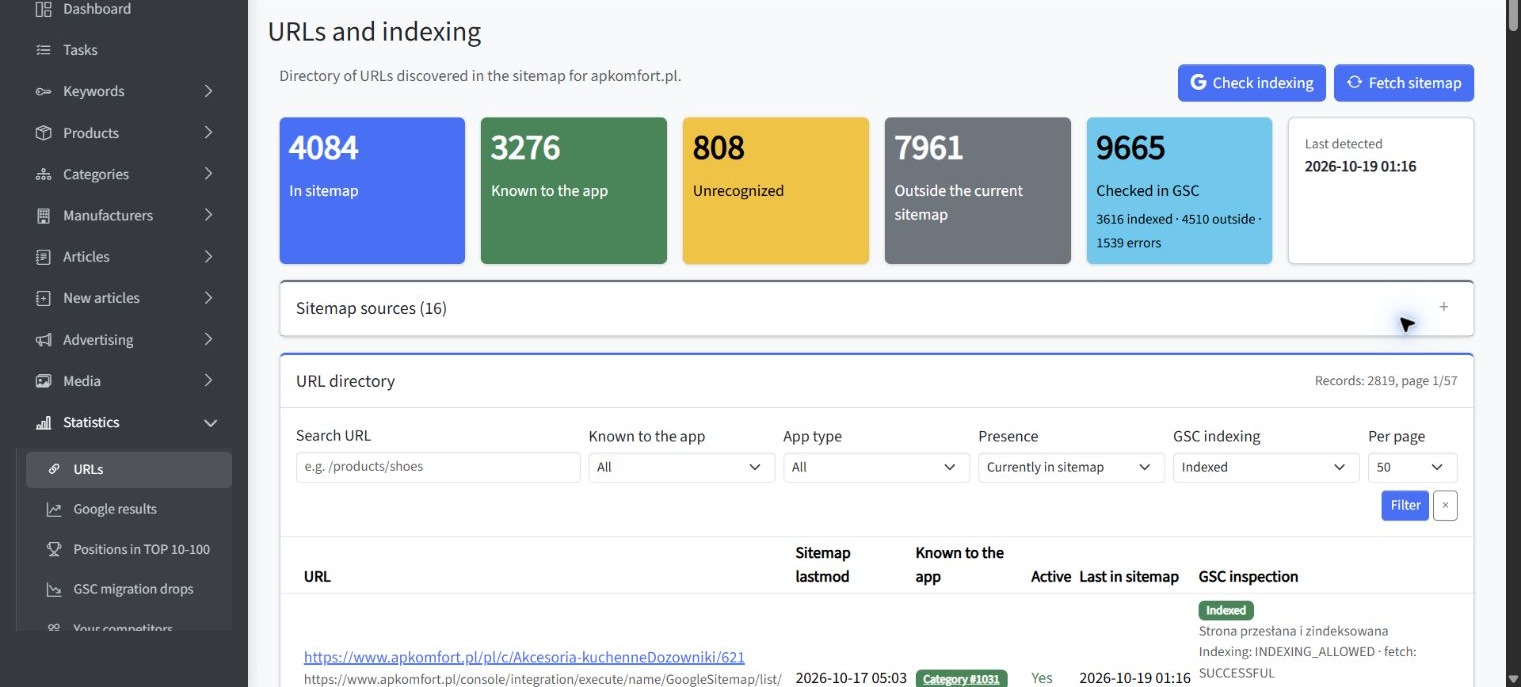
Supplementary SEOAssistant Indexing Overview
The following SEOAssistant view provides a supplementary overview of sitemap coverage and indexing status. It is filtered to indexed URLs and can help you compare groups by page type, sitemap presence and inspection status. It illustrates an external workflow for reviewing indexing data rather than a native Search Console report or a diagnosis of a specific non-indexed error.
Which Non-Indexed Pages Are Actually a Problem?
A non-indexed page becomes a priority when the URL is valuable, canonical and intended to attract organic search traffic. Product pages, service pages, categories, location pages and substantive articles usually warrant investigation when they are unexpectedly absent from the index.
Before attempting a fix, evaluate the affected group against the following conditions:
- The page is intended to appear in organic search.
- It returns a successful response and displays its main content correctly.
- It is not intentionally redirected, removed or marked noindex.
- It is the preferred canonical version of its content.
- It is accessible through useful internal links.
- It is included in the XML sitemap when appropriate.
- It provides distinct value rather than repeating another indexable URL.
If these conditions are not met, exclusion may be correct. For example, a checkout page, internal search result, tracking-parameter URL or duplicate filter combination usually does not need independent search visibility.
Investigate patterns rather than blindly repairing individual examples. If hundreds of URLs from one page template share a status, inspect the template, canonical rules, internal linking and generated metadata. A template-level correction is usually more reliable than editing sampled URLs one at a time.
How to Investigate Crawled—Currently Not Indexed
Crawled—currently not indexed means Google crawled the page but did not add it to the index. Google may reconsider the page later, and its documentation states that there is no need to resubmit the URL merely because it has this status. Google Search Console Help
This status does not identify one specific defect. It confirms that discovery and crawling occurred, so the investigation should concentrate on what Google received and how the URL relates to the rest of the website.
Use the following diagnostic sequence:
- Confirm that the page should be indexed. Check whether it is a valuable canonical page rather than a duplicate, filter, archive or temporary URL.
- Inspect the rendered page. Verify that the main content loads for Google and that the page is not blank, incomplete or dominated by an error message.
- Check indexing directives. Confirm that the current page does not contain a noindex instruction in its HTML or HTTP headers.
- Compare canonical signals. Review the user-declared canonical, internal links, sitemap entry and redirects for conflicting destination URLs.
- Assess content differentiation. Compare the page with similar indexed pages and determine whether it offers a distinct purpose, useful information and meaningful primary content.
- Review internal links. Important pages should be linked from relevant navigation, categories, hubs or related content rather than existing only in a sitemap.
- Check the wider URL group. Determine whether the status affects one page, one template or a large section of the website.
After making a substantive correction, test the current page and request indexing once if appropriate. Repeated requests do not guarantee inclusion and should not replace fixing the underlying template, content or canonicalization problem.
How to Investigate Discovered—Currently Not Indexed
Discovered—currently not indexed means Google knows the URL but has not yet crawled it. Google explains that crawling may have been rescheduled when attempting it was expected to overload the website. The report therefore has no last crawl date for the URL. Google Search Console Help
A few newly published URLs in this category may simply need time. A large or growing group deserves closer analysis, particularly when it includes important pages.
Review the following areas:
- Internal discovery: Make sure important URLs have crawlable links from established pages.
- Sitemap quality: Include canonical, indexable URLs rather than redirects, duplicates, blocked pages or obsolete inventory.
- URL generation: Look for faceted navigation, calendar paths, session parameters and other systems that create excessive URL combinations.
- Server capacity: Examine hosting availability, response times, timeouts and 5xx responses.
- Site architecture: Reduce unnecessary click depth for priority pages.
- Inventory consistency: Remove obsolete URLs from internal links and sitemaps instead of repeatedly presenting them for crawling.
If sitemap data appears inconsistent, check and submit your XML sitemap. A sitemap helps Google discover URLs, but it does not force crawling or indexing. The sitemap should reinforce your preferred inventory rather than list every URL the platform can generate.
Duplicate and Canonicalization Statuses Explained
Google groups URLs with the same or substantially similar content and chooses one representative canonical URL. Duplicate URLs are generally not indexed separately. This is normal when Google selects the version you intended to consolidate. Google Search Central: Canonicalization
Alternate Page with Proper Canonical Tag
This status usually indicates that the alternate URL correctly points to an indexed canonical version. No fix is needed if the selected canonical matches your plan. Google Search Console Help
Duplicate Without User-Selected Canonical
Google identified the page as a duplicate even though you did not declare a preferred canonical. Inspect the URL to see which page Google selected. If that selection is acceptable, the status is not an error. If it is incorrect, add consistent canonical signals and make the intended page clearly preferable. Google Search Console Help
Duplicate, Google Chose Different Canonical Than User
This means your declared canonical and Google-selected canonical differ. Compare the tested URL, your declared canonical and Google’s selection. Check whether the pages are genuinely equivalent and whether redirects, internal links, sitemap entries and canonical elements point consistently to the same preferred URL. A canonical declaration is a signal rather than an absolute command. Google Search Central: Canonicalization
Do not use robots.txt to manage canonicalization. Google recommends consistent internal links, self-referential canonicals on preferred pages and aligned signals across canonical annotations and sitemaps. Google Search Central: Consolidate Duplicate URLs
Robots.txt, Noindex, Redirect and Server Error Issues
URL Blocked by Robots.txt
A robots.txt rule controls crawling, not reliable removal from the index. Google may still know about a blocked URL through links and may index limited information without crawling its content. If the page should be indexed, remove the unintended block. If it must stay out of search results, allow crawling and use noindex, or protect the content behind authentication when appropriate. Google Search Console Help
URL Marked Noindex
This status means Google found a noindex directive and followed it. It is correct for pages intentionally excluded from search. If the page should be indexed, remove the directive from both the HTML and HTTP response, run a live test and confirm that indexing is allowed. Google must be able to crawl a page to see and process its noindex instruction. Google Search Central: Robots Meta Tags
Page with Redirect and Redirect Errors
A correctly redirected source URL is not expected to be indexed; the destination may be indexed instead. Investigate the issue only when the redirect is unintended or when Search Console reports a redirect error such as a loop, an excessive chain or an invalid destination. Google Search Console Help
Server Error, Access Error and Soft 404
A 5xx status indicates that Googlebot could not obtain a usable response because of a server problem, timeout or overload. Review the affected template, hosting logs, Crawl Stats and infrastructure controls that may be blocking verified Googlebot requests. Persistent server failures can reduce crawling because Googlebot adjusts its activity when a server struggles to respond. Google Search Console Help
A soft 404 occurs when a URL returns a successful response but presents missing, empty or error-like content. Return a genuine 404 or 410 status when content no longer exists, use a permanent redirect when there is a clear replacement, or improve the page when valid content should remain available. Google Search Central: Troubleshoot Crawling Errors
How to Prioritize Google Search Console Page Indexing Issues
Do not prioritize issues solely by the number of affected URLs. A problem affecting ten revenue-critical pages can matter more than an expected exclusion affecting thousands of filter URLs.
A practical prioritization framework is:
- Business importance: Address canonical pages that support important products, services, categories or customer questions.
- Indexing intent: Confirm that the affected URLs are genuinely meant to appear in search.
- Scope: Give priority to issues caused by shared templates, navigation or platform rules.
- Severity: Server errors, accidental noindex rules and incorrect canonicalization usually require faster action than expected redirects.
- Trend: Investigate sudden changes after a deployment, migration, redesign or content-management update.
- Fix control: Start with issues where the source is identified as the website and where your team can make a verifiable change.
Search Console sorts issues using its own assessment, but you still need to combine the report with business value and indexing intent. Before changing a sitewide rule, sample URLs from different sections to confirm that they share the same cause.
How to Validate a Fix in Google Search Console
Use Validate fix after correcting all known instances within a specific issue group. Search Console initially checks sample pages and then works through the known affected URLs. If it finds the issue on a checked page, validation can stop or fail. Google notes that validation often takes up to approximately two weeks and can sometimes take longer. Google Search Console Help
The correct workflow is:
- Identify the cause across the full URL group.
- Correct the page template, configuration or content.
- Test representative URLs, including edge cases.
- Confirm that the live pages return the intended responses and directives.
- Start validation from the relevant issue details page.
- Monitor passing, failed and pending examples.
- If validation fails, inspect the URL that caused the failure before restarting the process.
Validation starts Google’s rechecking process. It does not guarantee that a page will be indexed. It confirms whether the reported condition is still present, and a URL can even be treated as fixed when it becomes unavailable, is removed or is intentionally marked noindex. Indexing remains a separate decision. Google Search Console Help
When to Use URL Inspection for Further Diagnosis
The Page indexing report is designed for monitoring groups and trends. The URL Inspection tool is more suitable when you need to understand one specific page. Use it to compare Google’s stored information with the current live version and to review crawl permission, indexing permission, page fetching and canonical details. Google Search Console Help: URL Inspection
Use URL Inspection when:
- An important page appears in an unexpected non-indexed group.
- You need to see the user-declared and Google-selected canonicals.
- You recently removed a noindex directive or robots.txt block.
- You need to reproduce a server, rendering or access problem.
- The report reflects an old crawl and the live page has already changed.
- You want to request indexing after a meaningful correction or update.
Remember that the default inspection result describes Google’s last indexed or crawled information, not necessarily the page as it exists now. A live test checks current access but does not reproduce every indexing decision. Duplicate and canonical conditions, in particular, are determined by Google’s indexing systems rather than the live test. Google Search Console Help: URL Inspection
For a detailed workflow, learn how to diagnose a specific indexing issue with URL Inspection.
Google Search Console Indexing Mistakes to Avoid
Many indexing investigations become inefficient because the report is treated as a simple pass-or-fail score. Avoid the following mistakes:
- Trying to index every known URL. Duplicate, redirected and intentionally excluded URLs often should remain outside the index.
- Using robots.txt as a removal tool. Blocking crawling does not reliably prevent a URL from being indexed.
- Requesting indexing repeatedly. Requests do not override technical problems or guarantee selection.
- Editing only sampled URLs. A shared template or platform rule may continue generating the same issue elsewhere.
- Ignoring crawl dates. Search Console may show data collected before your latest change.
- Submitting unsuitable sitemap URLs. Redirects, duplicates, noindex pages and error URLs weaken the sitemap’s role as a list of preferred pages.
- Assuming canonical tags are commands. Conflicting signals can lead Google to select another representative URL.
- Validating before testing. Validation can fail quickly when even one known instance remains unresolved.
- Confusing indexing with ranking. An indexed URL is eligible to appear, but it is not guaranteed visibility or traffic.
Key Conclusions
The most useful conclusions from the Google Search Console indexing report are:
- Not every URL Google discovers should be indexed.
- The priority is to index valuable canonical pages, not to achieve 100% coverage.
- Intentional exclusions should be separated from problems affecting important pages.
- Crawled—currently not indexed and discovered—currently not indexed require different investigations.
- URL groups and templates are usually more important than isolated examples.
- Canonical, internal-link and sitemap signals should consistently support the preferred URL.
- Validation asks Google to recheck an issue but does not guarantee indexing.
- URL Inspection provides page-level evidence, while the indexing report reveals broader patterns.
Summary: Turn the Indexing Report into a Decision Process
When asking “Why is my page not indexed by Google?”, begin with indexing intent rather than the status label. Decide whether the URL should appear in search, confirm that it is the preferred canonical page and then identify whether the obstacle involves crawling, indexing directives, duplication, content delivery or server access.
Review affected URL groups, test representative pages and correct the underlying system before starting validation. This approach keeps attention on genuine page indexing issues and prevents time being spent on exclusions that are intentional or technically appropriate.