

Competitor keyword research is not an exercise in copying every term another website ranks for. Its purpose is to identify search demand your site can satisfy, understand why competing pages perform, and select ranking opportunities that fit your audience, offer, expertise, and resources. The useful output is therefore not a large keyword export. It is a prioritized plan for pages you should improve, create, consolidate, or monitor.
This guide presents a repeatable process for identifying genuine organic search competitors, finding competitor keyword gaps, evaluating ranking pages, and tracking meaningful changes over time. If you need to establish the broader process first, begin with our foundational keyword research guide.
What Is Competitor Keyword Research?
Competitor keyword research is the process of discovering which search queries generate visibility for other websites and assessing whether those queries represent realistic opportunities for your site. It combines keyword discovery, search intent analysis, page evaluation, competitor SEO analysis, and ongoing ranking measurement.
The important word is assessment. A competitor may rank for thousands of queries that have little connection to your products, services, customers, or geographic market. Adding all of them to your content plan would create activity without producing a coherent SEO strategy.
A useful competitor research process should answer five practical questions:
- Which websites compete with you in the search results that matter?
- Which relevant keywords do they rank for that your site does not?
- What pages, formats, and content angles support those rankings?
- Which gaps can your site realistically challenge?
- How will you track whether the opportunity or competitive landscape changes?
The result should expose unmet demand and weaknesses in your current coverage. It should not become a reason to reproduce a competitor’s structure, wording, or content strategy without considering your own users.
How Search Competitors Differ from Business Competitors
A business competitor sells a similar product or service. A search competitor appears for the same queries as your website, even if its business model is different. These groups may overlap, but they are rarely identical.

For example, an online store may compete commercially with other retailers. In organic search, however, it may also compete with manufacturers, marketplaces, publishers, comparison websites, forums, and informational portals. Each type of website can occupy valuable search results at a different stage of the customer journey.
This distinction affects your decisions. A marketplace ranking for a broad product category may show that Google rewards extensive selection for that query. A specialist guide ranking for a related question may indicate informational search intent. Neither example automatically proves that your store should imitate the ranking page.
Classify competitors according to their role:
- Domain-level competitors overlap with your site across many topics.
- Topic-level competitors compete within one product line, service, or subject area.
- Page-level competitors appear for a specific keyword group or search intent.
- Business competitors compete for the same customers but may have limited organic overlap.
This classification prevents a common error: treating one large, visible domain as the standard for every query. In practice, your most informative competitor often changes from one topic cluster to another.
How to Identify Your Real Organic Search Competitors
Start with the search results, not with a list supplied by sales or management. Select a representative group of keywords connected to your important products, services, categories, customer problems, and buying stages. Then record which domains appear repeatedly.
Use queries with different levels of specificity. Broad terms reveal established category competitors, while detailed queries expose specialist websites with narrower but more relevant topical coverage. Review both commercial and informational searches so that you do not overlook competitors influencing customers before they are ready to buy.
A practical identification process follows these steps:
- Select keyword groups that represent your priority topics.
- Check the current results for several queries in each group.
- Record domains that repeatedly appear in relevant organic positions.
- Separate marketplaces, publishers, manufacturers, retailers, and service providers.
- Measure keyword overlap using an SEO platform.
- Create a short competitor set for each topic rather than one universal list.
Search results can vary by location, device, time, and search context. A manual check is therefore useful for understanding the result page, but it should not be treated as a complete ranking record.
Compare competitors using several visibility ranges instead of one headline metric. Top 10 keyword counts show where a domain has stronger first-page exposure, while Top 20 and Top 50 counts can reveal broader coverage and developing visibility. The comparison below illustrates how selected competitors can be reviewed across these ranges.
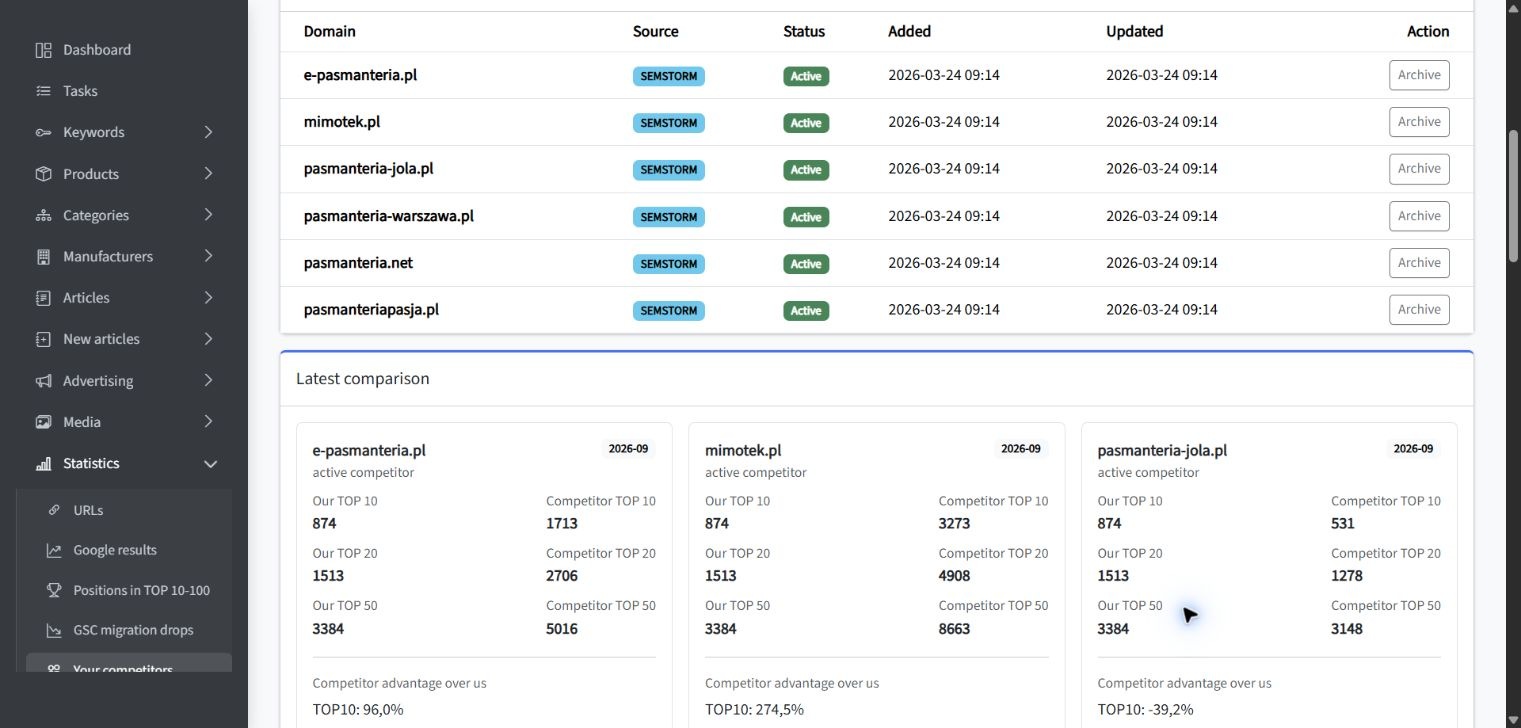
A visibility comparison is evidence of overlap, not proof that every competing keyword deserves attention. A domain may have a larger footprint because it covers a wider market, publishes in several languages, or targets topics outside your commercial scope. Verify the underlying keywords before deciding that a visibility difference represents a genuine gap.
How to Find Keywords Competitors Rank For
Once you have selected relevant search competitors, inspect their organic keywords at the domain, directory, and individual-page level. Domain-level analysis is useful for broad discovery, but narrower scopes usually produce more actionable findings.
For example, analyzing an entire marketplace may generate an unmanageable list containing unrelated products and topics. Reviewing the directory or category that competes with your offer removes much of that noise. Page-level analysis is even more precise when you are evaluating a specific keyword cluster.
You can use Ahrefs Site Explorer and Competitive Analysis to review organic keywords and identify queries for which competing websites rank while your target does not. Ahrefs allows comparisons at domain or URL level and provides filters for metrics and ranking ranges.
If you need a tool-specific process, follow the guide on how to use Ahrefs to find keyword gaps. Regardless of the platform, collect the following information for each potentially relevant query:
- keyword and close variants;
- ranking competitor and ranking URL;
- competitor position or position range;
- estimated search demand;
- page type and dominant search intent;
- your current ranking URL and position, if any;
- business relevance and likely next user action;
- required action, such as optimize, create, consolidate, or monitor.
Third-party organic traffic and keyword figures are estimates based on each provider’s database and calculation method. Ahrefs explicitly describes its organic traffic metric as an estimate rather than a direct record of a competitor’s traffic. Use these metrics for comparison and discovery, then validate priorities against the live search results and your own first-party data.
How to Run a Competitor Keyword Gap Analysis
A competitor keyword gap is a relevant query or topic for which another website has meaningful visibility while your site has weak visibility, an unsuitable ranking page, or no ranking page. The gap may exist because content is missing, but it can also result from poor page targeting, weak internal linking, limited topical depth, or a mismatch between the page and search intent.
Run the analysis in stages rather than exporting one enormous report:
- Define the scope. Select a market, language, location, topic, and page type.
- Choose comparable competitors. Use domains or sections that target a similar audience and intent.
- Extract missing and weak keywords. Include terms where you do not rank and terms where competitors substantially outperform you.
- Group related queries. Combine keywords that can be satisfied by the same focused page.
- Verify search intent. Check what page types and formats dominate the current results.
- Review your existing pages. Determine whether a relevant URL already exists before proposing new content.
- Score the opportunity. Compare value, feasibility, current visibility, and required effort.
Do not limit the report to keywords your site completely misses. A query where you rank in position 18 and several competitors rank in the Top 10 may be more actionable than a high-volume term for which you have no relevant page, authority, or credible offer.
The gap analysis should also distinguish between a keyword gap and a content gap. You may already mention the topic but fail to satisfy the expected format or level of detail. Conversely, a competitor may rank for many keyword variants through one strong page, which does not mean you need a separate page for each variation.
How to Evaluate Competitor Pages Behind the Rankings
Keyword lists show where competitors rank. Page analysis helps explain what may support those rankings and whether you can offer a suitable alternative. Review the full result page before drawing conclusions from metrics alone.
Compare Search Intent and Page Type
Identify whether Google is primarily returning category pages, product pages, service pages, guides, comparisons, tools, videos, or mixed results. If competitors rank with category pages, publishing a general article may not satisfy the dominant expectation. If detailed guides dominate, adding a short block of text to a commercial page may be insufficient.

Search intent labels such as informational or transactional are only a starting point. Examine the expected content type, format, audience, angle, and next action. For a more focused process, review our guide to analyzing search intent for better keyword targeting.
Assess Topical Coverage and Original Value
Review which questions the page answers, how it organizes the topic, and whether it provides evidence, examples, tools, comparisons, or first-hand expertise. The goal is not to copy its headings. You are looking for the standard users currently encounter and for needs that remain insufficiently addressed.
Google recommends creating people-first content that provides original information, analysis, or substantial additional value rather than simply rewriting existing sources. This supports a practical rule for competitor SEO analysis: use competing pages to identify expectations, then create a page grounded in your own expertise and customer needs.
Review Authority and Internal Support
Consider the ranking URL’s backlinks, internal links, position within the site architecture, and relationship to other pages in the topic cluster. A strong page may benefit from years of authority and extensive internal support. Matching its word count or headings will not reproduce those conditions.
Inspect the anchor text and placement of internal links. A competitor may consistently connect guides to category pages, link product pages to buying advice, or use hub pages to organize a topic. These patterns can reveal structural weaknesses in your own website, but they should be adapted to your customer journey.
Check SERP Stability
A current ranking is only one observation. Historical SERP data can reveal whether the same pages remain visible, whether positions change frequently, and whether Google is testing different content types. Ahrefs, for example, provides historical SERP views subject to the data available in the user’s plan.
Stable results dominated by highly relevant, authoritative pages may require a long-term approach. Volatile results or frequent URL changes can indicate uncertainty, changing intent, or an opportunity for a page that satisfies the query more consistently.
How to Separate Relevant Opportunities from Noise
The largest competitor keyword gap is rarely the best roadmap. Many exported terms will be irrelevant, misleading, too broad, or disconnected from what your business can credibly provide. Filtering is therefore a strategic task, not just spreadsheet cleanup.
Evaluate each keyword group against these conditions:
- Audience fit: Is the searcher someone your business can genuinely help?
- Offer fit: Does your product, service, or expertise support a useful response?
- Intent fit: Can you create the type of page users appear to expect?
- Commercial relevance: Could the query support a meaningful customer journey?
- Topical fit: Does the subject strengthen the website’s primary focus?
- Ranking feasibility: Can you compete with the current pages using realistic resources?
- Content distinctiveness: Can you add information or utility beyond what already ranks?
Remove keywords that pass a volume threshold but fail the relevance test. A smaller query connected to a high-value problem can be more useful than a broad term attracting visitors who will never need your offer.
Also exclude gaps created by different business models. A software provider should not automatically pursue every template, job listing, definition, or free tool query ranking for a large industry publisher. The competitor may be visible, but the opportunity may not fit the provider’s operating model.
If you need a more formal decision framework, use an SEO opportunity analysis to score competitor keyword opportunities. This makes assumptions about value, difficulty, and effort visible instead of allowing search volume to dominate the decision.
How to Find Weak Rankings You May Be Able to Challenge
A weak ranking is not simply a low-authority domain in the Top 10. It is a result that may satisfy the query incompletely, inconsistently, or with a page that is not well aligned with the apparent intent. Finding such rankings requires reviewing pages and result patterns rather than relying on a single authority metric.

Look for signals such as:
- pages that only partially address the query;
- results using a page type that differs from most of the SERP;
- outdated information where freshness materially affects usefulness;
- thin category or service pages with limited decision support;
- forum discussions ranking because no stronger specialist resource exists;
- several lower-ranking pages with similar relevance and no clear leader;
- competitor pages that receive little internal support;
- rapid ranking gains and losses suggesting an unsettled result page.
These signals do not guarantee that your page will rank. They indicate where closer evaluation is justified. You still need an appropriate page type, useful content, sound on-page optimization, internal links, and sufficient authority for the query.
Near-ranking keywords on your own site deserve particular attention. If your page already receives impressions in Google Search Console and ranks outside the main click-generating positions, improving it may require less effort than building a new page for an entirely unfamiliar topic.
Search Console’s Performance report provides first-party data about the queries and pages producing impressions and clicks for your own property. It also reports CTR and average position, although average position should be interpreted as an aggregated metric rather than a fixed live rank.
How to Track Competitor Rankings and New Content
Competitor SEO tracking should focus on changes that can affect your decisions. Monitoring every keyword every day produces alerts without context. Build a tracked set around priority topics, commercial pages, developing content clusters, and queries where rankings are realistically contestable.
Track meaningful events such as:
- a competitor entering the Top 10 for a priority query;
- rapid gains by a new page or domain;
- a previously stable competitor losing visibility;
- the publication of new category, service, comparison, or guide pages;
- expansion into keyword groups adjacent to your core offer;
- changes in the page types dominating important SERPs;
- replacement of one competitor URL by another URL from the same domain.
A URL replacement can be particularly informative. It may indicate consolidation, cannibalization, content migration, or a change in how the competitor targets the topic. Review the old and new pages before interpreting the movement as simple growth or decline.
Use consistent location, device, language, and keyword settings when you track competitor rankings. Otherwise, apparent changes may result from different measurement conditions. Rank tracking platforms commonly treat each keyword and location combination as a separate tracked item, which reinforces the need to select a focused monitoring set.
Combine third-party competitor monitoring with your own Google Search Console data. Search Console shows performance only for properties you can access, not private performance data for competing websites. It is therefore the source for validating your impressions, clicks, queries, and pages, while competitor tools provide comparative estimates.
How to Turn Competitor Findings into an Action Plan
Competitor findings become useful only when they lead to clear page-level decisions. Group the selected keywords by shared topic and intent, then assign each group to an existing or proposed URL. This prevents different teams from creating overlapping pages for closely related queries.
Separate competitor data from your own performance data at this stage. Competitor platforms help you discover external gaps and ranking changes. Your Google Search Console queries show where your site already receives impressions and clicks. The following view illustrates presets and filters for prioritizing the site’s own keyword opportunities; it does not display a competitor’s private Search Console data.
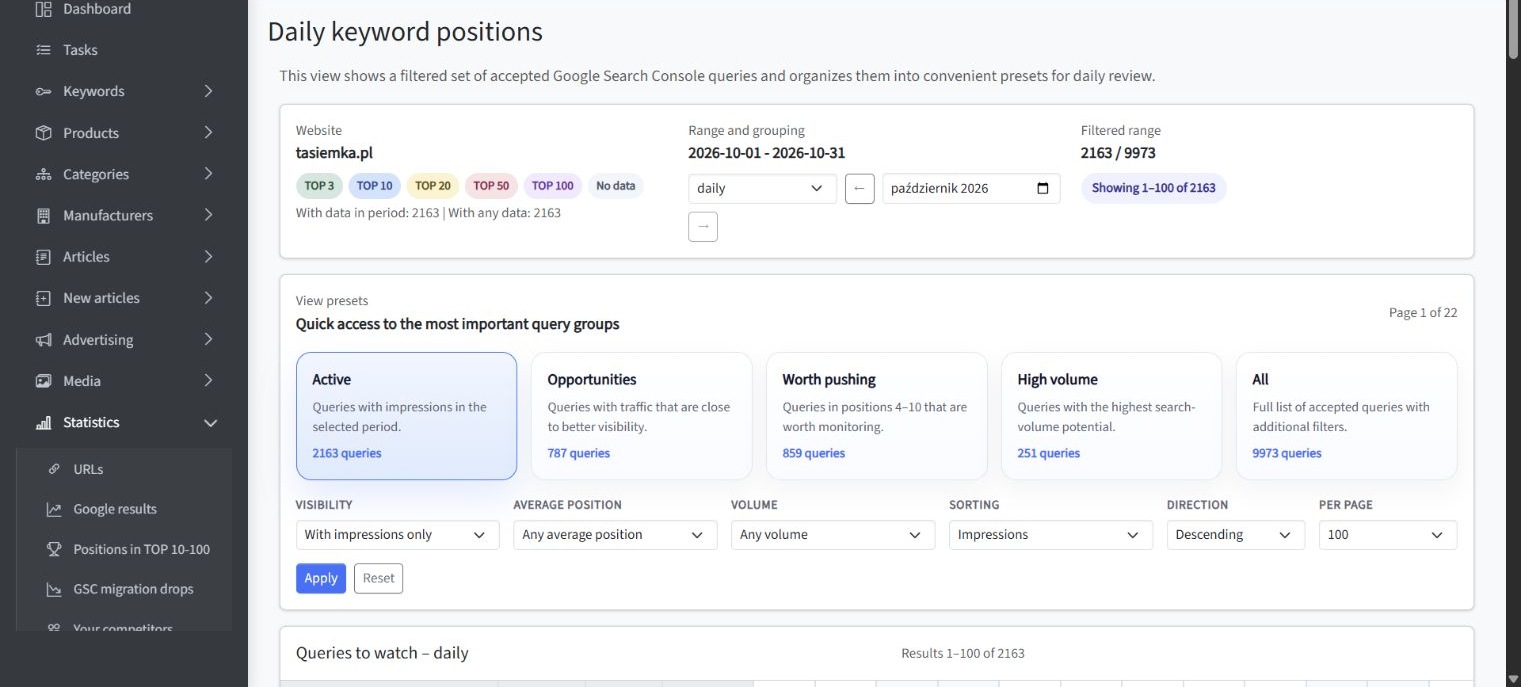
Presets such as active queries, opportunities, terms worth pushing, and high-volume keywords can reduce a large own-site dataset into reviewable groups. Filters for impressions, average position, and search volume can then support prioritization, but the final decision should still consider intent, business value, page quality, and required effort.
Assign one of the following actions to each validated keyword group:
- Optimize: improve an existing page that already targets the correct intent.
- Expand: add missing decision support, examples, evidence, or subtopics to a relevant page.
- Create: build a new page when no suitable URL exists.
- Consolidate: merge overlapping pages that compete for the same keyword group.
- Reposition: change the page type or angle when the existing format does not match the SERP.
- Support: strengthen internal linking to an appropriate but underconnected page.
- Monitor: defer action when relevance is clear but timing or feasibility is uncertain.
- Reject: remove the opportunity when it does not fit the audience, offer, or strategy.
Record the target page, primary keyword, supporting terms, intent, current visibility, competitor evidence, proposed action, owner, and review date. The process described in our guide to assigning keyword groups to the right pages can help turn these decisions into a maintained keyword map.
For larger workflows, selected gaps should move from analysis into prioritized, reviewed content or page improvements. An integrated SEO analysis and controlled publishing workflow can connect research, on-page changes, approval, publication, and subsequent measurement without treating automation as a substitute for human review.
If you are comparing platforms and operational approaches, you can also compare how SEO tools connect research, audits, and approved website changes. Tool selection should follow the workflow you need rather than determine the strategy by itself.
Balance Quick Wins and Strategic Topics
A practical roadmap should contain more than easy ranking gains. Near-ranking pages can produce earlier progress, while strategically important topics may require new content, stronger internal linking, or sustained authority development.
Balance the plan across three groups:
- Quick wins: relevant pages already receiving impressions or ranking near the Top 10.
- Coverage gaps: missing pages that can be produced with credible expertise and clear intent alignment.
- Strategic investments: valuable topics that require broader content, stronger authority, or structural improvements.
This balance protects the roadmap from two extremes: pursuing only easy but low-value keywords, or committing all resources to difficult topics with distant and uncertain returns.
Where investment is still uncertain, review how to assess when SEO is worth the investment. Competitor visibility demonstrates that demand and competition exist, but it does not by itself establish the commercial value of pursuing them.
For a relevant example connected to competitive visibility, see the Snowboardshop.pl case study: growing visibility against competitors.
Common Competitor Research Mistakes
Choosing Only Known Commercial Rivals
A list based exclusively on commercial competitors may exclude the publishers, marketplaces, and specialist websites occupying the actual search results. Begin with SERP overlap, then add business context.
Copying Every Competitor Keyword
A competitor’s keyword footprint reflects its own audience, products, history, and content model. Importing the entire list can dilute topical focus and create pages that your business cannot support with genuine value.
Treating Tool Metrics as Facts
Search volume, traffic estimates, keyword difficulty, and authority metrics are comparative indicators. They should inform investigation rather than replace live SERP review, first-party data, and expert judgment.
Ignoring Search Intent
A keyword may look commercially relevant while the current results show that users primarily want instructions, definitions, comparisons, or tools. Targeting the query with the wrong page type limits the usefulness of otherwise accurate research.
Creating a New Page for Every Keyword Variation
Closely related keywords often share the same intent and ranking pages. Group them when one focused URL can satisfy the common need. Creating separate pages without a meaningful intent difference can produce duplication and keyword cannibalization.
Comparing Domains Instead of Relevant Sections
Whole-domain analysis can distort the gap when competitors operate across broader markets. Compare equivalent directories, categories, services, or individual pages whenever possible.
Focusing Only on Current Winners
A static Top 10 snapshot hides volatility, rising competitors, and changing page types. Review historical rankings and monitor new content so that your plan reflects direction as well as current position.
Skipping Implementation and Measurement
A spreadsheet does not improve rankings. Each selected opportunity needs an owner, target URL, defined action, review process, and measurement period. Without these elements, competitor research remains an observation rather than an operating plan.
Key Conclusions from Competitor Keyword Research
The most useful conclusions can be summarized as follows:
- Identify competitors at the domain, topic, and individual SERP level.
- Distinguish organic search competitors from commercial rivals.
- Use keyword gaps as discovery inputs, not automatic content assignments.
- Compare search intent, page type, topical depth, authority, and internal linking.
- Prioritize opportunities that fit your audience, offer, expertise, and resources.
- Give near-ranking pages different treatment from topics requiring new assets.
- Use third-party estimates for comparison and Search Console for your own first-party performance data.
- Track new pages, rapid gains, losses, URL replacements, and expanding topic coverage.
- Create original value instead of reproducing the competitor’s page structure or wording.
- Translate every accepted opportunity into a page-level action and measurement plan.
These principles keep competitor SEO tracking focused on decisions rather than volume. A smaller set of verified opportunities is usually more useful than thousands of unfiltered keywords.
Summary: Turn Competitor Data into Controlled SEO Decisions
Effective competitor keyword research begins by identifying who actually competes with you in relevant search results. It then narrows competitor keywords into topic groups, verifies search intent, examines the pages behind the rankings, and removes opportunities that do not fit your business.
The final decision rule is straightforward: pursue a competitor keyword gap when the audience is relevant, the expected page fits your website, the business value justifies the effort, and you can offer a credible page that improves on the available choices. Optimize or support an existing URL where possible. Create a new page only when the gap cannot be addressed clearly by your current content.
Competitor data should show where demand is being served and where your coverage is weak. Your strategy must still determine what deserves to be built, improved, approved, and measured.