

Google Trends keyword research is most useful when you treat it as a directional signal, not a replacement for search volume data. The platform shows how relative search interest changes across a selected period, location and search environment. Its normalized 0–100 index does not report an absolute number of searches, and Google recommends considering Trends data alongside other evidence before drawing conclusions.
Used correctly, Google Trends for SEO can help you compare language variants, identify emerging vocabulary, investigate changes in search intent and validate whether demand is growing, declining or recurring. The practical goal is not to choose the phrase with the highest isolated score. It is to understand what the pattern means and decide whether it supports a relevant content opportunity.
Where Google Trends Fits into Keyword Research
Traditional keyword tools usually focus on estimated search volume, competition, keyword difficulty, cost-per-click or competitor ranking data. Google Trends answers a different question: how is interest changing relative to the selected context?
This distinction matters because two keywords can have similar estimated monthly volume but very different trajectories. One may be stable, another may be seasonal, and a third may be growing after a change in technology, consumer language or market behavior. Trend direction provides context that a single average cannot show.
Google Trends is particularly useful when you need to:
- compare alternative ways of describing the same need;
- check whether a keyword is growing, stable, declining or seasonal;
- investigate sudden changes in query wording;
- identify related queries and emerging subtopics;
- compare interest across locations or search types;
- validate whether an idea reflects durable demand or a temporary event.
The platform is less suitable for estimating traffic potential on its own. A value of 100 represents the highest relative point within the selected comparison, while a low value can reflect limited interest or insufficient data. It does not mean that 100 searches occurred or that one point equals a fixed number of searches.
If your starting objective is broader topic discovery rather than focused keyword evaluation, first review how to find trending searches and content ideas with Google Trends. Discovery and validation are connected, but they are not the same task.
Search Terms vs Topics: Which Option Should You Use?
The search term vs topic Google Trends choice can materially change the chart. Before interpreting any pattern, verify what you selected from the autocomplete menu.
Use a Search Term to Analyze Specific Wording
A search term focuses on the words entered by users. It is the better option when you want to compare spelling, terminology, product wording or query variants in a particular language. Google does not automatically treat misspellings, synonyms, singular forms and plural forms as the same search. Quotation marks and operators can also affect which searches are included.
Choose search terms when your question is specific, such as whether people increasingly use “competitor SEO tracking” instead of “competitor ranking tracking.” This comparison can reveal a vocabulary shift even if both phrases describe a related activity.
Use a Topic to Measure a Broader Concept
A topic groups searches associated with the same concept or entity. It may include related wording, spelling variations and searches in different languages. Topics are therefore useful when you want to assess overall interest without limiting the analysis to one exact expression.
Topics work well for broad entities, organizations, places and established concepts. They are less suitable when your objective is to select an exact keyword for a title, category name or landing page. In that situation, compare the individual search terms people may actually use.
Do Not Treat Terms and Topics as Interchangeable
A topic will often produce a broader pattern than a search term because it represents more than one linguistic form. Comparing a narrow term directly with a broad topic may answer the wrong question. If you need to test wording, compare terms with terms. If you need to compare overall conceptual interest, use topics with a similar scope.
When a phrase has several meanings, inspect the description shown beside each suggested topic. A chart can look convincing while representing a different company, product, person or concept from the one you intended to research.
How to Compare Keywords in Google Trends Correctly
To compare keywords in Google Trends, place the variants in the same comparison whenever possible. Results generated together share a common scale. If you analyze each phrase separately, every request may receive its own normalized peak of 100, making the separate charts unsuitable for direct magnitude comparisons.
A reliable comparison process follows a fixed sequence:
- Define the decision. Decide whether you are testing exact wording, a broad concept, seasonality or long-term direction.
- Choose comparable inputs. Do not casually mix a narrow search term, a broad topic and a differently scoped brand name.
- Set one location. Use the market in which the content, product or service will compete.
- Select a useful period. Use a longer range for structural direction and a shorter range for recent changes.
- Apply the same category. A category can help separate meanings when a phrase is ambiguous.
- Use the same search type. Web, News, Image, YouTube and Shopping searches can reflect different user behavior.
- Review the complete line. Compare baseline interest, peaks, decline, recurrence and recent movement rather than looking only at the average.
Google’s guidance requires equivalent time lengths when comparing periods and consistent locations when comparing terms geographically. Changing these inputs alters the population and context represented by the chart.
For example, a five-year view may show that a phrase is gradually replacing an older term. A 30-day view may instead emphasize a temporary spike caused by an announcement. Neither chart is automatically wrong. They answer different questions.
How to Identify Changes in Search Intent
Google Trends does not directly label informational, commercial, transactional or navigational intent. Search intent analysis therefore requires interpretation. You need to examine changes in wording, related queries, search type and timing, then verify the likely intent against actual search results and first-party data.
Start by comparing query modifiers. Words such as “what,” “how,” “examples” and “guide” often indicate a research need. Terms such as “best,” “vs,” “review” and “alternative” may signal evaluation. Product names combined with “price,” “buy,” “near me” or a specific feature can indicate movement toward a transaction.
Look for several types of change:
- Problem to solution: users move from describing a difficulty to searching for a named method or tool.
- General to specific: a broad category loses relative interest while a specialized phrase grows.
- Learning to evaluation: tutorial-oriented wording gives way to comparisons, alternatives and reviews.
- Concept to implementation: searches begin to include setup, templates, integrations, examples or workflows.
- Old vocabulary to new vocabulary: a market adopts terminology associated with a new product category, regulation or working method.
These patterns are evidence of a possible intent shift, not proof. A sudden change may be caused by news coverage, an event, a product launch or temporary curiosity. Check the search results and compare the pages that rank for the old and new wording. If the result types, page formats and dominant use cases differ, separate content may be justified.
You should also check your own visibility. Google Search Console reports the queries through which your pages appeared, along with impressions, clicks, click-through rate and position data for your property. This makes it useful for determining whether a market-level trend is already influencing your website.
How to Use Related Queries to Expand a Keyword Set
Related queries can uncover vocabulary that is not present in your initial seed list. Google Trends separates these suggestions into Top and Rising views. Top queries are frequently searched in association with the analyzed input, while Rising queries show the strongest growth over the selected comparison period.
Use related queries as research prompts rather than an automatic content queue. For each promising phrase, determine:
- whether it is relevant to your audience and offer;
- what problem or objective the user is expressing;
- whether the query is an independent topic or a subsection of an existing page;
- whether growth is recurring, durable or event-driven;
- whether you can provide a credible and sufficiently complete answer;
- whether the term has measurable demand outside the relative Trends index.
A rapidly rising phrase can still have low absolute demand. Conversely, a stable Top query may offer more sustainable value than a dramatic short-term increase. When Google displays “Breakout,” its documentation indicates growth greater than 5,000% over the comparison period, often from a low previous baseline.
Before prioritizing such a phrase, evaluate rising queries and breakout searches to identify what caused the growth and whether it is likely to continue.
How to Evaluate Web, News, Image, YouTube and Shopping Search
Google Trends can analyze search terms across Web Search, Image Search, News Search, Google Shopping and YouTube. A search term may produce different patterns in each environment because users visit them with different tasks and expectations.
Web Search
Use Web Search as the main reference for general SEO research. It can reflect informational research, commercial evaluation, navigation and transactional behavior. Because that scope is broad, inspect the current search results before assigning one intent to a keyword.
News Search
News Search can help you determine whether a spike is tied to current events, announcements or public discussion. If News interest rises sharply while long-term Web interest remains flat, the opportunity may require a timely article rather than an evergreen landing page.
Image Search
Image Search is useful when visual appearance influences the decision. Examples include design inspiration, fashion, diagrams, product styles, layouts and before-and-after comparisons. Rising image interest may indicate that the content needs original visuals, examples or galleries rather than additional text alone.
YouTube Search
YouTube Search can reveal demand for demonstrations, tutorials, reviews and visual explanations. If a term performs strongly on YouTube but weakly in Web Search, video may be the more appropriate primary format. You can still create a supporting page, but it should match the user’s need to see a process or result.
Google Shopping
Shopping Search is relevant when users are exploring products and purchase options. A rising Shopping pattern may support category, comparison or product-focused content, provided that search volume, availability and business relevance confirm the opportunity.
Differences between search types should guide format decisions, not only keyword selection. The same topic may require an article for Web Search, a visual guide for Image Search and a demonstration for YouTube.
How to Combine Trend Direction with Other Keyword Metrics
Effective keyword validation combines several forms of evidence. Google Trends contributes direction and timing, while other tools contribute estimated demand, competition, ranking data and website-specific performance.
A practical evaluation should consider:
- Trend direction: whether relative interest is increasing, declining, stable or recurring.
- Estimated search volume: whether enough measurable demand exists to justify the work.
- Search intent: what users expect and which page format can satisfy that need.
- Ranking competition: which sites and page types currently occupy the results.
- Business relevance: whether the topic supports the audience, offer and customer journey.
- Existing visibility: whether the website already receives impressions, clicks or rankings for related queries.
- Implementation cost: whether the required research, expertise, visuals and maintenance are proportionate to the opportunity.
Tools such as Ahrefs may support volume, backlink and competitor SEO tracking research, while Google Search Console shows how your own property performs in Google Search. For a broader view of how different platforms support analysis and execution, review this comparison of SEO research and workflow tools.
Use Trends to discover market movement, then validate trend research with Google Search Console when your website already has relevant pages or query impressions. Search Console data is limited to the property, so the absence of a query does not prove that wider market demand is absent.
Once an opportunity has passed keyword validation, a connected SEO workflow can carry the evidence into prioritization, content preparation, review, controlled publishing and measurement. The operational value comes from preserving the link between the original signal and the approved website change, rather than leaving research in a disconnected spreadsheet.
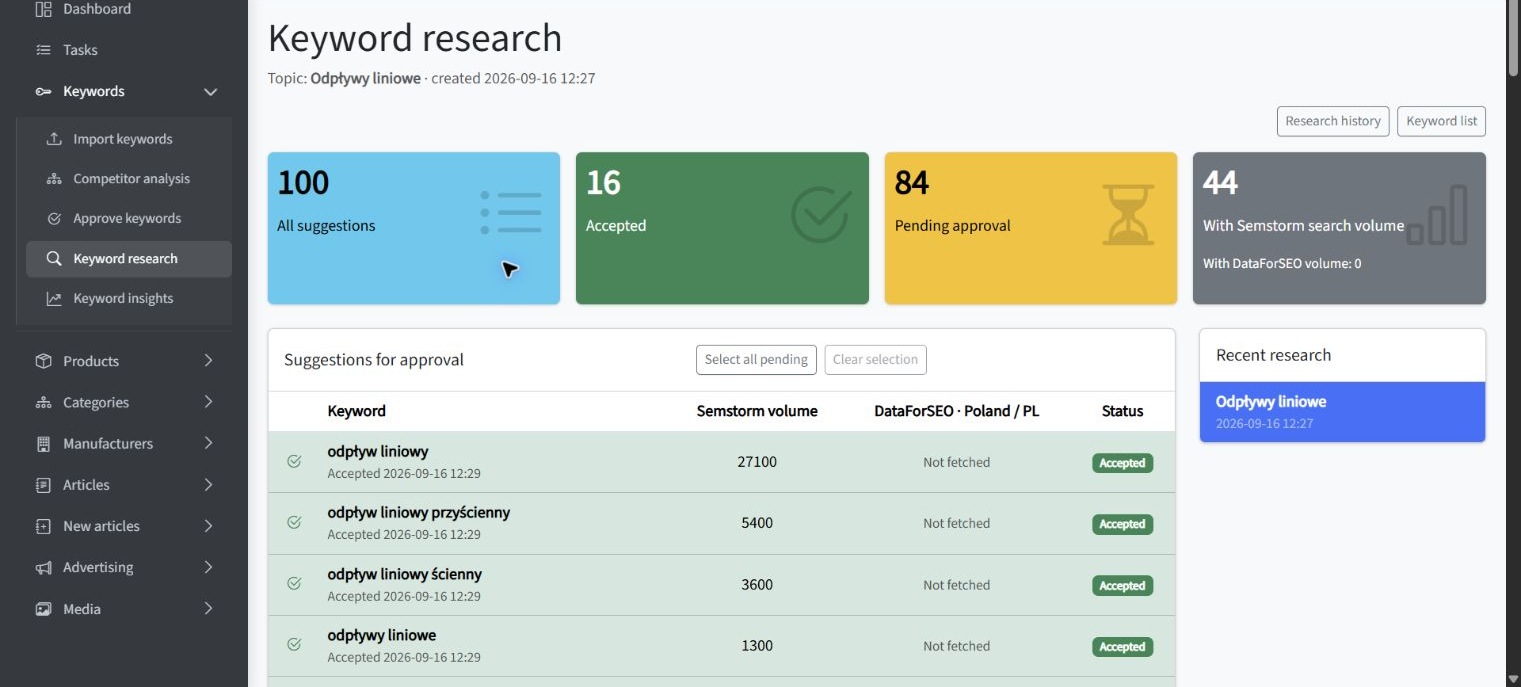
The application example below, captured on October 19, 2026, shows keyword suggestions and separate search-volume information within an SEOAssistant workflow. These volume figures complement Google Trends analysis; they should not be confused with the relative 0–100 Trends index.
Keyword Research Mistakes That Distort Google Trends Data
Most Google Trends errors come from interpreting a valid chart as an answer to a different question. Before making a decision, check whether any of the following mistakes affect the analysis.
Treating the Index as Search Volume
A value of 80 is relative to the selected request. It does not mean 80 searches, 80% market share or a predictable amount of traffic. Use a keyword volume source to estimate demand.
Comparing Separately Generated Charts
Two standalone charts can both peak at 100 even when their underlying demand differs substantially. Add variants to the same comparison or use a consistent reference term when you need a shared frame.
Changing Filters Between Variants
Differences in location, period, category or search type can create patterns that appear to reflect keyword preference. Keep filters consistent unless the purpose of the research is to compare those filters.
Mixing Search Terms and Topics Without Checking Scope
A topic may include multiple languages and related expressions, while a search term focuses on entered wording. The broader option may dominate simply because it represents a larger concept.
Using a Period That Is Too Short
A short view can exaggerate a news event, campaign or temporary spike. Expand the period to see whether the movement is part of a seasonal cycle or a sustained change. Google Trends also provides historical comparison options for assessing whether current movement differs from preceding periods.
Choosing the Keyword with the Largest Peak
A short peak may be less valuable than a stable baseline. Evaluate the duration, cause and repeatability of interest before selecting a primary keyword.
Assuming Related Queries Are Automatically Relevant
Association does not guarantee strategic fit. A rising query may refer to another audience, meaning or event. Validate its intent and relationship to the page you plan to create.
Ignoring Insufficient Data
Google Trends may not create a useful graph for low-volume terms. Expanding the date range, checking spelling or reducing the number of compared terms may help, but missing data should not be interpreted as confirmed absence of demand.
A Google Trends Keyword Validation Checklist
Use the following checklist before approving a keyword for a new page, content update or campaign:
- Define the market, audience and decision the analysis must support.
- Confirm whether each input is a search term or a topic.
- Check that ambiguous terms represent the correct entity or meaning.
- Compare keyword variants within the same Trends request.
- Apply the same location, period, category and search type.
- Review both long-term direction and recent movement.
- Check whether peaks recur or correspond to isolated events.
- Inspect Top and Rising related queries for vocabulary and subtopics.
- Identify the likely search intent behind each meaningful variant.
- Review actual search results to verify page type and content expectations.
- Confirm estimated search volume with a separate keyword data source.
- Check existing impressions, clicks and positions in Google Search Console.
- Assess competitor rankings and the quality of currently visible pages.
- Confirm business relevance, editorial credibility and implementation cost.
- Record why the keyword was selected and what evidence would justify revising the decision.
This process turns Google Trends from an idea generator into a controlled keyword validation tool. It also makes the decision easier to review later if the market, terminology or search results change.
Key Conclusions
The main lessons from Google Trends keyword research can be reduced to a small set of decision rules:
- Use Trends to measure relative direction, not absolute search volume.
- Choose search terms for wording analysis and topics for broader conceptual interest.
- Compare variants under the same filters and within a common request.
- Treat changes in language as clues to search intent, then verify them in search results.
- Use related queries to expand research, but validate every phrase independently.
- Compare search types when format and platform behavior may affect demand.
- Combine trend direction with volume, competition, first-party performance and business value.
- Prefer repeatable evidence over the largest or most dramatic isolated spike.
Together, these rules prevent the most common interpretation errors and keep the research connected to a practical SEO decision.
Summary
Google Trends for SEO is strongest when the question concerns change: which wording is gaining adoption, whether demand is seasonal, how interest differs between search environments and whether an emerging query deserves further investigation.
The tool cannot determine keyword value by itself. Reliable keyword validation combines its relative trend data with search volume, search intent analysis, competitor evidence, Google Search Console performance and business priorities. Use Google Trends to identify direction, use other metrics to test scale and feasibility, and approve content only when the combined evidence supports a clear audience need.