

A topic can attract sudden search interest without becoming a useful content opportunity. The practical challenge is not simply finding trending searches, but deciding which trends match your audience, support a credible editorial angle and justify the time required to create or update a page. Google Trends helps you make that distinction when you use its discovery and validation features as parts of a structured research process.
This guide explains how to use Google Trends to discover timely searches, investigate long-term demand, generate content ideas and validate them before production. The central rule is simple: use Trending Now for fast discovery, use Explore for deeper analysis, and combine both with search intent and first-party performance data before making an SEO decision.
What Google Trends Can and Cannot Tell You
Google Trends shows how search interest changes across a selected time, location, category and search type. Its values represent relative interest, not absolute search volume. Google normalizes each data point against total searches in the relevant geography and period, then scales the results from 0 to 100. A score of 100 marks the peak within that particular data set; it does not represent a fixed number of searches.
This distinction affects every interpretation. A query scoring 100 in a small market may receive fewer searches than a query scoring 40 in a much larger market. Likewise, two reports cannot be compared reliably if they use different locations, periods or search types.
Google Trends is particularly useful for identifying:
- changes in interest over time;
- recurring seasonal patterns;
- temporary spikes and emerging topics;
- differences between keyword variants;
- related topics and rising queries;
- regional variations in relative popularity;
- changes in the language people use around a subject.
It does not provide precise monthly search volume, conversion potential, competitor ranking positions or your website’s existing visibility. It is therefore a directional research tool rather than a complete keyword research or competitor SEO tracking system.
Google Trends also uses a sample of anonymized, categorized and aggregated searches. Low-volume terms may appear as zero, and small fluctuations can sometimes reflect statistical noise rather than meaningful demand. Treat the tool as one source of evidence, especially when researching narrow queries.
How to Find Trending Searches with Trending Now
The Trending Now page is designed for timely discovery. It surfaces queries experiencing a recent surge in search interest and associates many of them with current news stories, events, people or other newsworthy developments. You can filter the view by location, time window and trend status before opening an individual trend for more detail.
Use this area when speed matters, but do not treat every visible trend as a publishing instruction. Many entries will be unrelated to your audience, too short-lived to justify an article or already covered more effectively by established news sources.
A practical Trending Now review follows five steps:
- Select the relevant market. Choose the country or region served by your website rather than relying on the default location.
- Choose an appropriate time window. Recent windows help with active developments, while a seven-day view provides more context.
- Review whether the trend is active or has ended. A completed spike may no longer justify new content unless it reveals a recurring or durable subject.
- Open the trend breakdown. Examine the grouped searches and related coverage to understand what caused the surge.
- Move relevant queries into Explore. Trending Now identifies the signal; Explore helps you evaluate its direction, history and context.
The output of this process should be a shortlist, not a publishing calendar. A fast-rising query still needs to pass relevance, intent and business-value checks.
How to Explore a Topic and Set the Right Filters
Explore is where you test whether a trend deserves further attention. Start with a seed topic, then configure the report before interpreting the chart. A pattern can change substantially when you adjust the time range, location, category or search type.
Choose between a search term and a topic
A search term measures the wording entered into Google, while a topic groups searches connected to the same concept or real-world entity, including relevant language and spelling variations. Topics are useful for measuring broad conceptual interest. Search terms are more suitable when you need to compare exact phrases or specific product language.
If the phrase has several meanings, use the description shown in the autocomplete menu to select the correct entity. Choosing the wrong topic can produce a convincing chart that answers the wrong question.
Set the four core filters
Before drawing a conclusion, verify the following settings:
- Location: select the market in which the content must perform.
- Time range: use a short period for immediate developments and several years when checking seasonality or durable growth.
- Category: narrow an ambiguous term when the same wording appears in unrelated industries.
- Search type: compare Web, Image, News, Shopping or YouTube search when the expected content format matters.
Keep these filters consistent when comparing phrases. If one keyword uses a different market or period, the apparent difference may come from the configuration rather than genuine demand.
Compare alternative terms on the same chart
Comparison is useful for evaluating terminology, but the phrases must represent realistic alternatives. You might compare a formal product term with the wording customers commonly use, or an established phrase with a newer variant discovered in related queries.
Do not assume that the highest line automatically identifies the best keyword. The lower-interest phrase may express clearer commercial or informational intent. For a more focused process, see how to use Google Trends for keyword research, including the distinction between search terms, topics and intent-led keyword variants.
How to Find Content Ideas in Related Topics and Queries
The main trend line tells you whether interest is changing. The related topics and related queries sections help explain what people are searching for around that subject. This is where a broad seed topic can become a specific, useful article idea.
Google Trends separates related searches into two important views. Top queries are frequently associated with the selected subject under the current filters. Rising queries show the strongest growth compared with the preceding period. Google uses the Breakout label when growth exceeds 5,000%, although rapid percentage growth may begin from a very small baseline.
Review related data for several types of opportunity:
- questions that could become practical guides;
- new terminology that should be added to existing pages;
- products, features or events influencing the topic;
- comparisons that reveal evaluation-stage search intent;
- regional wording that may justify localized content;
- subtopics that your current content does not address;
- queries indicating that an older article needs an update.
Do not convert the list directly into article titles. First investigate what caused each rise. A query may reflect a temporary news event, a spelling variation, a new product, a viral post or a broader change in customer vocabulary.
Breakout searches require particular care. They indicate exceptional growth within the selected comparison period, not guaranteed long-term demand. Use the dedicated guide to interpret rising and breakout searches before committing resources to a rapidly changing subject.
How to Decide Whether a Trend Is Relevant to Your Audience
A visible trend is only valuable when it connects to a genuine reader need. Relevance should be evaluated before estimated traffic, because a large but unrelated audience rarely creates a useful SEO outcome.
Assess each candidate against the following questions:
- Audience fit: would your intended customer reasonably expect guidance on this subject from your website?
- Search intent: can you identify whether people want information, comparison, navigation or a transaction?
- Editorial credibility: can you provide accurate, useful information rather than repeating what is already available?
- Business value: does the topic support a product category, service, customer problem or strategic area?
- Timing: can you publish while the information remains useful?
- Durability: could the page continue to help readers after the immediate spike?
- Content fit: should the idea become a new page, an update, a short explanation or no content at all?
A trend does not have to generate an immediate sale to be worthwhile. Informational content can support discovery and trust. However, the relationship between the search and your audience should be clear enough to explain in a content brief.
Regional data can strengthen that assessment. Google Trends reports popularity relative to all searches in each location, so a high regional score does not necessarily mean that the location produces the highest absolute volume. Use regional findings to identify differences in terminology and priorities, then analyze local and regional search interest in more detail before creating separate local pages.
How to Turn a Trend into a Useful Content Idea
The trend itself is not the content idea. It is evidence of changing attention. Your task is to identify the underlying question and choose the most appropriate response.
Use this sequence to develop a defensible angle:
- Define the trigger. Identify the event, problem, product or language change responsible for the trend.
- Identify the searcher’s task. Determine what the user needs to understand, compare, choose, fix or complete.
- Review existing coverage. Check whether your website already has a page that could answer the need with a focused update.
- Inspect the search results. Evaluate which formats and interpretations currently satisfy the query.
- Choose the content response. Decide between a new guide, comparison, FAQ, category enhancement or update to an existing article.
- Define the useful difference. Specify what your page will clarify, demonstrate or organize better for the intended reader.
- Set a review condition. Decide when the page should be refreshed, expanded, consolidated or removed if the trend changes.
For example, a sudden rise around a product-related phrase does not always require a new article. If the search intent is already covered on a relevant category page, improving that page may be faster and more useful. If the rise introduces a distinct problem requiring explanation, a dedicated guide may be justified.
Recurring peaks require a different response from one-time surges. Review several years of data where possible and build a seasonal content calendar that schedules research, production and updates before demand reaches its expected maximum.
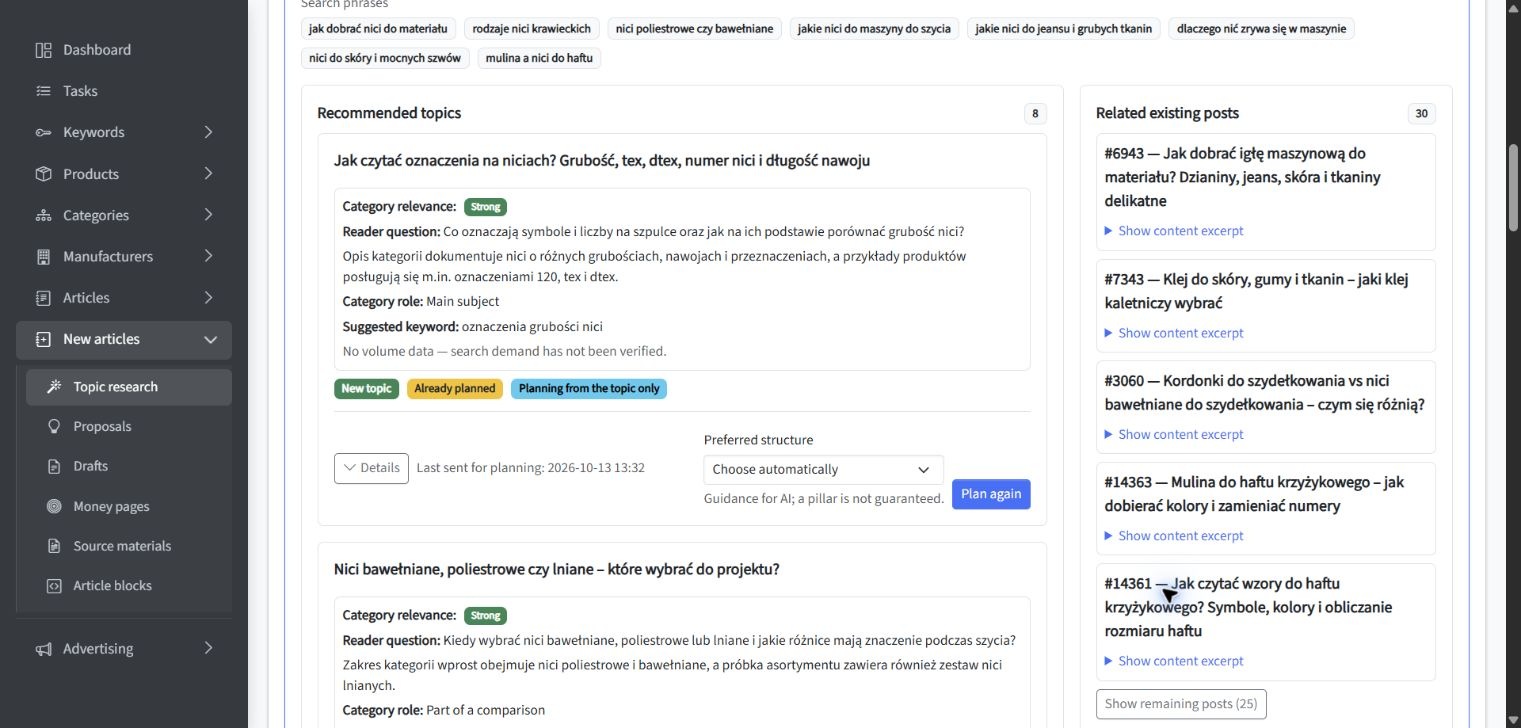
The following workflow example complements Google Trends research by showing how existing topic coverage, content gaps, category relevance and possible duplication can be reviewed before an idea moves into production. It illustrates a separate SEOAssistant topic-research process and should not be interpreted as a Google Trends report.
How to Validate Ideas with Search Intent and First-Party Data
Google Trends reflects wider search behavior. It does not show how your own pages currently perform. Before producing content, validate promising ideas against the search results and any first-party data available to your organization.
Begin with a manual search intent review. Examine whether the results favor tutorials, definitions, news coverage, product pages, videos or comparisons. Also check whether the meaning changes by location or whether several intentions are mixed within the same query.
Then use Google Search Console to investigate your existing visibility. Its Performance reports provide website-specific clicks, impressions, click-through rate, position and query data. These metrics describe how your property appears and performs in Google; they do not measure total market demand.
You can use this first-party evidence to answer practical questions:
- Does an existing page already receive impressions for the emerging query?
- Is visibility growing even though clicks remain limited?
- Which page does Google currently associate with the subject?
- Are several pages competing for similar query groups?
- Does performance differ by country, device or period?
- Did a previous seasonal peak produce measurable results?
A trend may be absent from Search Console simply because your site has no relevant page or visibility. Conversely, Search Console may reveal a growing query that is not prominent in public trend discovery. Learn when to use each source by reviewing how to compare Google Trends with Google Search Console.
Once an opportunity has passed these checks, a connected SEO workflow can help move it from analysis and prioritization into content creation, review, controlled publishing and measurement. The tool supports the process, but editorial approval and evidence-based decisions remain necessary.
Competitor ranking observations can provide additional context, particularly when established sites begin publishing around the same subject. However, competitor activity is not proof that the topic fits your audience. Use competitor SEO tracking to understand the search landscape, not to replace relevance and intent validation.
Common Google Trends Mistakes to Avoid
Most weak conclusions come from interpreting a valid chart without checking what the chart actually represents. Avoid the following errors:
- Treating 0–100 values as search volume. They indicate normalized relative interest within the selected report.
- Using the default filters without review. The wrong location, period or search type can distort the conclusion.
- Comparing mismatched concepts. A broad topic and a narrow exact phrase do not represent equivalent inputs.
- Assuming a spike will continue. Investigate the event behind it and compare the pattern with historical data.
- Ignoring the baseline. Large percentage growth can begin from limited previous demand.
- Creating content for every rising query. Many trends lack audience relevance, business value or a credible editorial angle.
- Confusing regional popularity with regional volume. A smaller market can have a higher relative score but fewer searches.
- Skipping existing-content checks. Updating a relevant page may be better than adding another page on the same subject.
- Choosing a keyword before understanding intent. Similar phrases can require different formats and answers.
- Using Trends as the only source of evidence. Combine market signals with search results, website data and editorial judgment.
These mistakes share a common cause: moving from observation to production too quickly. Add a review stage between finding a trend and commissioning content.
A Repeatable Google Trends Content Research Workflow
A repeatable workflow improves consistency and makes it easier to explain why an idea was accepted, postponed or rejected. The following process can be used for regular SEO and editorial planning:
- Scan Trending Now. Select the correct market and collect only trends with a plausible audience connection.
- Open candidates in Explore. Set the location, period, category and search type before interpreting the pattern.
- Compare relevant terms or topics. Test alternative wording without mixing incompatible inputs.
- Review interest over time. Classify the pattern as emerging, stable, seasonal, declining or event-driven.
- Inspect related topics and queries. Record useful questions, vocabulary changes and rising subtopics.
- Investigate the cause. Determine why interest changed and whether the trigger is likely to persist.
- Evaluate strategic relevance. Check audience fit, business value, credibility and timing.
- Audit existing coverage. Decide whether to create, update, merge or avoid content.
- Validate search intent. Review the current results and identify the appropriate page type.
- Check first-party data. Use Search Console and available analytics to assess current visibility and past performance.
- Create a focused brief. Define the target reader, question, angle, supporting evidence and review date.
- Measure the outcome. Monitor impressions, clicks, relevant engagement and business outcomes after publication.
The workflow should remain proportional to the opportunity. A short-lived update may need a fast review, while an evergreen guide or commercial page requires deeper validation. The objective is controlled speed: respond while the topic is useful without allowing urgency to remove editorial judgment.
Key Conclusions for Google Trends Content Research
The most important principles can be summarized as follows:
- Use Trending Now to discover recent surges and Explore to investigate their context and durability.
- Interpret Google Trends scores as relative interest, not absolute search volume.
- Confirm the location, period, category and search type before evaluating any pattern.
- Use related topics and rising queries to turn broad themes into specific content angles.
- Investigate the reason for a spike before assuming that growth will continue.
- Reject trends that do not match your audience, business priorities or editorial credibility.
- Choose between creating a page and updating existing content based on coverage and search intent.
- Validate market-level signals with Google Search Console and other available first-party data.
- Record why an idea was approved and when its relevance should be reviewed again.
Summary: Use Google Trends as a Decision Tool
Google Trends for SEO is most useful when it supports a decision rather than produces one automatically. Trending Now can reveal what is accelerating, while Explore shows how that interest behaves across time, locations and related searches. Neither feature can determine whether your organization should publish.
The final decision depends on audience relevance, search intent, existing coverage, editorial value and evidence from your own website. Find the signal, configure the data correctly, investigate its cause and validate the opportunity before creating content. That process turns a temporary trend into a considered content decision—and makes it easier to avoid ideas that are visible but strategically weak.