

Google Trends and Google Search Console both provide search data, but they answer different questions. Google Trends shows how interest changes across the wider market. Search Console shows when and how your own website appears in Google Search. Treating them as interchangeable can lead to weak topic choices, misleading demand estimates and poorly timed updates.
The practical rule is simple: use Google Trends for discovery and demand patterns, then use Google Search Console for validation, prioritization and measurement. When both tools are available, combining their signals creates a stronger content planning process than relying on either source alone.
Google Trends vs Google Search Console: The Core Difference
Google Trends uses a sample of Google searches to represent relative interest in a term or topic. The data is normalized for the selected location and period, then indexed on a scale from 0 to 100. A value of 100 marks the highest relative interest within that particular comparison. It is not an absolute search volume.
Google Search Console reports how a verified website property performs in Google Search. Its Performance report includes clicks, impressions, click-through rate and average position, with data that can be grouped by queries, pages, countries, devices, dates and search appearance.
This distinction determines how the tools should be used:
- Google Trends asks: Is interest in this subject growing, declining, recurring or concentrated in a particular place?
- Google Search Console asks: Does our website already appear for this subject, which pages receive visibility and how do searchers respond?
A topic can be growing rapidly in Google Trends while remaining absent from Search Console. That does not invalidate the trend. It may simply mean that the website has no relevant page, has not been indexed for the topic or lacks sufficient visibility to generate measurable impressions.
What Google Trends Can Tell You
Google Trends for content planning is most useful when you need to understand external demand patterns before committing resources to a topic. It can reveal whether interest is increasing, whether a peak repeats each year and whether one term is gaining relative popularity against another.
Useful research signals include:
- the direction and speed of relative search interest;
- recurring seasonal peaks and declines;
- differences between countries, regions and cities;
- comparisons between alternative terms or topics;
- related topics and queries;
- rapidly growing searches within the selected period;
- differences between Web, News, Image, Shopping and YouTube Search interest.
Google explains that regional popularity is relative to total searches in the selected location. A smaller region can therefore receive a higher interest score without producing more searches in absolute terms.
Related queries are particularly helpful during early keyword research. Top queries show frequently associated searches, while rising queries identify phrases with the greatest growth during the selected comparison period. A rising percentage describes growth, not total popularity, so a fast-growing phrase may still represent limited demand.
If you are beginning with a broad topic, follow the process for how to find trending searches with Google Trends. When you need to compare specific wording, topics and intent patterns, use the more focused guide to validate keywords and search intent.
Google Trends cannot tell you whether your website ranks, receives impressions or earns clicks for a topic. It also does not provide an exact search volume, keyword difficulty score, conversion rate or competitor ranking. Those questions require Search Console, analytics, business data or suitable third-party SEO tools.
What Google Search Console Can Tell You
Google Search Console content planning starts with evidence from your own property. The Performance report shows which queries caused your site to appear, which pages received that visibility and how frequently those appearances led to clicks.
The four core metrics answer different questions:
- Clicks: How often searchers selected a link to your website from Google Search.
- Impressions: How often a link to your site was shown under the applicable counting rules.
- CTR: The percentage of impressions that produced a click.
- Average position: The average position of the topmost result from the site or page, depending on the report aggregation.
Average position should not be interpreted as a fixed daily rank. Google may aggregate data by property or page, and property-level reporting uses the topmost result from the site. Search appearance, device, location and query mix can also affect the figure.
For content opportunity analysis, Search Console can help you identify:
- pages receiving many impressions but relatively few clicks;
- queries that are relevant but only partially addressed by the ranking page;
- pages gaining or losing visibility between comparable periods;
- content that performs differently by country or device;
- query clusters that could justify expanding or restructuring a page;
- existing articles that should be updated before recurring demand returns.
Search Console is site-specific. Its impressions measure appearances of your property, not all searches in the market. A low impression count may reflect weak visibility rather than weak demand, while a high impression count confirms that Google is already displaying your site but does not reveal the topic’s total search volume.
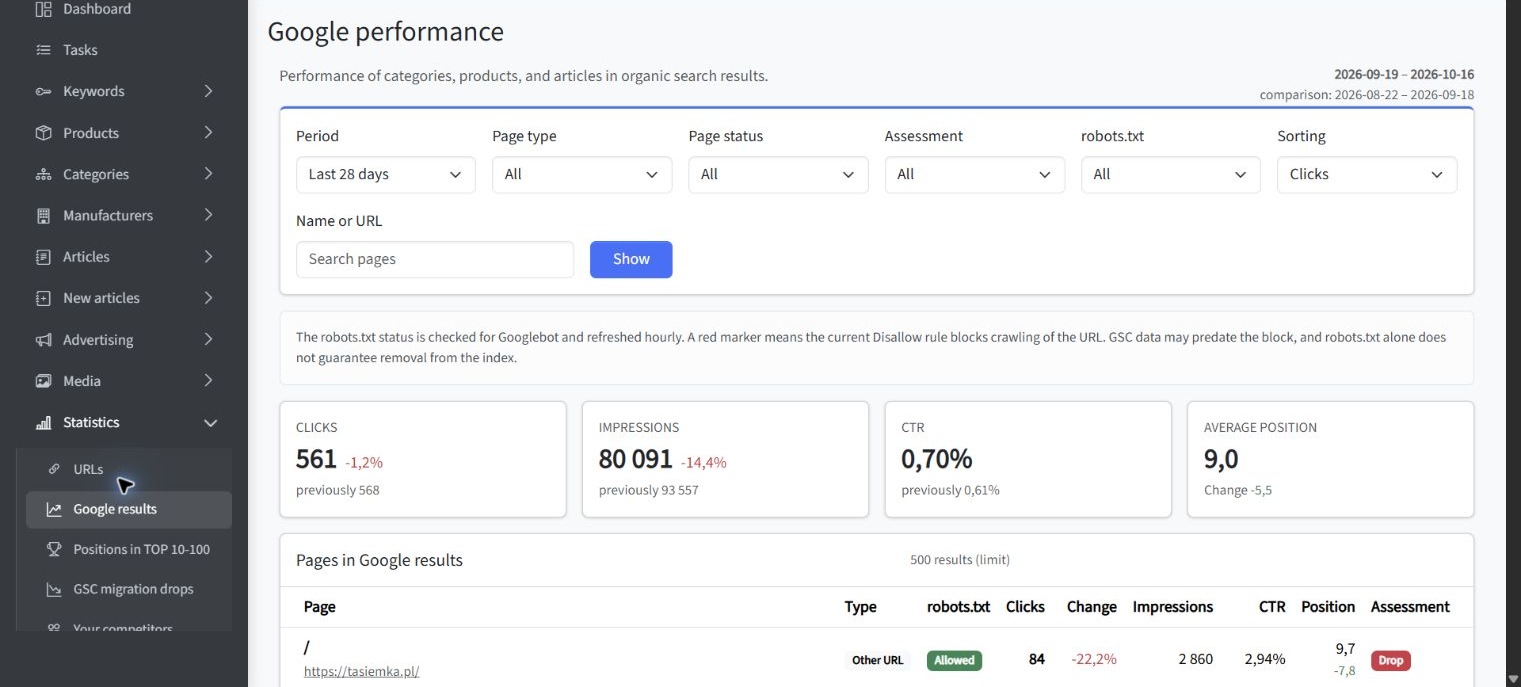
Example: Search Console page-performance analysis in SEOAssistant. The application view below was captured on October 19, 2026. It presents clicks, impressions, CTR and average position between periods, together with page-level filters. It illustrates an SEOAssistant workflow built around Search Console data and is not the native Google Search Console interface.
Which Tool Should You Use for New Topic Discovery?
Use Google Trends first when the website has little or no existing data for a subject. Search Console cannot report useful query performance if your site has never appeared for the relevant searches. Trends can expose the external demand pattern before a page exists.
A practical discovery process follows these steps:
- Start with an audience-relevant topic. Avoid selecting ideas only because they appear in a trending list.
- Set the correct location, period, category and search type. These filters define the context of every result.
- Compare related terms or topics. Keep the settings consistent so that the comparison remains meaningful.
- Review interest over time and related queries. Look for durable growth, recurring demand and useful subtopics.
- Validate search intent. Confirm what searchers expect and whether your business can publish a credible response.
- Check other keyword research data. Use available volume estimates, search results and competitive analysis to assess scale and difficulty.
Traditional keyword research platforms such as Ahrefs can complement this process with estimated metrics and competitor research. Google Trends adds direction and timing, but it should not replace search intent analysis or a review of the current results page.
Do not commission content solely because a line is moving upward. Verify the cause of the increase, the likely durability of demand and the connection to your audience. A temporary news event may require a rapid response, while a steadily growing problem may support an evergreen guide.
Which Tool Should You Use for Existing Content Opportunities?
Use Google Search Console first when a relevant page already exists. Its property-level data can show whether Google associates that page with the intended query set and where practical improvements may be available.
Typical opportunities include:
- High impressions and low CTR: Review the page title, description, intent match and competing result formats.
- Relevant queries not covered in depth: Expand the page where the additional information supports the same search intent.
- Several pages appearing for similar queries: Check whether their purposes are sufficiently distinct or whether they overlap.
- Declining clicks and impressions: Compare periods and investigate seasonality, changing demand, indexing issues and content relevance.
- Growing impressions with limited clicks: Determine whether the page is beginning to gain visibility and needs stronger alignment with the query.
- Strong performance in one region: Assess whether regional differences justify localized examples or dedicated content.
Search Console does not provide competitor SEO tracking because it reports data for properties you can access. It cannot show a competing domain’s private query and click data. Google Trends may compare relative interest in brands or topics, but it is not a competitor ranking tool. For broader tool selection, you can compare SEO research tools with a workflow for implementing approved changes.
How to Combine Both Tools in a Content Planning Workflow
The strongest workflow assigns each source a defined role. Google Trends discovers changes outside your website. Search Console evaluates your current visibility and measures what happens after you publish or update content.
Use the following sequence:
- Discover demand with Google Trends. Identify rising, recurring or regionally important topics.
- Interpret the pattern. Check whether the movement reflects seasonality, changed vocabulary, a new entity or a short-lived event.
- Check Search Console. Look for existing pages and queries related to the opportunity.
- Choose the correct action. Create a page if no suitable asset exists, or update an existing page when it already serves the same intent.
- Prioritize the opportunity. Consider audience relevance, business value, current visibility, production effort and timing.
- Publish or revise with review controls. Confirm factual accuracy, intent alignment, internal linking and technical readiness.
- Measure the result. Monitor impressions, clicks, CTR and query coverage in Search Console, while continuing to observe market direction in Trends.
Search Console data makes prioritization and post-publication monitoring more specific, while an operational platform can connect research, approval, implementation and measurement. A connected SEO workflow is useful when a team needs to turn search signals into reviewed website changes rather than leaving insights in separate reports.
Example: topic research after combining Trends and Search Console. The SEOAssistant view below was captured on October 19, 2026. It shows researched queries, related existing posts and recommended article ideas, including content gaps and duplicate warnings. It is an optional planning layer and not a native interface of Google Trends or Google Search Console.
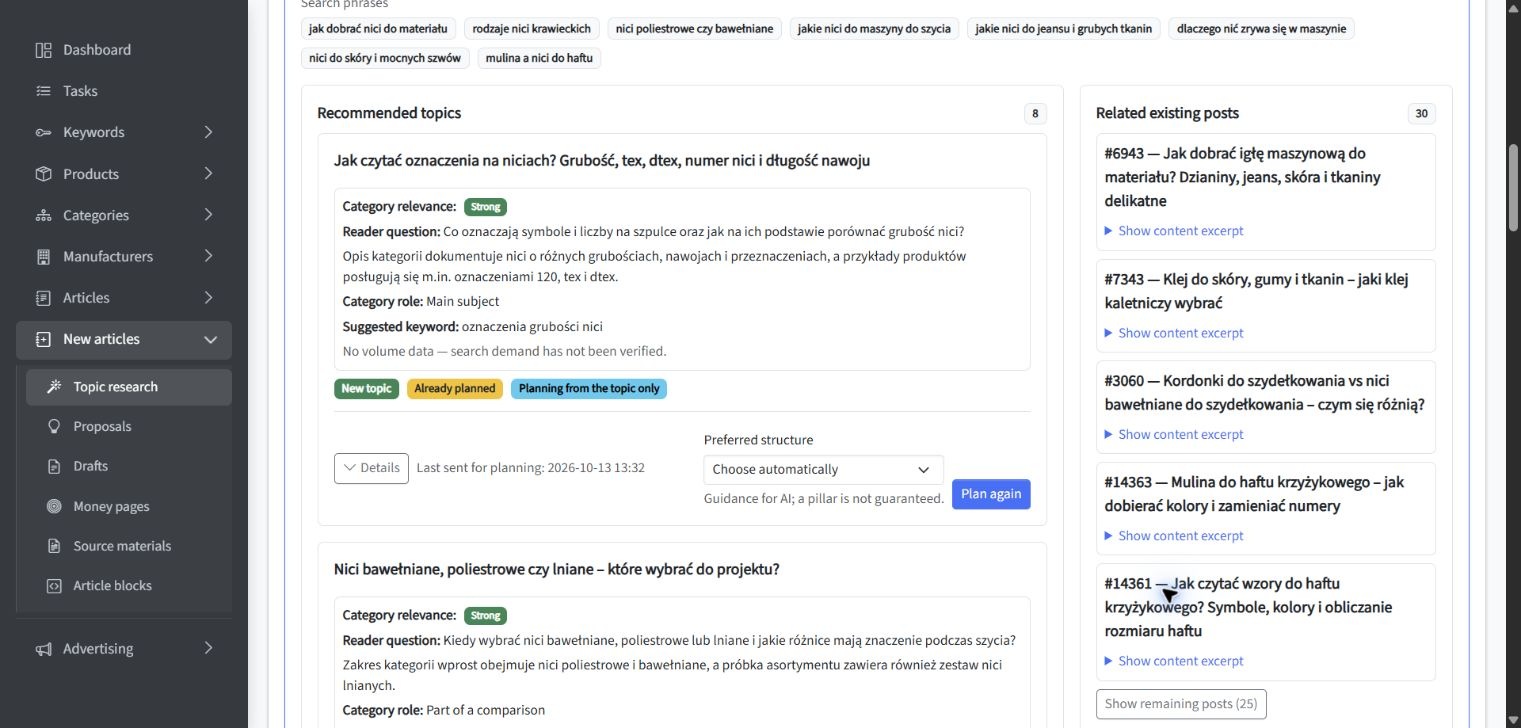
This process also prevents a common planning error: creating a new article when an existing page should be improved. Trends can establish that the subject matters, but Search Console and a review of current content determine whether the correct response is creation, consolidation or revision.
Example: From an Emerging Topic to a Validated Content Brief
Suppose Google Trends shows sustained growth around a new problem within your market. Related queries indicate that people are moving from general awareness toward practical questions about selection, comparison or implementation.
First, compare the relevant terms using the same country, period, category and search type. Review whether the increase appears across several months or depends on one isolated spike. Then inspect the current search results to establish the dominant search intent.
Next, search Search Console for related queries and pages. Three outcomes are possible:
- No relevant visibility: The website may need a new page if the opportunity fits its audience and expertise.
- One relevant page already appears: Updating that page may be more efficient than creating a competing asset.
- Several pages appear weakly: Review their roles before expanding, consolidating or redirecting content.
The content brief should record the target audience, primary question, search intent, supporting subtopics, suitable page type and evidence behind the opportunity. Trends data explains why the topic deserves attention. Search Console explains how the site currently relates to it.
Example: Refreshing a Page Before a Seasonal Peak
Seasonal content should normally be reviewed before demand reaches its maximum. Google Trends can show whether a peak repeats, when interest usually begins to rise and whether timing differs by location.
Once the likely preparation window is identified, use Search Console to inspect the existing page. Compare its performance with the corresponding period from the previous cycle where sufficient data is available. Review the queries generating impressions, changes in clicks and CTR, and whether the page still satisfies the current search intent.
The update may involve revising outdated information, improving the opening answer, adding missing query-related sections or strengthening internal links. Publication timing matters because discovery, crawling and reassessment do not happen on a guaranteed schedule.
For a repeatable scheduling method, learn how to plan content before seasonal demand peaks. The calendar should include research, approval, production, publication and post-peak review dates rather than recording only the expected peak.
Data Limitations and Interpretation Mistakes
Reading Google Trends as Search Volume
A Trends score of 100 does not mean 100 searches or a fixed number of monthly searches. It marks the highest normalized point in the selected dataset. Changing the date range, location or compared terms can change which point receives that score.
Using Search Console Impressions as Total Demand
Search Console impressions count eligible appearances of your website. They do not count every search for the topic. If your page ranks weakly or does not appear, market demand may be much larger than the property’s impression total suggests.
Assuming Missing Data Means No Interest
Low-volume searches may not appear clearly in Trends, while Search Console can omit or anonymize some queries for privacy. Filtering by query can also change totals because anonymized queries are excluded.
Comparing Inconsistent Settings
A comparison becomes unreliable when terms use different locations, periods, categories or search types without a specific analytical reason. Keep settings aligned and compare search terms with search terms or topics with topics where possible.
Treating Average Position as an Exact Rank
Average position is aggregated across searches and may reflect different locations, devices, queries and result formats. Use it as a diagnostic indicator alongside impressions, clicks and page-level analysis, not as a substitute for dedicated rank tracking.
Ignoring Search Intent
Neither a rising trend nor a high-impression query automatically justifies a new article. Check whether the searcher expects information, a comparison, a product page, a tool or another result type. Content format should follow the need behind the query.
A Decision Guide for Common Content Planning Tasks
Finding Topics Your Website Does Not Cover
Start with: Google Trends.
Why: Search Console cannot provide meaningful visibility data for a topic when your website has no relevant page or appearances. Validate the idea with search intent and broader keyword research data before production.
Choosing Between Two Keyword Variants
Start with: Google Trends for direction and terminology, then check Search Console if the site already appears for either variant.
Why: Trends can reveal changes in relative wording, while Search Console shows the exact queries currently associated with your pages.
Finding Pages That Need Better CTR
Start with: Google Search Console.
Why: CTR is calculated from your property’s clicks and impressions. Filter by page and query before deciding whether the issue involves the snippet, search intent or the page itself.
Planning Seasonal Publication Dates
Start with: Google Trends, then validate the existing page in Search Console.
Why: Trends identifies recurring timing, while Search Console shows how the site performed during previous cycles.
Evaluating a Sudden Traffic Decline
Start with: Google Search Console and technical checks.
Then use: Google Trends to determine whether market interest also declined.
Why: Falling clicks can result from weaker demand, lost visibility, lower CTR, indexing problems or several factors at once.
Measuring a Newly Published Article
Start with: Google Search Console.
Why: It shows whether the article is beginning to earn impressions, which queries trigger it and whether those appearances produce clicks. Trends can provide market context but cannot measure the page’s performance.
Researching Competitors
Use: Third-party competitive research and direct search result analysis.
Why: Search Console is limited to accessible properties, while Trends measures relative interest rather than competitor rankings, backlinks or estimated organic traffic.
Key Conclusions
The most useful conclusions from the Google Trends vs Google Search Console comparison are:
- Google Trends measures relative market interest, while Search Console reports the search performance of a specific website property.
- Use Trends to discover external demand patterns, terminology changes, regional differences and seasonality.
- Use Search Console to evaluate existing visibility, query associations, page performance and post-publication results.
- A topic can trend without appearing in Search Console when the website lacks a relevant page or sufficient visibility.
- Search Console impressions and clicks are not substitutes for total market demand.
- Neither tool alone provides complete competitor SEO tracking or a full keyword research dataset.
- The strongest workflow combines discovery, intent validation, site-level prioritization, controlled implementation and measurement.
Summary
Google Trends and Google Search Console should not compete for the same role in content planning. Trends helps you look outward at changing search behavior. Search Console helps you look inward at how your website participates in that demand.
For new topics, begin with Google Trends and validate relevance, durability and search intent. For existing content, begin with Search Console and identify where impressions, queries, clicks and page performance support a specific action. When both sources agree, you have stronger evidence. When they disagree, investigate whether the difference comes from visibility, timing, geography, wording or an actual change in demand before deciding what to create or update.