Two Hours a Week on Ecommerce SEO: What You Do and What the App Does

You run an online store. There are orders, suppliers, customer questions and problems that cannot wait. You know your product and category descriptions need work, and your blog could attract new customers. But when are you supposed to do it?

Another tool does not solve the problem if logging in gives you a task list for the next three weeks.

SEOAssistant is being built to do more of that work, not simply point it out. Our experience across the projects we work on suggests that around two hours of regular work with the app each week can be enough to steadily develop your store’s content and achieve noticeable SEO improvements.

That does not mean writing every description in two hours. It means reviewing and guiding the work the app prepares.

And it does not have to be an SEO specialist. Above all, you need someone who knows your offering and can judge whether the proposed content is factually correct.

Two hours of your time is not two hours of work on your store

Manually optimizing a single description means gathering information, researching keywords, deciding on a structure, writing the text, checking it and publishing it. Then moving on to the next product. And eventually returning to what you have already published.

With a dozen products, that is manageable. With a few thousand, you start running out of time before the work has really begun.

SEOAssistant changes that division of responsibilities. The app uses website data, your offering and analytical sources, helps establish priorities, and prepares proposed content and improvements. Changes belong to specific pages, and fields supported by the integration can be updated after approval.

You do not start with a blank document. You start with a proposal you can assess, edit and approve.

Two hours is the time you spend participating in the process. It is not a limit on the work the system can prepare during that time.

You do not need to know SEO. You need to know your products

The person using the app does not have to research every keyword or design the structure of every text independently. They should, however, be able to answer some much more practical questions:

  • Does this product actually have the features described?
  • Is it suitable for the suggested use?
  • Does the customer receive the listed items in the package?
  • Is any information that customers frequently ask for missing?
  • Does the description match what we actually sell?

Suppose the app prepares a description of a kitchen tap. A team member who knows the range notices that this particular variant does not have a pull-out spout, or adds an important installation detail. That is not an edit “for the algorithm.” It is knowledge a customer needs to choose the right product.

The owner, a product manager or a customer service team member can take on this role. Often, the person answering shoppers’ questions every day knows exactly what the descriptions are missing.

Fluent writing still needs fact-checking. If a claim is uncertain, check the specification or ask someone who knows. Do not approve a sentence just because it sounds convincing.

What could a two-hour working week look like?

The schedule below is an illustrative way to organize the work, not a time measurement for every customer. You can use one block or split it into two shorter sessions each week.

Time Your task Why it matters
20 minutes Review the proposed priorities against your current offering Keep the work focused on pages that matter to the business
70 minutes Check prepared changes, correct facts and approve proposals that are ready Get worthwhile improvements onto the website
20 minutes Add context: customer questions, product features and feedback on content Help future proposals reflect the specifics of your store
10 minutes Check what has been published, what is waiting and whether anything needs attention Maintain continuity and avoid overlooking problems

Most of this time goes into decisions about prepared content, not operating the tool.

You do not have to “clear the entire queue” every time, either. It is better to review the most important proposals carefully than to approve everything just to bring the pending count down to zero. The number of descriptions you can review depends on their length, the quality of the source data and the complexity of the products.

A quick look at results does not mean judging SEO every week based on a few days of traffic. Its main purpose is to spot signals and decide what needs attention next.
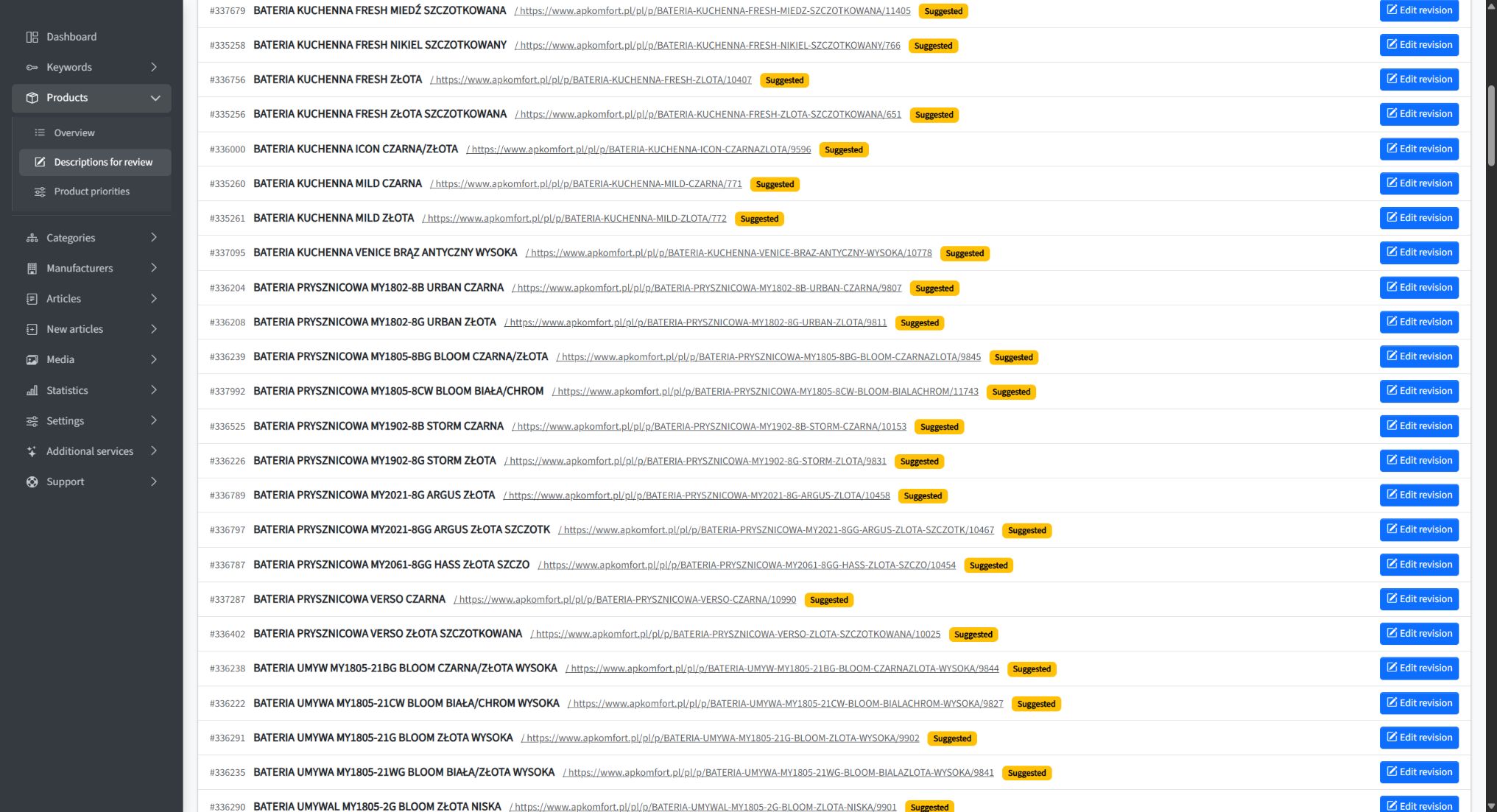
AP Komfort content revision queue in SEOAssistant
An archival view of the AP Komfort revision queue: proposed changes awaiting review. This illustrates the workflow, not the number of changes that can be reviewed in two hours.

A diff makes comparison faster. It does not replace judgment

Reviewing content should not mean opening your store in one tab, a proposal in another, and looking for differences sentence by sentence.

In SEOAssistant, a proposal is saved as a revision. You can compare it with the current content, and the diff highlights added and removed passages. This makes it easier to see whether a product use has been added, important information has disappeared, or the scope of the description has changed.

That is particularly useful when you return to a page that has already been improved. You do not have to work out the entire change from scratch each time.

Color alone does not confirm that a sentence is true. The diff helps you locate what needs attention; someone who knows the offering makes the decision. When a description has been substantially rewritten, it is also worth reading the finished version as a whole.

We show a practical approach in How to Review AI-Generated SEO Content Without Reading Everything Twice.
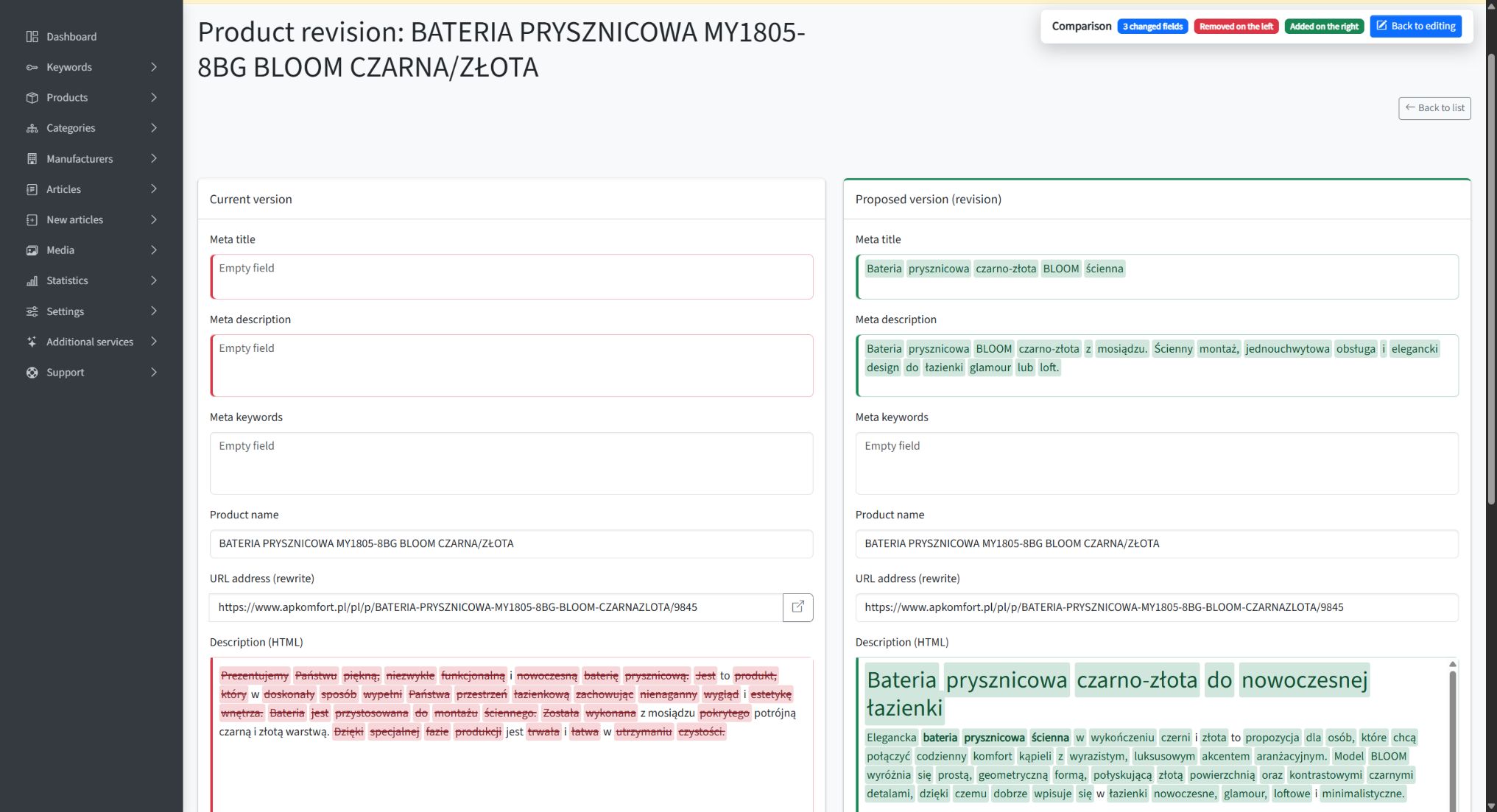
AP Komfort product description with additions and removals highlighted in the diff view
An AP Komfort product description revision with highlighted changes. The diff helps identify added and removed passages; it does not replace fact-checking.

What did this look like at AP Komfort?

AP Komfort, a kitchen equipment retailer, is a useful example. The project covered a catalog of 1,858 products and 170 categories.

In the published case study, we described the client’s involvement as around one hour of approvals per week and one weekly meeting. SEOAssistant handled publication. This is not a record of exactly 120 minutes of work. It does show how a small, regular human contribution can accompany a much broader scope of activity.

The project published 211 product revisions, 83 category revisions and 20 manufacturer revisions. Comparing two equal, 41-day periods—November 21–December 31, 2025 and January 1–February 10, 2026—showed a 24.19% increase in Google impressions and a 36.73% increase in the number of pages receiving clicks. The details, data sources and scope of work are presented in the AP Komfort case study.

These results are not a promise of identical growth for another store. They demonstrate something more practical: the client did not have to personally write and publish hundreds of revisions for work on the website to move forward.

A greater volume of work than a traditional agency package

Working with a tool yourself does not have to mean a narrower scope than outsourcing SEO. With a well-prepared process, it can mean precisely the opposite.

In September 2026, public agency offers still include packages with a few texts per month and a defined scope of catalog optimization. For example, GBoost lists three pieces of content, optimization of up to 15 products and 1–2 categories per month in its Start package; larger packages increase those limits. KC Mobile lists 4–8 texts per month in its ecommerce package, plus category and product descriptions. These are examples of specific offers, not a statistical average of the entire market. GBoost’s scope, KC Mobile’s scope.

The volume of content work you can set in motion yourself with SEOAssistant can significantly exceed a traditional retainer built around a few texts and a limited number of monthly updates. At AP Komfort, we are talking about 314 published product, category and manufacturer revisions across the documented project—not 314 content ideas or drafts waiting in a folder.

Here, we are comparing the scale of catalog content work, not an agency’s entire service, which may also include technical SEO, link building and analytics. More changes make sense when they are justified, accurate and actually implemented.

For a store owner, the most important question is therefore: how much valuable work reaches my website, not how many people are involved in servicing the account?

SEO agencies need to change their operating model

Our assessment of the market in September 2026 is clear: SEO agencies need a substantial transformation to keep pace with the scale and speed of work that automation makes possible.

Replacing a copywriter with a text generator while leaving the same limited scope of work for the client is not enough. The entire process needs to change: from data analysis and prioritization, through preparing and implementing updates, to evaluating results and making further improvements to existing content.

If a store owner or employee can set work on a substantial catalog in motion with a small, regular contribution, the bar for outsourced services rises. A list of recommendations, a few new articles and a monthly report will find it increasingly difficult to justify their value.

Automation does not lower expectations of SEO. It raises expectations of how much valuable work should get done.

What needs to be in place for this model to work?

Two hours a week refers to regular work with an app that is already set up. Initially, the website needs to be connected, data and content rules configured, and the first proposals reviewed. We help with this stage—it is separate from the ongoing working routine.

The quality of the input information matters, too. If a product has a name and a one-sentence description, while important specifications exist only in a salesperson’s head, someone needs to provide them. Automation should not mean guessing product specifications.

A simple arrangement works best: one person responsible for regular review, access to reliable product information, and clear rules about what gets approved and what needs correction.

Introducing a new product line, sorting out a neglected catalog or working on more specialized content may require more involvement. Similarly, a store migration or a technical issue blocking indexing may need separate specialist work. A two-hour routine does not mean that every website problem fits into the same time allowance.

The first improvements can be noticeable after the first month

Our observations from the projects behind our case studies suggest that the first noticeable improvements can appear after just the first month of regular work. You do not have to assume from the outset that, for six months, another report will be the only visible result of the engagement.

This is an observation from projects we have worked on, not a guarantee of results in 30 days. In the AP Komfort example above, the documented increases in impressions and pages receiving clicks compare two 41-day periods.

The speed at which justified changes reach the website matters. If updates spend weeks waiting to be written, approved or pasted into the store, that time is not yet helping you assess their impact in search. Automation helps shorten the path to publication; it does not set Google’s response time.

Google explains that changes can take anything from hours to months to be reflected, and that it generally makes sense to assess their impact after a few weeks. Not every improvement produces a noticeable result. Source: Google Search Central.

The first increase is the beginning, not the end of the work. What matters is the cycle: choose justified changes, implement them, observe the results and revisit existing content. This is the process we are developing SEOAssistant around, so that further work follows your offering, customer questions and changes in search.

Your contribution is business knowledge, not a second job

The biggest change is not that a person writes faster. It is that they no longer have to carry out every stage of the work themselves.

The app prepares proposals. You or your employee check the facts, add knowledge about your offering and make decisions. That allows even a small but regular contribution to become a steady stream of improvements to your store.

You do not need more hours to write “for SEO.” You need a process that puts your product knowledge into the content without making you create everything from scratch.
An Automated Blog Is Not Automated Ecommerce SEO

A new article every few days. A publishing calendar filled for the month. AI researches topics, writes and publishes. The tool’s website calls it “SEO on autopilot”.

Meanwhile, in your store? The same supplier descriptions. Categories nobody has improved for a year. Existing pages with potential that remains untapped.

You can automate the production of new content and still leave the work on your store unautomated.

We explored this through our own MeetEdward account. We also looked at Soro, GetAutoSEO and Semly. We were not interested in counting features on a landing page. We wanted to know one thing: what happens to an existing page when it needs analysis, an improvement, implementation and another review later?

That is the distinction we are building SEOAssistant.pro around.

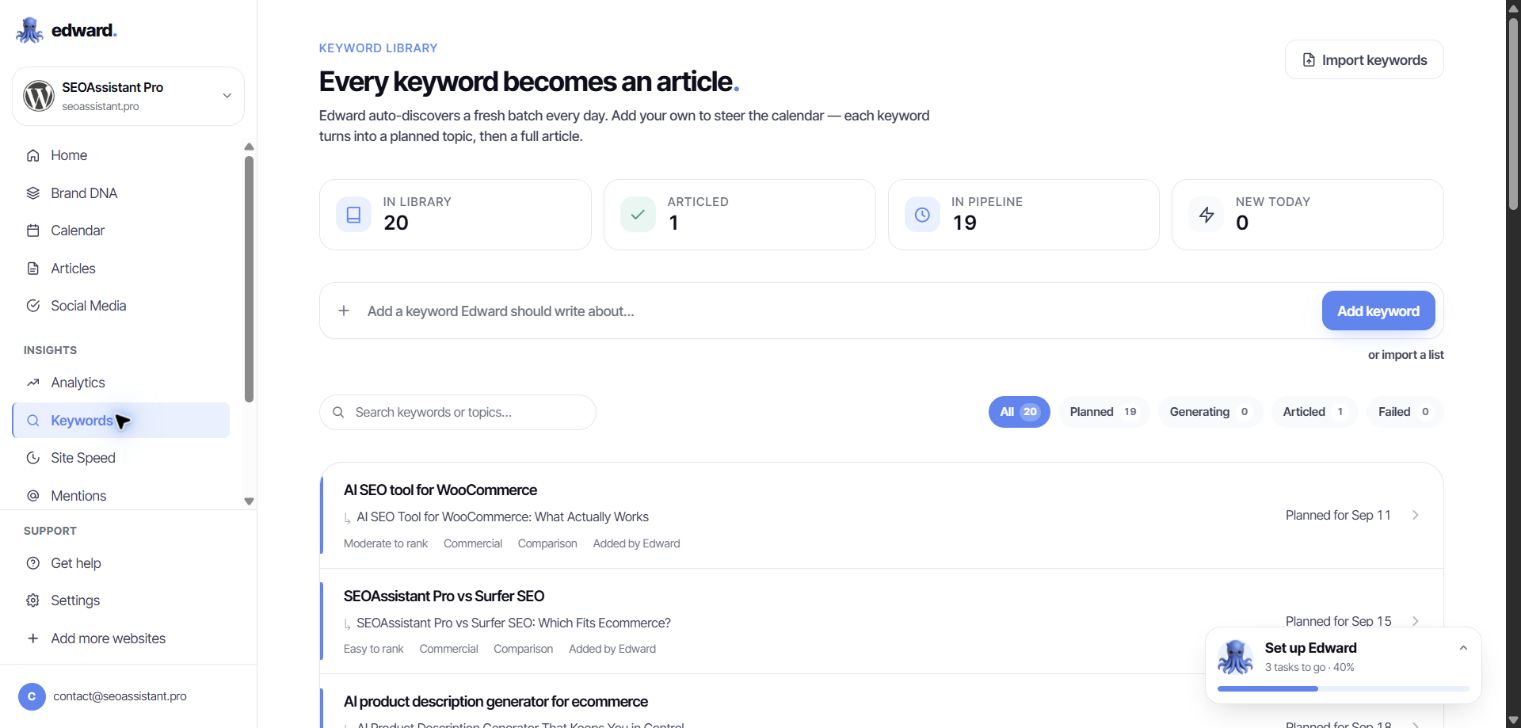
“Every keyword becomes an article.” For ecommerce, that is not enough

Edward’s Keywords module greets users with a clear statement: “Every keyword becomes an article.” It explains that a keyword becomes a planned topic and then a complete article.

There is no need to interpret the advertising. That is how the application itself describes this workflow.

Edward's Keywords module showing Every keyword becomes an article and topics queued for publication
Our Edward account, September 8, 2026. Keywords feed a queue of article topics.

But not every keyword needs a new article.

If you sell kitchen sinks, a query about a particular product type may call for work on a category you already have: a clearer description, a better explanation of the range and answers to shoppers’ questions. Sometimes the right destination is a product page. Sometimes it is an existing buying guide that needs updating.

Automatically turning more keywords into more posts does not resolve that choice. A system can perform a task very efficiently without that task being your store’s most important priority.

In SEOAssistant, an existing product or category is also a unit of work. Keyword selection supports a specific page and its offer—not just a blog publishing calendar.

We explored Edward’s dashboard. Where do you return to published content?

We went through the keyword library, calendar, article list and editor for an existing draft. The visible workflow runs from an idea to writing and publication. The calendar displays upcoming topics. The editor lets you change the text, publish it, schedule publication or export it.

In the views available to us, we did not find a recurring optimization workflow for existing content: a page’s results → fresh analysis → a recommended change → another revision → an update to that same page.

Being able to edit an article manually is not that workflow. Nor is a Search Console chart a mechanism that draws a conclusion and prepares an improvement.

Edward has analytics, competitor-change monitoring and a technical-audit module. But those tabs do not close the gap between “I can see the data” and “the system helps me improve this specific piece of content”. If you still organize the analysis, page selection and follow-up yourself, that work remains yours.

The provider describes broader SEO changes on its WordPress and Shopify integration pages. A claim on a website does not, by itself, demonstrate an operational improvement cycle for an existing catalog. We did not find that cycle in the dashboard we reviewed; our publishing integration had not yet been connected.

This is a specific gap in the workflow we examined, not an argument about whether AI can write a good paragraph.

A ready-made landing page? Ready to copy and paste

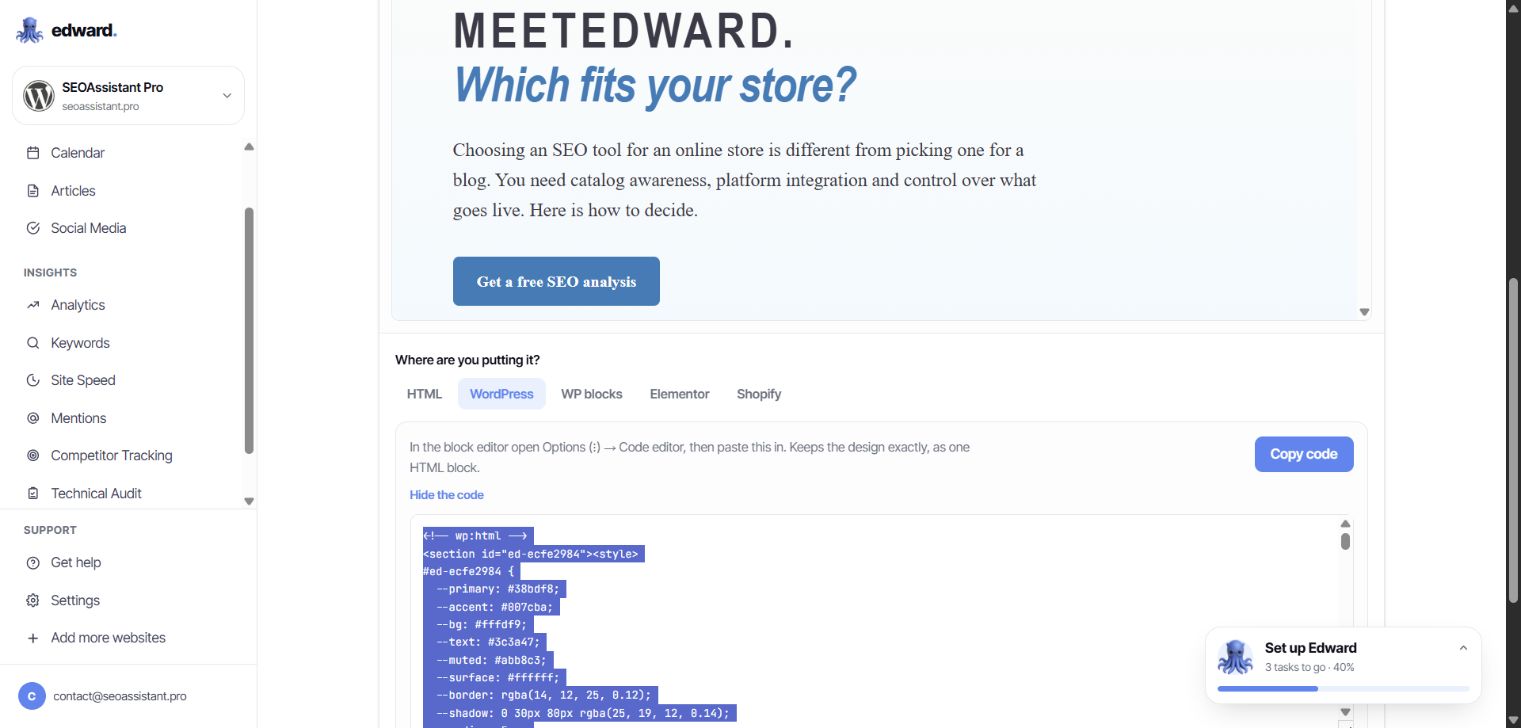
Edward’s Marketing Pages module generated a comparison page for us: headings, sections, a table and a call to action. In the preview, it looked finished.

The next step: copy the code and put it on your website.

Edward's landing-page export showing WordPress paste instructions and HTML with its own CSS styling
Marketing Pages: the selected WordPress export contains HTML and styling. This module hands the implementation back to the user.

There are several export formats, including WordPress blocks. That does not change the core point: implementation remains the user’s job. You must place the material correctly and check it in your site’s actual template. Code for a standalone landing page does not automatically become an update to a category description.

If another round of manual work awaits after generation, automation has not removed it. It has moved it downstream.

In SEOAssistant, a proposed description change belongs to an existing product or category. The integration sends it to that page’s supported fields. You do not first have to turn a generated page design into content you can use in your catalog.

Soro, GetAutoSEO and Semly: do not mistake one capability for the whole SEO job

These tools differ. But an online-store owner should ask each of them the same question: will this work on my catalog, or add another layer of content alongside it?

Tool What its offer or accessible workflow shows What that alone does not establish
MeetEdward In our account: keywords → topics → articles → publication, with separate analytics and additional modules We did not find a visible path from an existing page’s results to another revision of its content
Soro Research, content creation and automatic article publication in a connected CMS Publishing a post is not the same as updating an existing product or category
GetAutoSEO Article production and distribution, blog integrations and blog hosting Additional posts do not replace analysis and improvements to catalog descriptions
Semly Visibility in AI answers, content creation and refreshes, and claimed access to store data AI monitoring and content refreshes do not, on their own, demonstrate a complete revision and implementation workflow for product and category descriptions

Scope sources: Soro, GetAutoSEO’s integration demo, Semly’s content capabilities and Semly’s integrations. The table distinguishes demonstrated or described scope from work that cannot simply be inferred from it.

A Shopify or WooCommerce logo is not enough. Publishing to a store’s blog, reading product data and updating product descriptions are different integration capabilities.

Likewise, tracking changes on a competitor’s website is not the same as using competitor analysis to prepare a new version of your own category page.

Do not only ask, “Do you have an integration?” Ask, “Show me what you would change in this product—and what you would do with it later.”

SEOAssistant: working on the store, not just its publishing calendar

Imagine a store with several thousand products. Some use supplier descriptions. Some category pages fail to explain the differences between products. Older guides do not reflect the current range.

Publishing another ten articles will not automatically improve any of those descriptions.

SEOAssistant is also built to work on those existing assets: it reads product and category data, prepares changes and sends them back to the connected platform. The supported fields depend on the integration.

SEOAssistant's review queue for revisions to existing AP Komfort products
An archival screenshot from AP Komfort, shared with the client’s permission. These are proposed changes to specific catalog products, not a list of new blog topics.

Product context, not just a topic

Descriptions are prepared in the context of the business’s offer, product or category data and selected keywords. The starting point is not simply “write something about kitchen sinks”.

For a category, you can inspect keyword proposals and their roles, then prepare content for the relevant page fields. The analysis and the resulting text relate to a specific place in the store.

A revision, not a document to paste somewhere

Proposed content becomes a revision attached to a product or category. You can see the current and proposed versions, edit the proposal and approve the change.

A diff highlights additions and removals. Instead of comparing two entire texts sentence by sentence, you can immediately see where to focus.

The current product description and proposed revision with additions and removals highlighted
An AP Komfort product revision with the diff enabled. Archival material: red and green highlights identify the content changes.

After approval, the application queues an update to the connected platform. Product-description generation also has an option to send the result to publication automatically.

The distinction matters: a person can contribute knowledge of the offer. They do not have to act as the copy-and-paste connection between systems.

See more examples in our article on reviewing AI-generated SEO content with a diff.

An audit, not the assumption that generated means finished

An appropriate word count and heading structure do not establish whether a description actually represents its category well.

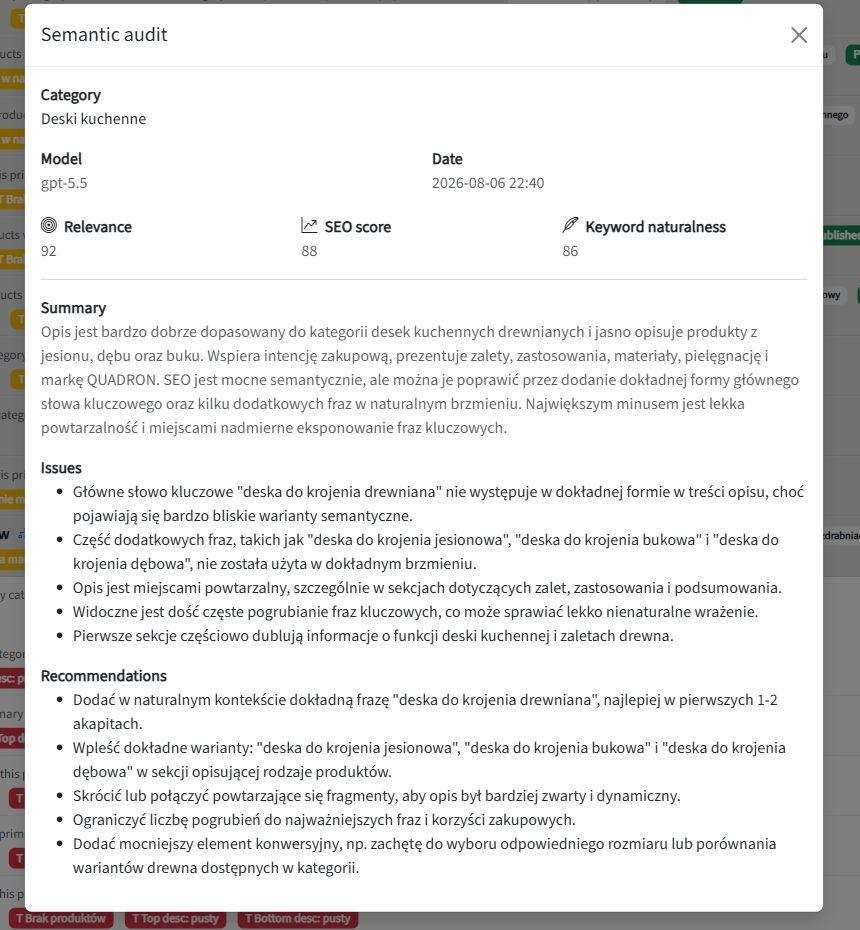
SEOAssistant’s semantic category audit identifies relevance issues and recommendations. You can return to a description with a specific reason to improve it, rather than commission the next article simply because the previous one has been published.

SEOAssistant's semantic category audit with scores, issues and recommendations
An audit of AP Komfort’s “Deski kuchenne” category—an archival example of recommendations for further work. The scores belong to the application, not Google.

SEO needs a cycle, not a production line for new content

Publication does not stop the market changing. Product ranges, customer questions, competitors and search results all evolve. A good description does not automatically become bad—but it should be reassessed when there is a reason.

The right workflow therefore looks like this:

Page analysis → a justified change → implementation → observation → the next decision.

Not: another keyword → another article → another keyword → another article.

In SEOAssistant, we connect catalog work, revisions, audits and Search Console data associated with a specific category. We are developing this into an increasingly autonomous cycle; which stages run automatically depends on content type and configuration. The aim is better decisions about existing pages, not rewriting everything unconditionally every month.

This way of working allows future changes in the offer, trends and search-engine requirements to inform subsequent decisions. That is the direction of SEO automation that matters to a growing store.

We explain the process in more detail in our article on automating ecommerce category SEO.

A $39 subscription. What about the work left over?

Our Edward subscription cost $39 per month. But a price comparison only makes sense once you compare the scope of the completed job.

If you still have to analyze categories separately, improve products, implement exported pages and organize follow-up work on older content, those tasks have not disappeared from the SEO budget.

A low subscription price does not make the work outside the tool free.

Do not compare only article allowances and monthly fees. Compare how much work on your actual website you no longer have to do manually.

Ask to see an improvement. Not another generated article

During a demo of an ecommerce SEO tool, bring a specific product and category. Ask:

  1. What does the system know about this page, and what does it propose based on that data?
  2. Will it improve the existing content or write a new article alongside it?
  3. Can I see exactly what it changes?
  4. Will it implement the change in the correct store fields?
  5. What enables us to return to that same page after publication?

If the presentation ends at “AI wrote the text”, you have seen a content-generation demo. Not a complete workflow for your catalog’s SEO.

Your store does not just need more content. It needs consistent work on the pages where you sell. That is what we are building SEOAssistant.pro for.


About this comparison: prepared by the SEOAssistant.pro team, based on our review as of September 8, 2026. We used our own Edward account, GetAutoSEO’s public demo, official Soro and Semly materials, and SEOAssistant’s workflows. Our Edward observations concern the features visible in the account we reviewed; we did not run deployments through its connectors. This is not a comparative traffic-growth experiment or a ranking guarantee. AP Komfort screenshots come from previously published materials and are used with the client’s permission.

SEOAssistant.pro vs Semrush, Ahrefs, Surfer SEO and Screaming Frog: From Analysis to Approved Changes

SEO tool comparisons often start with the number of reports, keywords or issues a platform can detect. Those details matter, but they do not answer the most practical question for a business owner:

how much work remains between “this page should be improved” and publishing a good change?

Semrush, Ahrefs, Surfer SEO and Screaming Frog are mature products with different strengths. SEOAssistant.pro is not trying to beat every one of them on database size or report count. It is being built as an operational layer that connects data to an existing website and carries the work forward: from selecting a task to preparing a revision, reviewing it and publishing it.

The short answer

  • Semrush is a broad suite for market, keyword and competitor research, audits, content and monitoring.
  • Ahrefs is especially strong in backlink, visibility and competitor data, while increasingly supporting content work and selected implementations.
  • Surfer SEO focuses on creating and optimizing content based on competing results and recommended topical coverage.
  • Screaming Frog is a flexible crawler for technical and on-page website analysis.
  • SEOAssistant.pro focuses on a repeatable process for a connected website: collect signals, select the right product or category, prepare a change, show the difference, request approval and send the content for publication.

These are not always mutually exclusive products. They often solve different layers of the same problem.

How does the working model differ?

Tool Main focus What the user typically does
Semrush Broad data, analysis, content and monitoring platform Connects output from different modules to an action plan; Content Toolkit can publish to WordPress
Ahrefs Domain, backlink, competitor and visibility research, extended with content tools Interprets the data and chooses the action; Patches deploy selected changes
Surfer SEO Creating and optimizing a selected piece of content Chooses the keyword or page, works in the editor and approves suggestions
Screaming Frog Technical crawling, extraction and recurring reports Configures the crawl, interprets issues and passes them on for implementation
SEOAssistant.pro A workflow for products, categories, manufacturers and articles on a connected site Reviews the diff, verifies business accuracy and approves the prepared revision

The table describes the dominant working model, not every available feature. These products evolve quickly and their capabilities increasingly overlap.

Competing tools do more than produce reports

An honest comparison has to recognize that all four platforms now go beyond simple recommendation lists.

Semrush Content Toolkit supports topic research, briefs, article generation and optimization. Its WordPress integration can send content directly for publication or save it as a draft.

Ahrefs AI Content Helper compares topical coverage with competing pages and supports the writing process. Patches in Site Audit can also publish selected changes directly to a site — currently primarily titles and meta descriptions.

Surfer Content Editor guides users from competitor analysis through writing and optimization to a pre-publication review. Auto-Optimize suggests specific changes that can be accepted or discarded, and finished content can be exported to WordPress.

Screaming Frog SEO Spider can run scheduled crawls, combine crawl data with additional APIs and export recurring reports to files, Google Sheets or Looker Studio.

The difference is not that four tools “only analyze” while the fifth “takes action.” The real difference is their center of gravity and how many steps the user still has to connect into a continuous process.

SEOAssistant.pro is not trying to replace every data source

Semrush and Ahrefs have enormous datasets and mature research ecosystems. Screaming Frog gives specialists deep control over technical crawling. Surfer provides a polished environment for improving individual pieces of content.

SEOAssistant.pro addresses a different problem: how can data be used to improve hundreds of existing pages regularly without manually moving everything between a report, spreadsheet, editor and ecommerce platform?

The system uses data from the connected platform, Google Search Console, external keyword and competitor data sources, and AI models in the background. This does not mean that SEOAssistant integrates with Semrush, Ahrefs, Surfer SEO or Screaming Frog. It means that SEOAssistant does not try to recreate every underlying data source: it takes the relevant signals and converts them into actions for a specific product, category, manufacturer or article.

What does the difference look like for one category page?

Imagine an ecommerce category that is receiving Google impressions but few clicks and is not reaching its full potential.

With a traditional toolset, a specialist may:

  1. identify the opportunity in the data,
  2. research keywords and competitors,
  3. assess the existing content,
  4. decide what should change,
  5. write or commission the text,
  6. move it into the CMS,
  7. record the implementation,
  8. return to the data later and evaluate the page again.

Each stage can be completed with a good tool. The challenge appears when the same process has to be repeated across hundreds of categories and products.

SEOAssistant.pro is being built around a single workflow:

  1. the application synchronizes the page and its current content,
  2. it combines that information with Search Console results and external data,
  3. it selects and prioritizes opportunities,
  4. it proposes keywords or a specific task,
  5. it prepares a content and metadata revision,
  6. it runs structural and semantic checks,
  7. it shows the user a diff — the exact changes made,
  8. after approval, it updates the supported platform,
  9. refreshed data and audits inform the next decision.

The user does not receive only a message saying “this description is weak.” They receive a prepared revision assigned to the correct page.

What works today, and what is the product direction?

SEOAssistant.pro can already:

  • synchronize products, categories, manufacturers and articles from supported platforms,
  • collect and organize Google Search Console data,
  • use external keyword and competitor data,
  • assess content with structural and semantic audits,
  • select category and product tasks using conditions and priorities,
  • prepare content and metadata revisions,
  • display the difference between the current and proposed versions,
  • support approval, rejection and revision history,
  • update content on supported platforms,
  • optionally publish generated product descriptions without final manual approval.

The current level of automation still varies by page type and platform integration. Fully closing the loop — regularly reassessing every previously improved page and automatically opening the next revision — is being developed in stages.

The direction, however, is consistent: SEO is not a one-off optimization. It is a cycle that should respond to new performance data, changes in the offer, competitor activity, content development and search algorithm updates.

The biggest difference is the user’s role

In the traditional model, software helps an SEO specialist perform their work faster.

In the SEOAssistant.pro model, the system is intended to perform an increasing share of the work between analysis and implementation. The human can focus on decisions that should not be delegated blindly:

  • Is the information consistent with the actual offer?
  • Does the description represent the product correctly?
  • Can the company fulfil the promise being made?
  • Should knowledge from sales or customer service be added?
  • Is the proposed change ready for approval?

This means the application can be used not only by an SEO specialist, but also by a business owner, product manager or employee who understands the offer.

Which tool should you choose?

The answer depends on the problem you need to solve:

  • choose Semrush or Ahrefs when you need broad market, domain, backlink, competitor and SEO research,
  • choose Surfer SEO when your main task is creating and optimizing specific content in an editorial environment,
  • choose Screaming Frog when you need a flexible technical crawl and control over analysis and exports,
  • consider SEOAssistant.pro when the main problem is not the absence of another report, but consistently moving from data to approved and implemented changes across an existing website.

For many organizations, the best approach may combine these roles. An analytical platform supplies deep data, a crawler controls technical issues, and an operational layer ensures that insights become work on the right pages.

From knowing about a problem to completing the work

The most useful question is not: “Which platform has the most features?”

A better question is:

what happens after an opportunity is detected — and how many people, exports and manual decisions are required before the improvement actually appears on the website?

SEOAssistant.pro is being developed to shorten precisely that distance. Data is the beginning of the process, not the end.

See what SEOAssistant would do next

Start with a free website analysis or book a demo to see which actions the system would select and prepare for your website.

Competitor features were verified in official documentation on September 7, 2026. Features and plans may change.

Does Google Penalize AI-Generated Content? What the Guidelines Actually Say

Short answer: no. Google does not penalize content simply because artificial intelligence helped create it.

That does not mean every AI-generated page is safe, useful, or likely to rank. Google acts against large-scale content created primarily to manipulate search results while offering little or no value to users.

The most useful question is therefore not:

Was this written by a human or by AI?

It is:

Does this page genuinely help the person who found it?

This distinction matters for companies using AI to improve product descriptions, category pages, guides, landing pages, and older content already published on their websites.

What does Google officially say about AI content?

In its guidance on generative AI content, Google explains that generative AI can be useful for researching a topic and adding structure to original material.

At the same time, publishers are expected to focus on accuracy, quality, and relevance. This applies not only to the visible copy, but also to automatically generated titles, meta descriptions, structured data, and image alternative text.

Using AI is not, by itself, a violation of Google Search policies. The problem begins when automation is used to publish large numbers of pages without adding meaningful value.

The same principle applies to human-written copy. Poor content does not become helpful simply because a person typed it.

Google evaluates the result, not the writing tool

A business can create content in many ways:

  • write it entirely in-house,
  • hire a copywriter or agency,
  • use AI as a writing assistant,
  • generate drafts from company and website data,
  • combine an expert, automation, and editorial review.

The production method alone does not determine quality.

Google says its systems aim to reward helpful, reliable, people-first content. Its helpful content guidance asks publishers to consider whether a page:

  • contains original information, analysis, or insight,
  • covers the subject thoroughly enough to satisfy the reader,
  • adds something beyond an obvious summary of other sources,
  • would be useful enough to save, recommend, or share,
  • is carefully produced and factually reliable,
  • shows genuine knowledge or experience of the subject.

AI-assisted content can meet these criteria. Human-written content can fail every one of them.

When can AI content become a problem?

The biggest risk does not come from a particular language model. It comes from the way automation is used.

Google’s spam policies describe scaled content abuse: producing many pages primarily to manipulate rankings while providing little or no value. Google explicitly says this can involve content created by people, automation, or a combination of both.

Risk increases when a company:

  • publishes a separate page for every possible keyword variation,
  • creates hundreds of nearly identical product or category descriptions,
  • rewrites competitors’ pages without adding its own knowledge,
  • publishes facts that have not been verified,
  • generates content without understanding the products or offer,
  • uses one generic template across unrelated subjects,
  • never analyses or updates pages after publication.

These practices can be problematic whether the content comes from AI, a content farm, freelancers, or an agency.

“Unique” does not automatically mean valuable

Generative AI can produce sentences that do not duplicate any existing page. Technical uniqueness, however, is not the same as usefulness.

A thousand original words can still fail to answer a single important customer question.

A good ecommerce category description should help a buyer understand:

  • which products belong in the category,
  • how the available options differ,
  • which option suits a particular use case,
  • which parameters matter before purchase,
  • what common mistakes to avoid,
  • what customers most often ask before deciding.

A product description should use the real characteristics of that product rather than polished generalities that could be attached to hundreds of other items.

This is why a prompt such as “write an SEO-optimized category description” is not a complete SEO process.

Can content be generated mostly by AI?

Yes. The percentage written by AI is not the decisive criterion.

A largely automated draft can be useful when the system receives trustworthy data, sufficient business context, a clearly defined search intent, and rules that prevent it from inventing information. It may even be prepared more consistently than copy written manually without research.

AI does not automatically know:

  • the actual features and limitations of your products,
  • how your company operates,
  • what your customers ask your sales team,
  • which claims your business can support,
  • what changed recently in your range or industry.

Value is not created merely by generating fluent sentences. It comes from selecting the right data, understanding the user’s intent, and keeping the text aligned with reality.

How SEOAssistant approaches AI-assisted content

SEOAssistant is not designed to produce the highest possible number of disconnected articles.

The system is being developed around the context of a specific website: its products, categories, existing pages, Google visibility, Search Console data, selected keywords, and competitive environment.

The intended workflow is:

  1. Analyse the current page and its search-performance data.
  2. Select a topic and query that belong to that particular page.
  3. Use the website’s products, categories, offer, and existing knowledge as context.
  4. Prepare a page-specific revision rather than generic copy.
  5. Check the semantic scope and important missing subjects.
  6. Show a diff between the current and proposed version.
  7. Allow the change to be reviewed or, where the workflow permits it, move through subsequent stages automatically.
  8. Return to published pages as their results, competition, and search demand change.

We are working toward an increasingly complete cycle in which content is not generated once and forgotten. It should evolve with the business, the search market, user behaviour, competitors, and future changes in search systems.

Automation does not have to replace knowledge of the business. It can help apply that knowledge consistently across far more pages and revisit content that would otherwise remain unchanged for years.

Why a simple AI writer is not enough

A language model can produce a plausible article in seconds. That is only one small part of SEO work.

The process also requires:

  • choosing the right page,
  • understanding its current visibility,
  • identifying the search intent,
  • selecting meaningful topics and queries,
  • comparing the page with competing results,
  • finding genuinely missing information,
  • keeping claims consistent with the real offer,
  • updating previously published content,
  • measuring what happens after implementation.

Without these steps, AI merely makes it faster to publish average content. With them, it can help scale a well-designed SEO process.

Should you use an AI content detector?

AI detectors estimate authorship from statistical language patterns. Their scores are not proof of who wrote a text and they are not a measure of content quality.

A peer-reviewed study, “GPT detectors are biased against non-native English writers”, found serious false-positive problems when detectors evaluated English essays written by non-native speakers.

A separate practical evaluation of AI-generated text detectors found that performance can fall substantially across different models, domains, and relatively modest changes to the text.

A “98% human” result does not prove that a person wrote the content. A “98% AI” result does not prove that the page is spam or that Google will rank it poorly.

You can create a useless article that passes as human. You can also publish a genuinely useful page that a detector labels as AI.

Instead of optimizing for detector scores, check whether the content is accurate, relevant, specific to the business, meaningfully different from competing pages, and useful to the reader.

Do you have to disclose the use of AI?

Google suggests considering an explanation of how automation was used when readers could reasonably be expected to care about the production process. This is not the same as a universal requirement to label every sentence assisted by AI.

Context matters. Transparency is particularly valuable for medical or financial advice, original research, product testing, and other subjects where authorship, expertise, and methodology affect trust.

For a category description, the most important questions will usually be whether the information is correct and whether it helps customers choose.

Other Google services, including Merchant Center, may have separate rules. Organic Search guidance should not automatically be treated as a policy for advertising, product feeds, or generated images.

A practical pre-publication checklist

  1. Does the page answer a real user need?
  2. Are its claims consistent with the actual offer?
  3. Does it use knowledge specific to this company, service, or product?
  4. Does it add something beyond generic information already available elsewhere?
  5. Would a subject-matter expert consider it accurate?
  6. Does it avoid invented specifications, data, and promises?
  7. Does it match the search intent?
  8. Does it help the visitor solve a problem or make a decision?
  9. Is it published on the right page?
  10. Will its results be monitored and the content revisited?

If the answers are positive, the tool used to prepare the first draft becomes a secondary question.

Does Google penalize AI content? The conclusion

Google does not prohibit the use of artificial intelligence in content creation. Nor does it guarantee rankings because a text is long, technically unique, or written entirely by a person.

The risk begins when automation is used to mass-produce pages with little real value, primarily to capture search traffic.

Used well, AI can help analyse data, improve existing pages, organise company knowledge, and create content grounded in the context of a real business.

So the right question is not whether Google likes AI content.

Can AI help us create and continuously improve content that genuinely serves users?

If the answer is yes, artificial intelligence is not a shortcut around SEO work. It becomes a way to perform that work more consistently and at greater scale.

See what SEOAssistant would do next

SEOAssistant analyses existing pages, search visibility, keywords, and development opportunities. It then proposes concrete changes that can be reviewed before publication.

See how to review AI-generated SEO content or start with a free website analysis.

How to Automate Ecommerce Category SEO Without Losing Control

Automating category SEO should not mean publishing hundreds of generic descriptions. It should mean making a sequence of SEO decisions faster, more consistent and easier to verify.

Category pages have an unusually important role in ecommerce. They help shoppers browse a product range, connect the site’s navigation with individual products and give search engines context about how the catalogue is organised. Google explains that it uses the relationships created by menus and internal links to understand ecommerce site structure and the relative importance of pages.

That makes category optimisation a good candidate for automation—but also a risky place to automate only the writing.

If a system generates a description before it understands the category, its products and the search intent, it simply produces weak content faster. A useful workflow needs to separate keyword selection, content generation, review, publication and quality control.

This article shows how that staged process works in SEOAssistant, where human approval fits and how the workflow can develop into an increasingly autonomous optimisation cycle.

The examples below come from a live workflow used for AP Komfort, an ecommerce store specialising in kitchen and bathroom equipment. The screens are shared with the client’s permission.

Category SEO is not a copywriting task

A category page is not a miniature blog article.

Its primary job is to help a visitor understand what is available and move towards the right product. The SEO layer should reinforce that job by clarifying the category’s subject, supporting relevant commercial searches and connecting the page with the products and subcategories below it.

Before generating any content, a system therefore needs context such as:

  • the category name and its position in the category tree;
  • the products assigned to the category and its descendants;
  • the existing top and bottom descriptions;
  • the current metadata;
  • the website’s accepted keyword set;
  • any keyword already assigned as the primary target of another page;
  • the minimum catalogue size or other business rules required before optimisation.

This is the first difference between content generation and category SEO automation. The input is not simply a keyword and an instruction to “write 800 words.” The input is a structured view of what the category actually represents.

Step 1: start with an approved keyword pool

SEOAssistant does not begin category optimisation by asking a language model to invent phrases from scratch.

The current workflow starts with keywords that have already been accepted for the website. From that controlled pool, it excludes phrases already used as primary targets and searches for candidates that are semantically close to the category’s context.

That context includes the category path, the existing description and a sample of products from the category and its subcategory tree. The system first retrieves a shortlist of candidates and then asks the model to select:

  • one main keyword;
  • three supporting keywords.

A second evaluation checks the proposed set and records a score, a short explanation and possible alternatives. The result is saved as a proposal, not applied directly to the category.

This distinction matters. Semantic similarity can identify plausible phrases, but it does not know every merchandising decision, margin priority or naming convention used by the business. The system narrows the decision. A person can still verify whether the category is the right destination for that search intent.

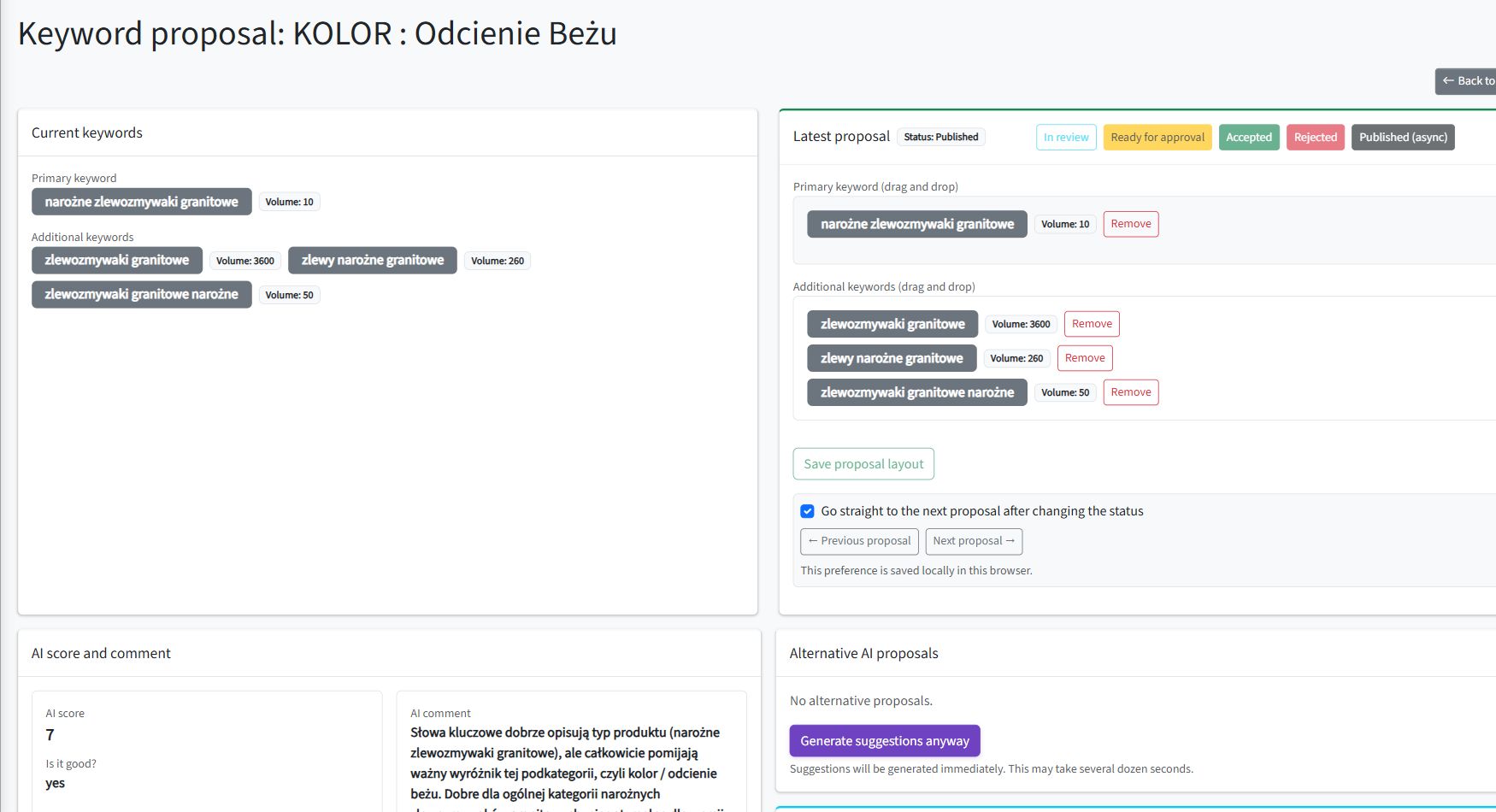
A category keyword proposal in SEOAssistant with the primary keyword, supporting phrases, search volumes, workflow status and AI evaluation

A live category keyword proposal for AP Komfort. The reviewer can see the current assignment, search volumes, workflow status and the model’s explanation in one place.

Step 2: review the keyword decision before generating content

Keyword selection deserves its own review stage because a wrong primary keyword affects every step that follows.

In the category keyword proposal view, the reviewer can compare the category’s current assignments with the proposed set. The interface exposes the main and supporting roles, available search-volume data, the model’s evaluation and any suggested alternatives.

The reviewer can:

  • replace the main keyword;
  • add or remove supporting phrases;
  • search the website’s keyword database;
  • add a new candidate when necessary;
  • send the proposal for review or approval;
  • accept or reject it;
  • continue to the next proposal in the queue.

Once accepted, the proposal is applied to the category and becomes the input for later analysis and content generation.

The benefit is not that AI makes the final decision. The benefit is that it reduces a large keyword database to a small, explainable choice that can be reviewed in context.

Step 3: generate a versioned category revision

After the category has enough context, SEOAssistant can prepare a content revision.

The generation process can use the category tree, products from the category and its descendants, producer information, the selected keywords, existing descriptions and website-level content instructions. It prepares separate fields for:

  • the short or top description;
  • the longer bottom description;
  • the SEO title;
  • the meta description.

Most importantly, the generated content is stored as a revision. It does not silently overwrite the live category.

That gives the workflow a clear baseline and proposal:

Current category → proposed revision → review decision → platform update

The automation settings can also limit which categories enter the process. For example, the system may focus on categories that have an assigned keyword, lack a description, do not contain an H2 heading or exceed a configured product threshold.

This is a more useful definition of automation than “generate content for every category.” Eligibility rules determine where the work is needed before the model is asked to write anything.

Step 4: review the actual change, not two complete documents

The category revision uses the same principle as the product workflow described in How to Review AI-Generated SEO Content Without Reading Everything Twice.

The reviewer should be able to see:

  • which fields changed;
  • what text was removed;
  • what was added;
  • whether the category name and URL remained outside the change;
  • whether metadata and on-page content still describe the same catalogue section.

A visual diff makes the decision faster because attention is directed to the intervention rather than the entire page. The reviewer can edit the proposal, send it for approval, accept it or reject it.

Only an accepted revision is sent to the connected ecommerce platform. After a successful update, the revision receives a published status and remains available as a record of what happened.

Step 5: audit structure and meaning separately

Publishing a syntactically correct description does not prove that the page is useful. SEOAssistant therefore separates two kinds of quality checks.

Structural SEO audit

The rule-based audit checks signals that can be measured directly, including:

  • whether the top and bottom descriptions are empty or too short;
  • whether headings, lists and internal links are present;
  • whether the selected keywords occur in relevant headings;
  • how many products are connected with the category;
  • whether links or images in the content appear invalid.

These checks are deterministic. They are useful for finding missing elements and enforcing consistent minimum standards across a large catalogue.

Semantic audit

The semantic audit asks a different set of questions:

  • Is the description genuinely about this category?
  • How relevant is it to the selected keywords?
  • Does it support SEO without forcing the phrases unnaturally?
  • Does it contain useful commercial or purchasing context?
  • What problems and recommendations should a reviewer see?

The result includes relevance, SEO and keyword-naturalness scores together with a summary, issues and recommendations. These signals appear in the category list and can be opened as a more detailed audit view.

The two layers complement each other. A page can contain an H2, a list and enough characters while still being generic. It can also be semantically relevant while missing basic structure or containing a broken internal link.

A semantic category audit in SEOAssistant showing relevance, SEO and keyword-naturalness scores, issues and recommendations

The semantic audit turns a broad quality judgment into a reviewable result: three scores, a summary, detected issues and concrete recommendations for the next revision.

From a staged workflow to an improving cycle

The category workflow connects the main operational stages:

  1. find a category that meets the automation rules;
  2. propose suitable keywords;
  3. review and apply the keyword assignment;
  4. create a versioned content proposal;
  5. review and publish the revision;
  6. run structural and semantic quality checks.

These stages are not intended to form a one-off project. Category SEO works best as a cycle that returns to the page after publication and asks what should happen next.

The next analysis may be triggered by a schedule, a material catalogue change, new Search Console data or a change in the quality rules used by the website. A recurring loop can then:

  • run a fresh structural and semantic audit after publication;
  • repeat the analysis after an appropriate interval or a material catalogue change;
  • compare the new result with the previous one;
  • combine content quality with Search Console performance;
  • decide whether the page needs another revision or can remain unchanged;
  • create that revision without overwriting the live version;
  • keep the next publication subject to the website’s chosen approval policy.
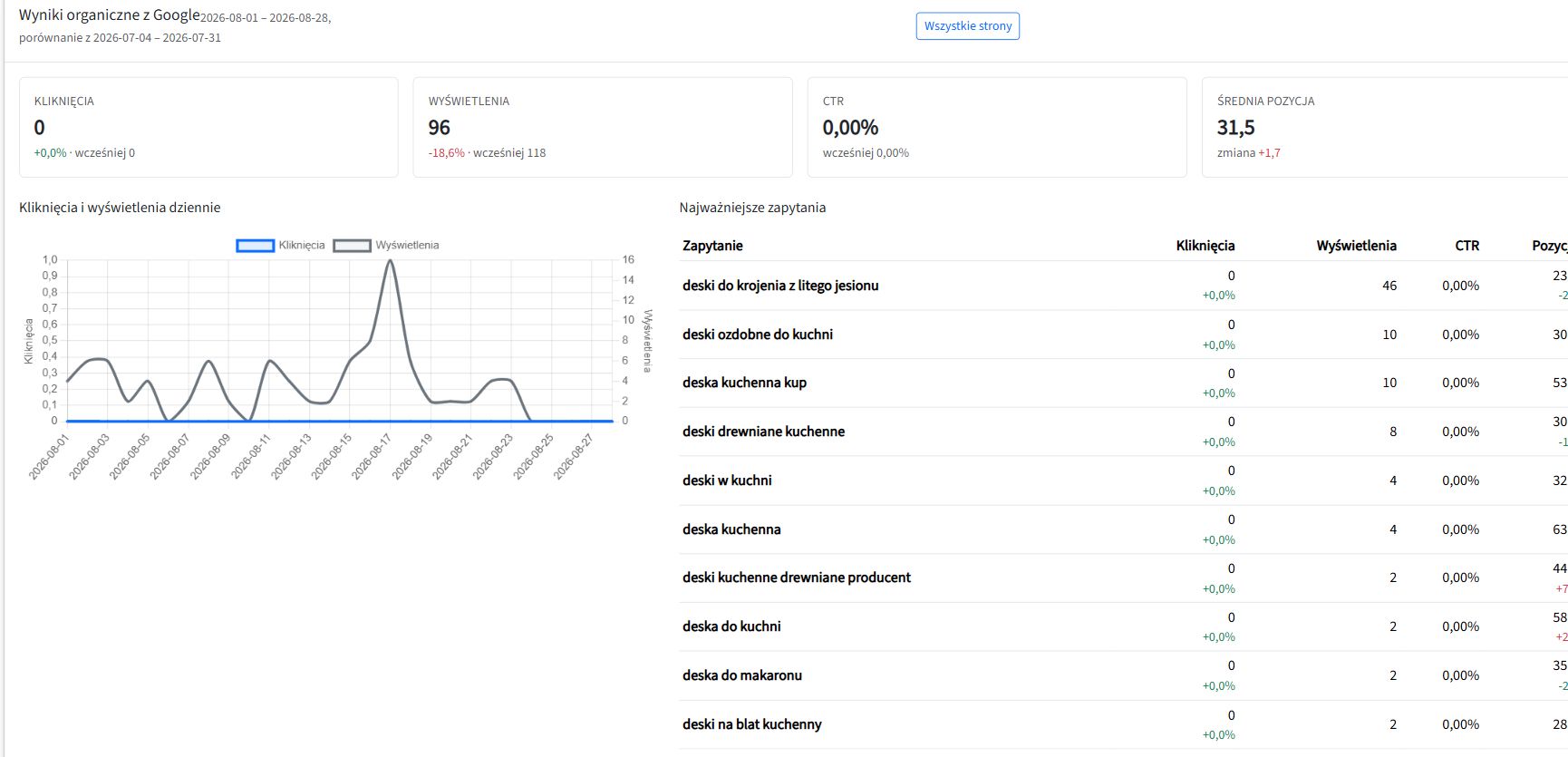
Google Search Console data inside an SEOAssistant category view, including impressions, average position and the most important search queries

Search Console data adds another feedback signal. Query-level impressions and positions help the next analysis respond to how the category is actually appearing in search—not only to what its description contains.

This orchestration matters because neither category pages nor the environment around them remain static. Products are added or removed, terminology changes, internal links break, search demand moves and a previously good description can become incomplete.

The cycle can also absorb future improvements without requiring the entire process to be redesigned. New ranking signals, better keyword-selection logic, updated content requirements, changes in search behaviour and improvements to the models can all influence the next analysis and the next proposal.

Because each change remains versioned, the system does not have to treat any description as final. It can analyse the current state again, apply the latest rules and prepare the next justified improvement. SEOAssistant is being developed around this model: the workflow becomes more connected over time, while the website keeps control over which decisions require human approval.

The target model: controlled autonomy

The goal is not necessarily to keep manual approval forever.

A mature workflow can reduce review when the category type, generation rules and source data have produced consistently reliable results. For example, a website might allow low-risk metadata improvements to publish automatically while continuing to review long category descriptions.

The decision should depend on evidence and risk:

  • Is the source catalogue reliable?
  • Are the selected keywords already approved?
  • Has this content template produced acceptable revisions before?
  • Does the category contain regulated, technical or safety-sensitive products?
  • Can every published change be traced and reversed?
  • Will the page be analysed again after publication?

This is controlled autonomy: automation performs more of the repeatable work, while the business chooses where human approval remains mandatory.

A practical category SEO operating model

Teams can use the same structure to build an optimisation cycle that becomes more capable over time.

1. Define eligible categories

Exclude empty, inactive or strategically irrelevant categories. Decide whether a minimum number of products is required.

2. Maintain an accepted keyword pool

Research and approve the phrases that are genuinely relevant to the website. Treat automated matching as assignment, not unrestricted keyword invention.

3. Review keyword proposals separately

Confirm the search intent and prevent two pages from targeting the same primary topic before generating content.

4. Generate versioned changes

Keep the live category and the proposal separate. Include metadata and both visible description areas in the same revision.

5. Review through a diff

Focus on changed fields and risky claims. Preserve an explicit accept, reject and return-to-editing workflow.

6. Audit structure and semantics

Use deterministic checks for measurable elements and semantic evaluation for relevance, usefulness and natural language.

7. Schedule reanalysis

Define when the page should be checked again: after publication, after a catalogue update, after a fixed interval or when search performance changes materially.

Automation should reduce uncertainty, not hide it

The most useful category SEO system is not the one that produces the largest number of descriptions. It is the one that makes every important decision visible:

  • why this category was selected;
  • why these keywords were proposed;
  • what content changed;
  • who approved it;
  • what was published;
  • whether the result still meets the quality standard.

SEOAssistant brings these stages into one reviewable workflow and continues to develop the connections between post-publication analysis, prioritisation and revision generation. This allows category optimisation to follow changes in the catalogue, search behaviour, algorithms and content standards instead of remaining a one-off exercise.

That is the difference between automated writing and SEO automation: writing creates a document; automation manages the decision before it, the change itself and the quality checks that follow.

For the broader operating model, read What “SEO on Autopilot” Actually Means.

Sources

What “SEO on Autopilot” Actually Means

“SEO on autopilot” should not mean pressing one button and hoping that AI-generated text produces rankings. A useful SEO autopilot is a controlled operating system: it finds opportunities, chooses the right pages, prepares changes, shows exactly what will be modified and moves approved work towards publication.

That is the direction behind SEOAssistant. The platform is designed to automate as much repetitive SEO execution as possible while keeping the level of human control appropriate for each customer.

SEO autopilot is a workflow, not a content generator

Most SEO tools stop after analysis. They identify missing keywords, thin pages or ranking gaps and leave someone with another spreadsheet of tasks. Generic AI writing tools start at the opposite end: they generate copy, but often without knowing which page should be changed, why the change matters or what should happen next.

A real SEO automation loop connects the whole process:

  1. build a relevant keyword market;
  2. decide which opportunities fit the business;
  3. connect each opportunity with the right product, category or article;
  4. prepare the proposed optimization;
  5. show the difference between the current and proposed version;
  6. publish approved changes and keep their history;
  7. measure the result and start the next cycle.

Without this loop, “automation” usually means producing more drafts. With it, automation means consistently completing more of the right SEO work.

Step 1: build the market you actually want to compete in

A real example comes from AP Komfort, a Polish online store specializing in kitchen and bathroom equipment.

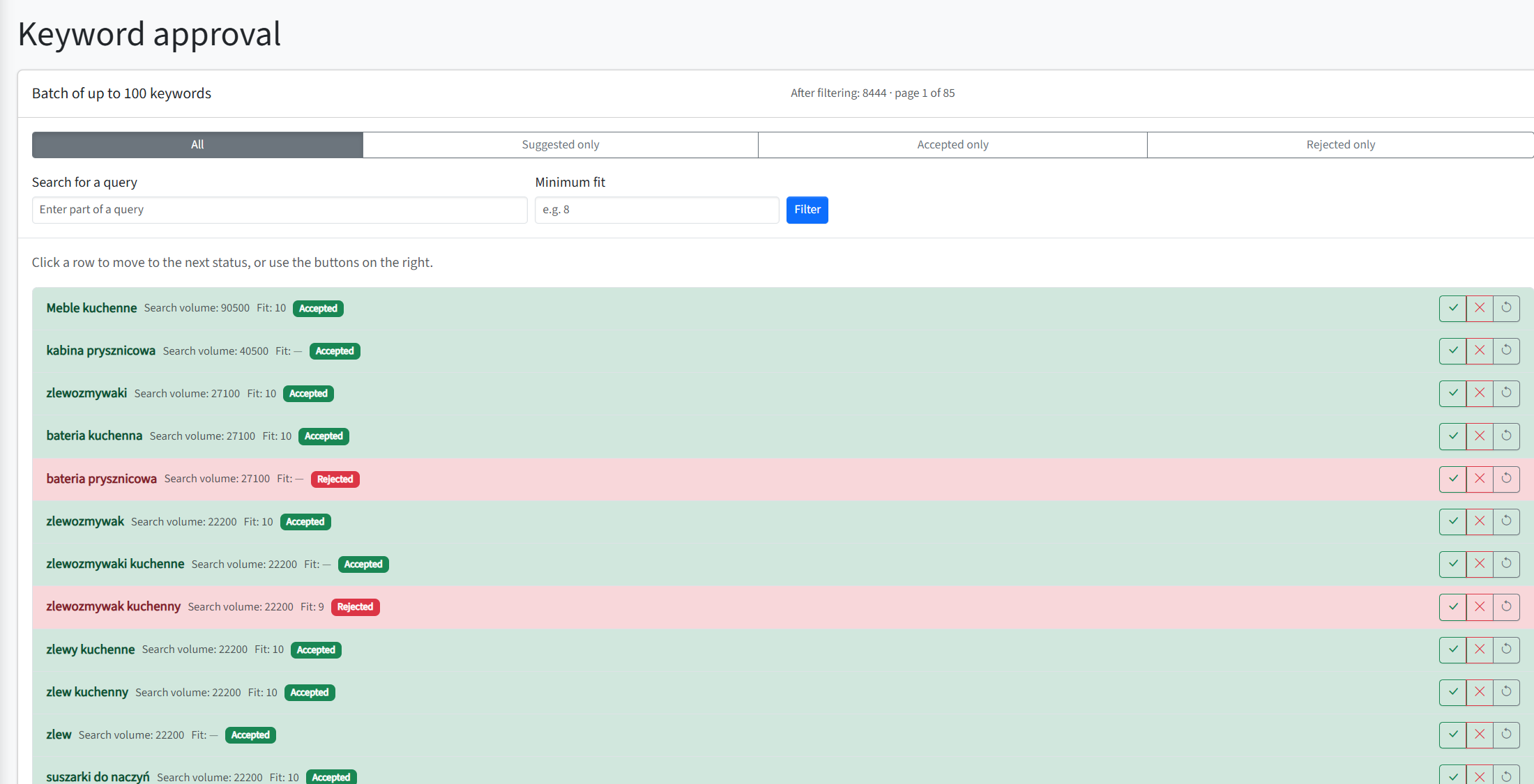
SEOAssistant builds a market of candidate search queries and presents each phrase together with signals such as search demand, business fit and its current approval status. The aim is not to accept every popular phrase. It is to teach the workflow which searches genuinely match the store’s products and commercial direction.

AP Komfort keyword approval screen showing search volume, business fit and accepted or rejected phrases
A real keyword market built for AP Komfort. Phrases can be accepted or rejected based on demand and their fit with the store’s offer.

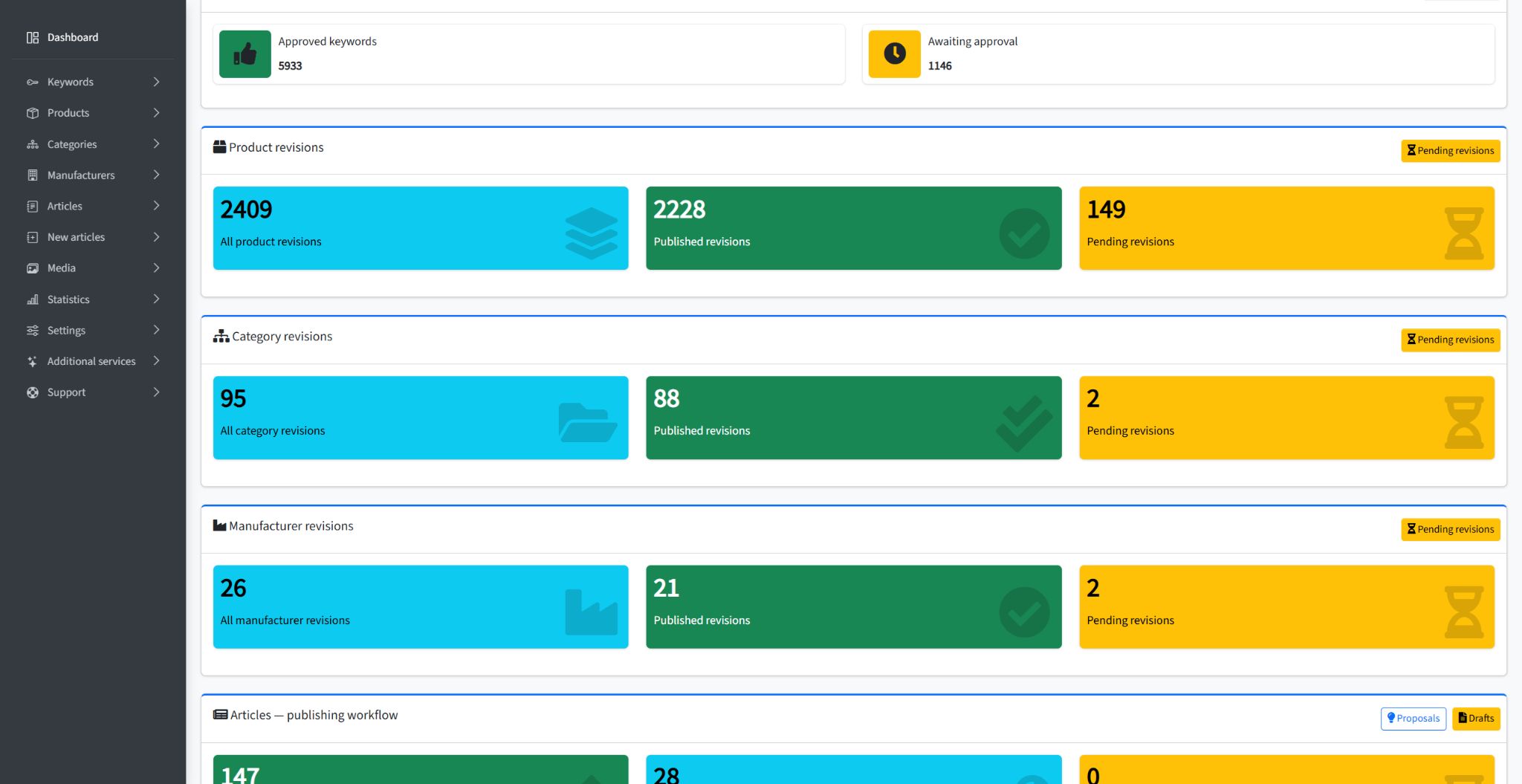
At the time of capture, the AP Komfort workspace contained 5,933 approved keywords and another 1,146 awaiting a decision. That accepted direction becomes the input for the next stages of the system.

Step 2: turn priorities into a repeatable production queue

Once the keyword scope is defined, SEOAssistant can connect demand with existing products, categories, manufacturers and editorial opportunities. It then prepares work according to the website’s data, templates and content rules.

For AP Komfort, this workflow had already produced 2,409 product revisions at the time of capture, including 2,228 published changes. It also included 88 published category revisions and 21 published manufacturer revisions.

SEOAssistant dashboard for AP Komfort showing approved keywords and published product, category and manufacturer revisions
SEOAssistant tracks the full optimization workflow — from keyword decisions to published revisions.

These numbers matter because they show the difference between an isolated AI prompt and an operating process. A prompt can generate one description. A process can coordinate thousands of decisions and revisions while preserving their status and history.

Step 3: prepare changes from real business inputs

SEO content should not begin with an empty text box. A useful proposal can draw on the existing page, product data, selected keywords, category context, templates, internal-linking rules and customer-specific instructions.

Depending on the page and opportunity, the resulting revision can cover metadata, product or category copy, article content and related on-site improvements. The goal is not to replace facts with plausible-sounding language. It is to use the available facts to prepare a stronger version that remains open to verification.

Step 4: make review fast enough to work at scale

Human approval only helps if reviewing a change takes less effort than recreating it. That is why SEOAssistant keeps the current and proposed versions side by side and provides a visual diff.

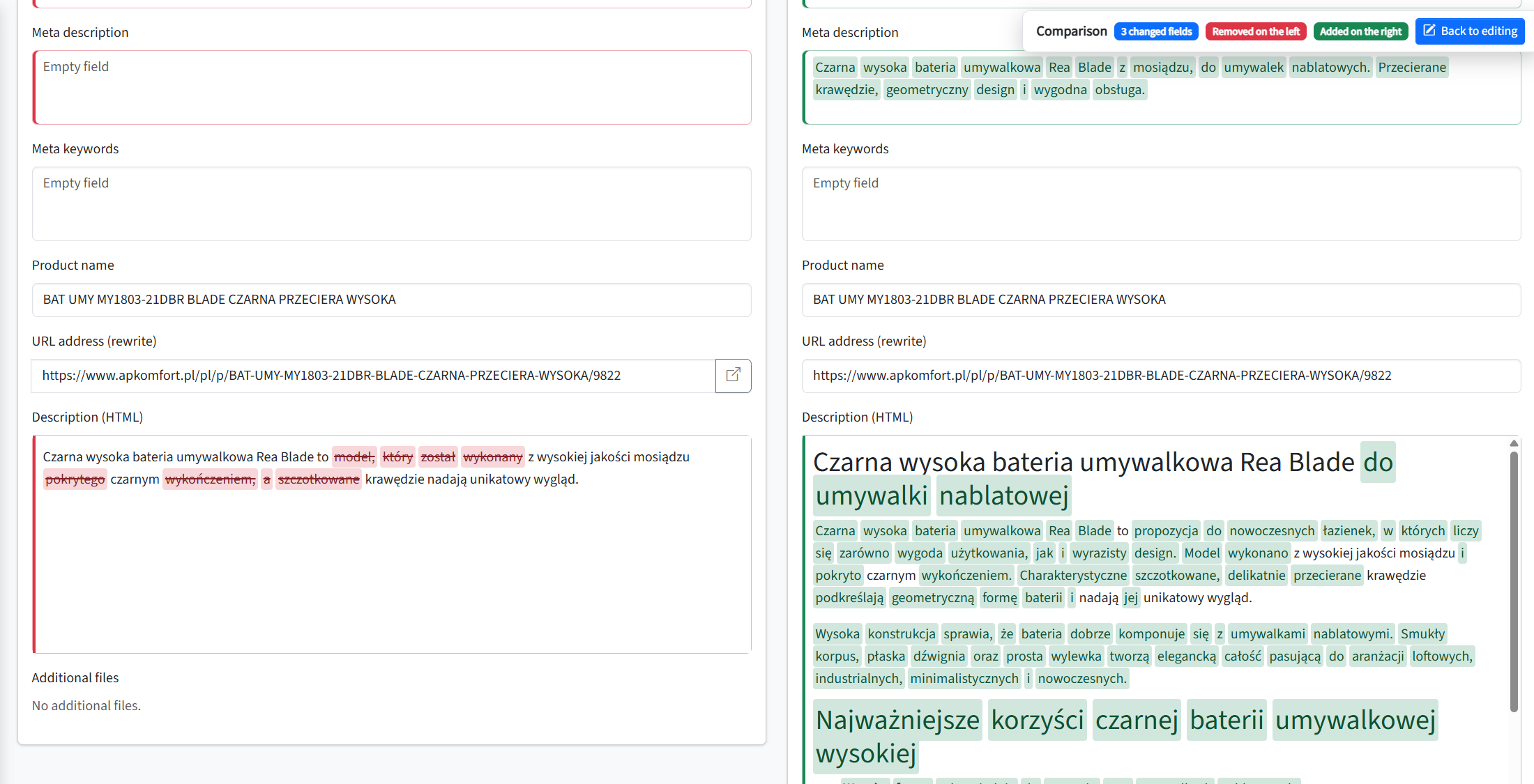
The example below is a real AP Komfort product revision awaiting approval. Removed fragments are marked in red and proposed additions in green, so a reviewer can immediately see what will change. The revision relates to a Rea Blade countertop basin tap available from AP Komfort.

Side-by-side AP Komfort product revision showing removed content in red and proposed additions in green
A real AP Komfort product revision awaiting approval. Removed content is highlighted in red and proposed additions in green.

The reviewer can accept the proposal, edit it, reject it or return it for another revision. This keeps factual responsibility visible without forcing the team to compare long documents manually.

Human review can be a setting, not a permanent bottleneck

Different organizations need different levels of control. A new customer may want every change reviewed. Another may only require approval for high-risk pages, while allowing proven types of metadata or content updates to move forward automatically.

SEOAssistant is moving towards this controlled-autonomy model: the workflow remains traceable, but the final review stage can become optional where the customer requests it and the process has been appropriately configured. The objective is not blind publishing. It is to automate each repeatable decision once the business is comfortable with the rules and quality level.

What happened after the workflow was introduced?

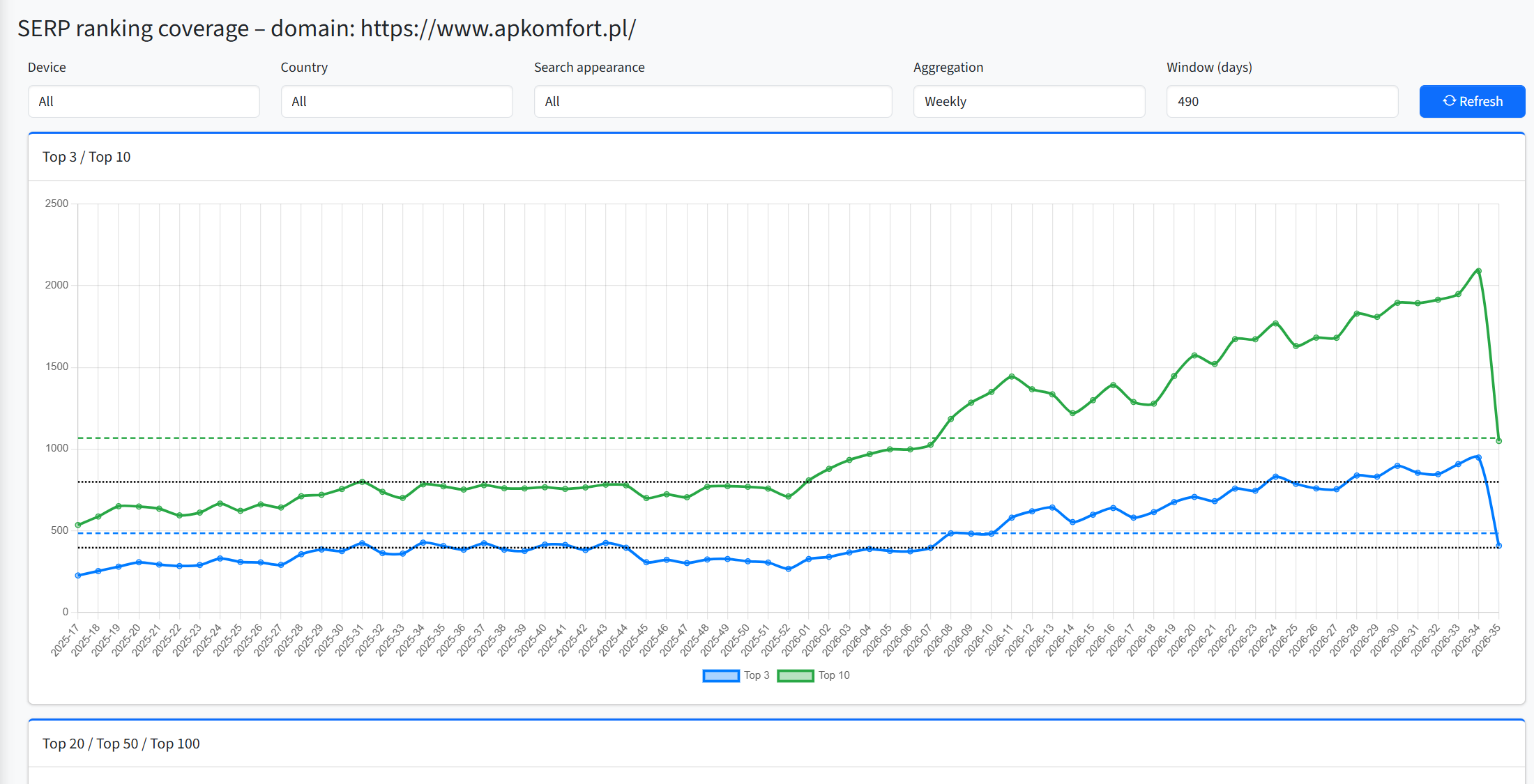
AP Komfort started working with SEOAssistant in December 2025. Since then, the store’s search visibility has followed a clear upward trend.

Comparing the December 2025 weekly average with the latest complete week shown on the chart:

  • the number of keywords ranking in Google’s Top 10 increased from approximately 753 to 2,090 — an increase of around 178%;
  • the number of keywords ranking in the Top 3 increased from approximately 303 to 948 — an increase of around 213%.
Weekly AP Komfort ranking coverage chart showing growth in keywords ranking in Google Top 3 and Top 10
AP Komfort’s weekly ranking coverage. The cooperation started in December 2025. The final point represents an incomplete current week and is excluded from the comparison.

This does not mean that one description or one metadata change produced the result. SEO growth is influenced by many factors. What the chart does show is that a sustained, increasingly automated operating process coincided with substantial growth across both Top 10 and Top 3 coverage. The final point represents the current incomplete week and is not included in the calculation.

For more context about the store and the earlier stages of the project, see the full AP Komfort SEO case study.

So what does “SEO on autopilot” actually mean?

It does not mean removing strategy, business knowledge or accountability from SEO. It means reducing the manual work required to turn those inputs into consistent execution.

The system should automate

  • collecting and organizing search opportunities;
  • matching keywords with relevant pages;
  • prioritizing repeatable SEO work;
  • preparing grounded revisions;
  • showing differences and tracking decisions;
  • coordinating approved publication;
  • measuring progress and restarting the cycle.

People should remain responsible for

  • business priorities and boundaries;
  • facts the source data cannot verify;
  • brand and legal requirements;
  • deciding which workflows still require approval;
  • changing the rules when the business changes.

The result is not SEO without people. It is an SEO operation in which people spend less time copying data, coordinating drafts and checking what changed — and more time setting direction.

Start with supervised automation, then earn autonomy

The safest route to SEO autopilot is gradual. Connect the data, define the rules, review early outputs and use the visible history to decide which parts of the process can run with less intervention.

That is how automation becomes operational rather than experimental: every completed cycle improves the available context, expands the set of trusted actions and makes the next review faster.

If you want to see which parts of your SEO workflow could be automated first, book a tailored SEOAssistant demo.