

AI has made drafting content faster. It has not automatically made approving content easier.
When a system can prepare hundreds of product descriptions, metadata updates or category revisions, the bottleneck moves. The question is no longer only, “How do we create this content?” It becomes, “How do we decide whether this specific change is accurate, useful and safe to publish?”
That distinction matters. Google’s current guidance does not treat the use of generative AI as an automatic problem. It asks website owners to focus on the accuracy, quality and relevance of automatically generated content. At the same time, Google’s spam policies warn against producing large volumes of unoriginal pages that add little value, regardless of whether they were created by AI, people or both.
The practical conclusion is simple: automation needs a quality-control system, not just a text generator.
The bottleneck moved from writing to deciding
Imagine an ecommerce team with 200 product revisions waiting for review.
If each reviewer has to open the existing page, read it from the beginning, open the proposed version, read that from the beginning and mentally compare both, the workflow does not scale. AI may have saved time during drafting, but the team pays much of it back during approval.
This is a common failure mode in AI content projects:
- generation becomes fast;
- the number of drafts increases;
- review remains document-based and manual;
- the approval queue grows;
- changes become stale before they reach the website.
The solution is not to remove review immediately. It is to redesign review around decisions rather than documents.
What should an SEO review screen answer?
A useful review interface should help a person answer four questions quickly:
- What changed? Which fields and fragments are different?
- What stayed unchanged? Were the product identity, URL and source facts preserved?
- Is the proposal credible? Does it match the product, business and search intent?
- What happens next? Can the reviewer accept, reject, edit or escalate the revision without leaving the workflow?
This is why a side-by-side comparison and a visual diff are operational features rather than cosmetic ones.
The current version provides the baseline. The proposed version shows the intended outcome. Red highlighting identifies removals, green highlighting identifies additions, and unchanged fragments remain visually neutral. The reviewer can focus attention on the actual intervention instead of rediscovering the entire page.
A real product revision from AP Komfort
AP Komfort is a Polish ecommerce store specializing in kitchen and bathroom equipment. Its SEOAssistant workspace provides a useful example because the review process is being applied to real product data at meaningful scale.
The revision below concerns a black-and-gold BLOOM shower tap available from AP Komfort. SEOAssistant identifies three changed fields:
- the previously empty meta title receives a focused proposal;
- the previously empty meta description receives a product-specific summary;
- the short existing description is replaced with a more structured product description.
The product name and URL remain unchanged. That is visible without opening another system or comparing two browser tabs.
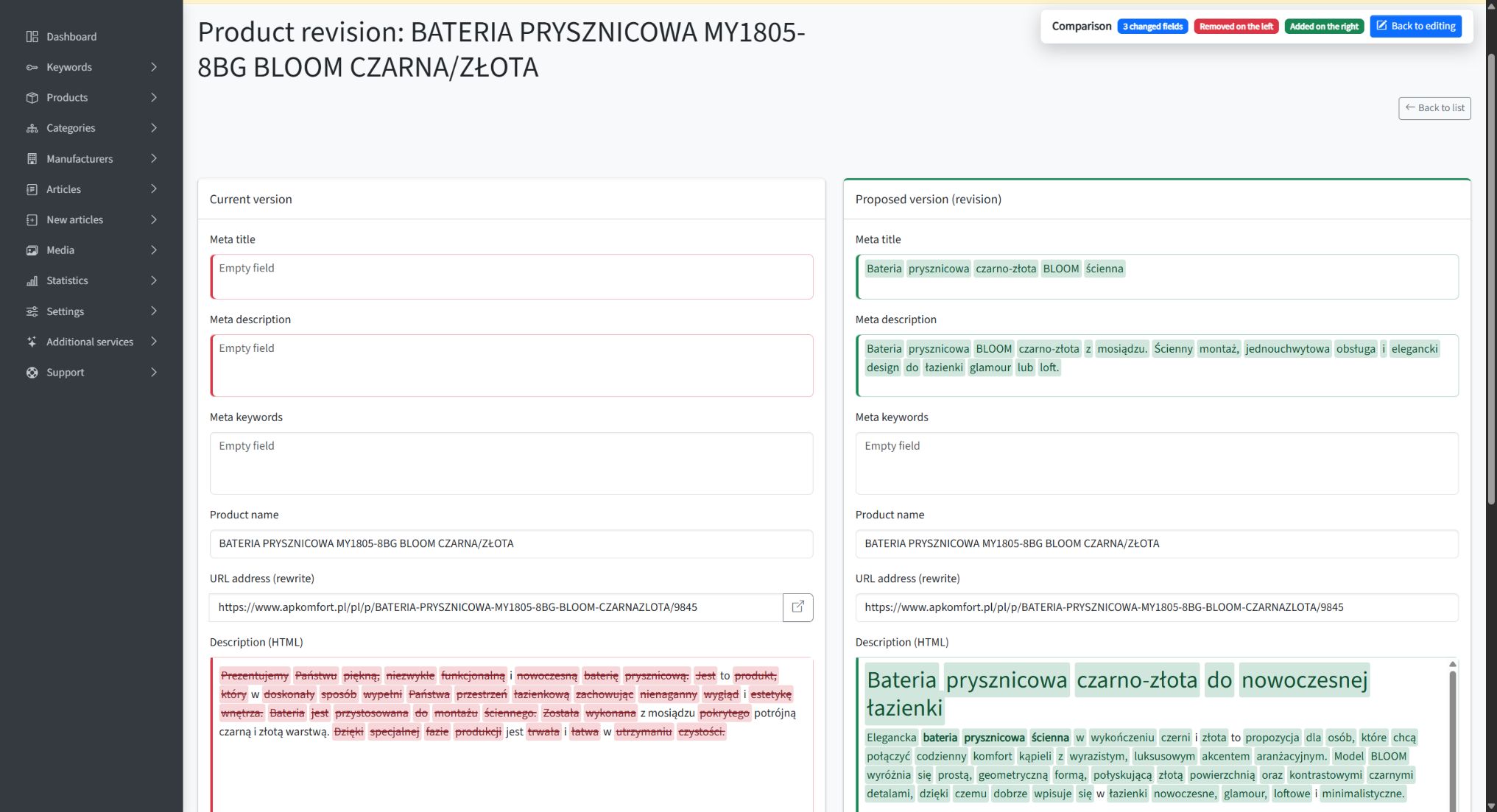
A real AP Komfort product revision in comparison mode. Empty metadata fields are filled on the right, while the existing and proposed descriptions are compared directly.
The comparison is also read-only. Diff highlighting does not become part of the content, and a reviewer can return to editing when a change is required. This separation is important: the comparison layer should support a decision without silently modifying the proposal.
Use a two-pass review instead of rereading everything
A visual diff becomes most useful when the team has a repeatable way to read it. We recommend separating the review into two passes.
Pass 1: verify the scope of the change
Start with structure, not prose.
Check:
- which fields changed;
- whether the product name and URL stayed stable;
- whether new headings or sections were added;
- whether the proposal removes important source information;
- whether metadata and on-page content still describe the same item;
- whether the size of the rewrite is appropriate for the task.
This first pass should reveal unexpected scope. A request to improve a meta description should not quietly rewrite a product specification. A content expansion should not rename a product or change its canonical URL unless that was explicitly intended.
Pass 2: verify the risky claims
Next, review the fragments that can affect trust, conversion or compliance.
For ecommerce content, these usually include:
- materials and construction;
- measurements and compatibility;
- included accessories;
- installation method;
- warranties, certifications and standards;
- availability, delivery or price claims;
- claims about durability, safety or performance;
- the intended use of the product.
In the AP Komfort example, the reviewer can see that the proposal retains source facts such as brass construction, a black-and-gold finish and wall installation. The review can therefore focus on whether the newly added benefits and use cases are supported, rather than checking every unchanged word.
This is where human judgment still matters. A diff can show that a claim is new. It cannot prove that the claim is true.
Review the purpose, not only the wording
Good AI content review is not a grammar check.
A text may be fluent and still fail because it:
- targets the wrong search intent;
- repeats generic phrases that could describe any product;
- introduces unsupported claims;
- overuses a keyword;
- hides important purchasing information;
- conflicts with the brand’s preferred terminology;
- adds length without adding value.
This aligns with Google’s emphasis on helpful, reliable and people-first content. Google explicitly recommends focusing on accuracy, quality and relevance when generative AI is used, including for titles, descriptions, structured data and image alt text. Its scaled-content policy is concerned with pages created primarily to manipulate search visibility without helping users—not with the mere presence of AI in a workflow.
The reviewer should therefore ask: Does this revision make the page more useful to the person considering this product?
That question is more valuable than asking whether the copy “sounds AI-generated.”
Approval states make responsibility visible
Review is not one universal action. A useful workflow needs more than an Accept button.
In SEOAssistant, the reviewer can:
- save a revision;
- send it back to editing;
- send it for approval;
- accept it;
- reject it;
- continue directly to the next revision.
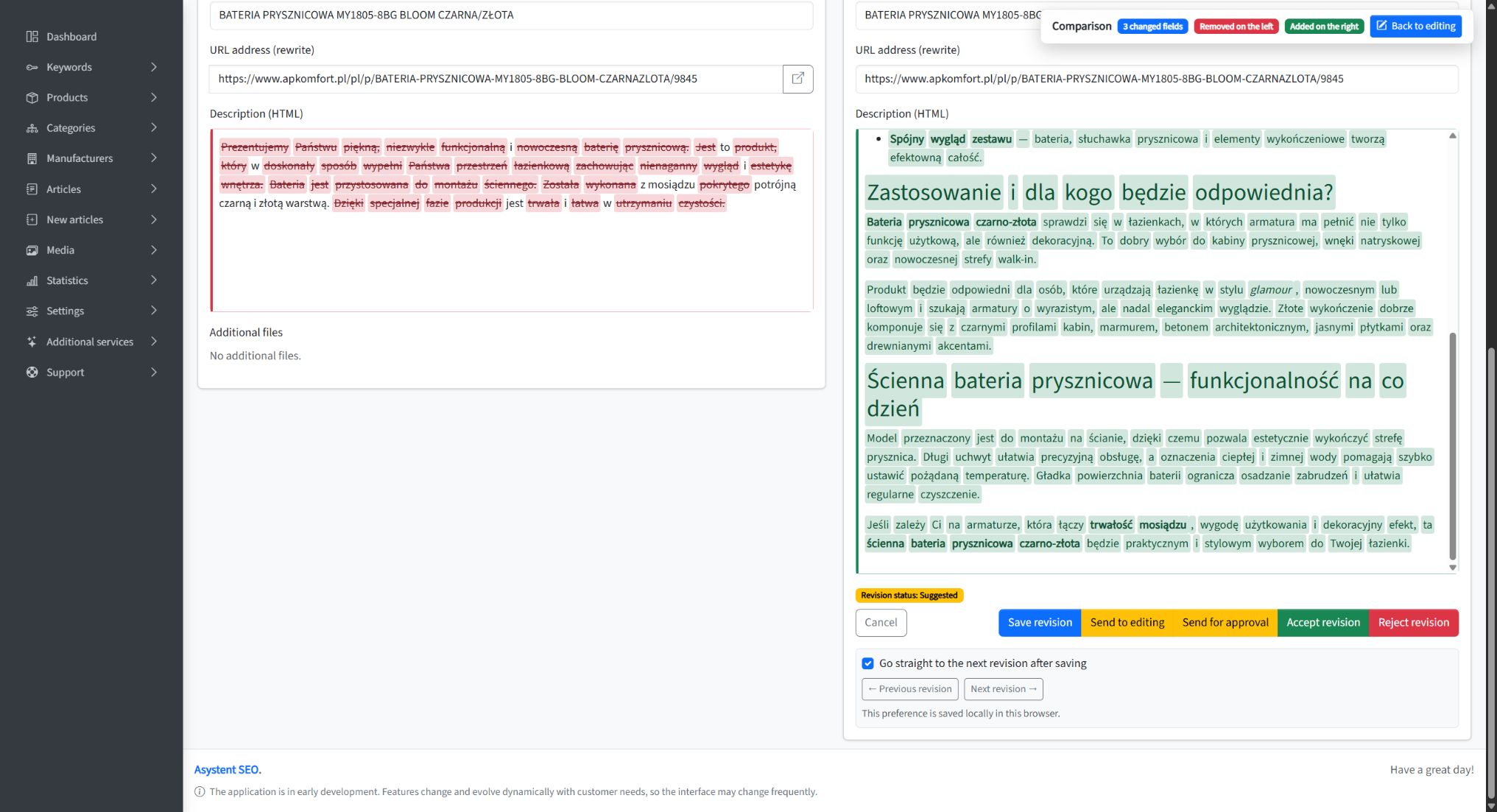
The decision layer remains attached to the proposal: edit, escalate, accept, reject or continue to the next revision.
These states separate different responsibilities. A content specialist can improve the proposal without publishing it. A person responsible for the account can approve it. A rejected revision remains a visible decision rather than disappearing into email or chat.
This matters when several people participate in the process—and it becomes essential when automation performs the first draft.
At scale, review must operate as a queue
One well-designed comparison screen solves the single-document problem. It does not yet solve the volume problem.
At the time of capture, the AP Komfort workspace contained 222 suggested product revisions waiting in the review queue. Each item had a visible status and a direct route into its revision.
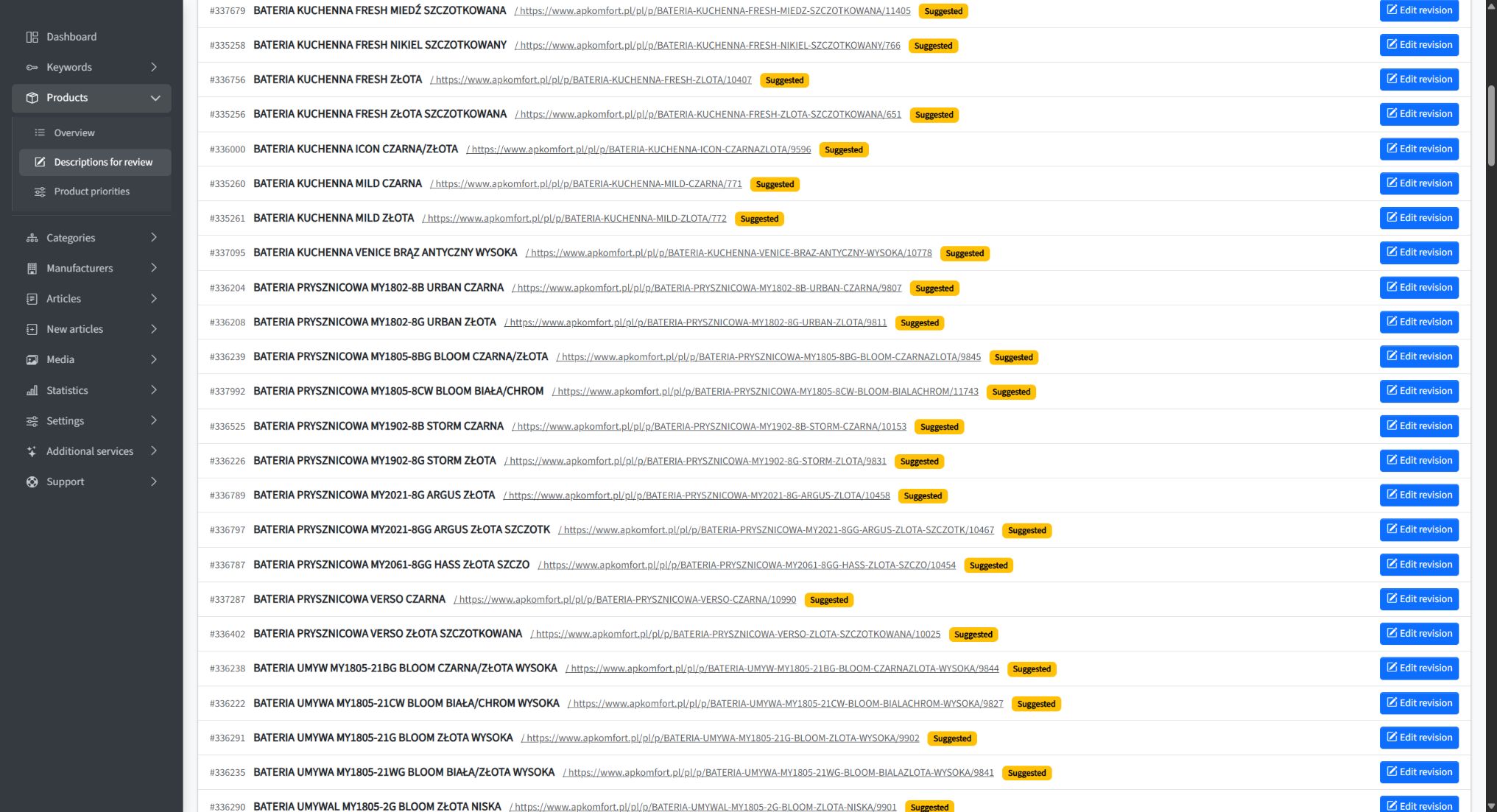
A review queue turns generated drafts into managed work. Each revision has a visible status and a direct editing path.
A queue adds the operational layer:
- the team knows how much work is waiting;
- revisions can be filtered by status;
- audit modes can support different review perspectives;
- reviewers can move through items without rebuilding their context;
- no proposal needs to be tracked in a separate spreadsheet.
The queue also exposes an important planning signal. If suggestions accumulate faster than they are approved, the answer may be better prioritization or more selective generation—not simply generating even more content.
When can the final review become optional?
The long-term goal does not have to be permanent manual approval for every field on every page.
Review can become lighter when a workflow has earned trust. That usually means:
- source data is structured and reliable;
- the same content type has produced consistently acceptable revisions;
- the generation rules and templates are stable;
- the affected fields are low risk;
- every change remains traceable;
- published results are monitored;
- the team can still sample completed work and intervene when needed.
For example, a business may eventually allow proven metadata updates to publish automatically while continuing to review full descriptions. Another may automatically process low-risk products but require approval for regulated categories or pages containing technical claims.
Full review should usually remain in place when:
- a new prompt, model, template or data source is introduced;
- the system starts working with a new content type;
- the page includes legal, medical, financial or safety-sensitive information;
- claims depend on facts that are missing from structured data;
- the brand voice or merchandising strategy is changing;
- the cost of an incorrect publication is high.
This is controlled autonomy: reduce human intervention where the evidence supports it, while keeping stronger controls where risk remains.
A lightweight operating model for AI SEO review
Teams can implement the process in five stages:
1. Define what the system may change
Specify the eligible page types, fields, source data and prohibited claims before generating revisions.
2. Generate proposals as versioned changes
Keep the current version and the proposal separately. Never overwrite the source page merely because a draft exists.
3. Review through scope and risk
Use the first pass to check what changed and the second pass to validate the facts and business impact.
4. Record the decision
Acceptance, rejection and return-to-editing should remain visible as workflow states rather than informal messages.
5. Earn automation gradually
Use review outcomes to identify repeatable, low-risk actions. Automate those actions selectively and continue sampling their quality.
The goal is fewer blind decisions, not fewer people
AI content automation works best when it reduces repetitive effort without hiding responsibility.
The person reviewing a revision should not need to recreate the draft, manually compare two documents or wonder which version was published. The system should prepare the proposal, expose the exact changes, preserve the current version and make the available decisions explicit.
That is how human review stops being a permanent bottleneck. It becomes a configurable quality-control layer—strong where risk is high, lighter where the process is proven and optional where the customer deliberately chooses automation.
For the broader workflow behind this model, read What “SEO on Autopilot” Actually Means.