
Remove your company name from an article. Could any competitor publish the same piece tomorrow?
If so, AI may not be the problem. You may simply have given it nothing that distinguishes your business from anyone else’s.
“Write a unique, expert article” is not a source of expertise. It does not show your products, your workflow or the decisions you make with customers. It might improve the wording, but it cannot replace the material worth writing about.
Don’t ask AI to pretend it has your experience. Give it material that demonstrates it. At SEOAssistant, one way we do this is through a library of authentic screenshots and documented content inserts: Article blocks. A guide can then show what a process looks like, rather than merely tell readers what to do.
Content that is truly yours starts before the writing
Imagine two articles about improving product descriptions. The first recommends benefits-led copy, relevant keywords and avoiding duplication. The second shows an actual description, a proposed revision and the questions to ask before approving it.
Both could be AI-assisted. But the second gives readers something concrete they can use to follow the decision. The difference is not a more “human” writing style. It is access to specific material.
That material might include:
- product photographs and information about real applications;
- customer questions answered by someone who knows the range;
- excerpts from your own training session, demonstration or expert conversation;
- screenshots of the process you are explaining;
- version comparisons, documented observations and explanations of decisions.
Being company-owned does not automatically make material useful. It needs to help someone understand a problem or make a decision. Google’s guidance on helpful content highlights original information, analysis and first-hand experience. An original screenshot can support that explanation; it is not an automatic “SEO point” or a ranking guarantee.
From a screenshot folder to a reusable content library
A folder full of files named “screen-1” and “screen-2” is not yet a content workflow. For every article, someone has to remember what the images show, find the right one and explain why it matters.
For the SEOAssistant.pro blog, we prepared a library of 41 authentic application screenshots. They cover keyword selection, content revisions, article planning and search data analysis, among other workflows. Each asset received a description of its intended use and was saved as a block belonging to our project.
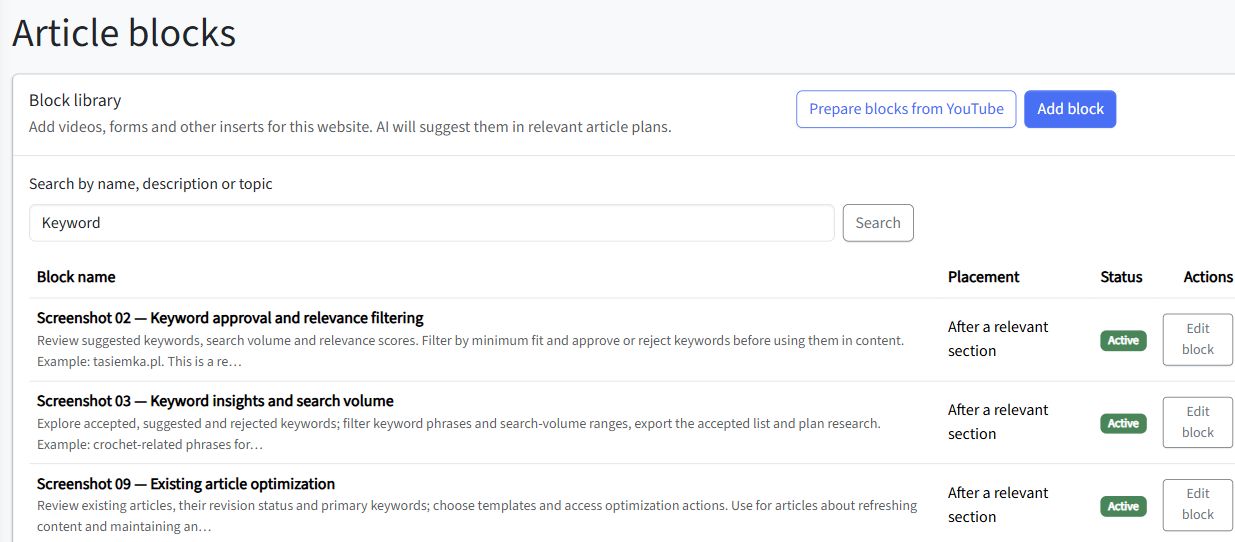
An Article block is more than an image. It contains a ready-made HTML insert, such as an illustration with a caption, and the information needed to choose it intelligently:
- What does it show? A particular feature, process or example.
- Which topics does it support? A reader’s problem, not just a shared keyword.
- When should it be excluded? For example, when it is unrelated or duplicates another screenshot.
- Where should it appear? Alongside the relevant explanation, rather than at a random point.
A keyword approval screen fits a section about business relevance. It does not justify treating a relevance score as a keyword difficulty metric. That distinction belongs in the asset description before AI starts using it.
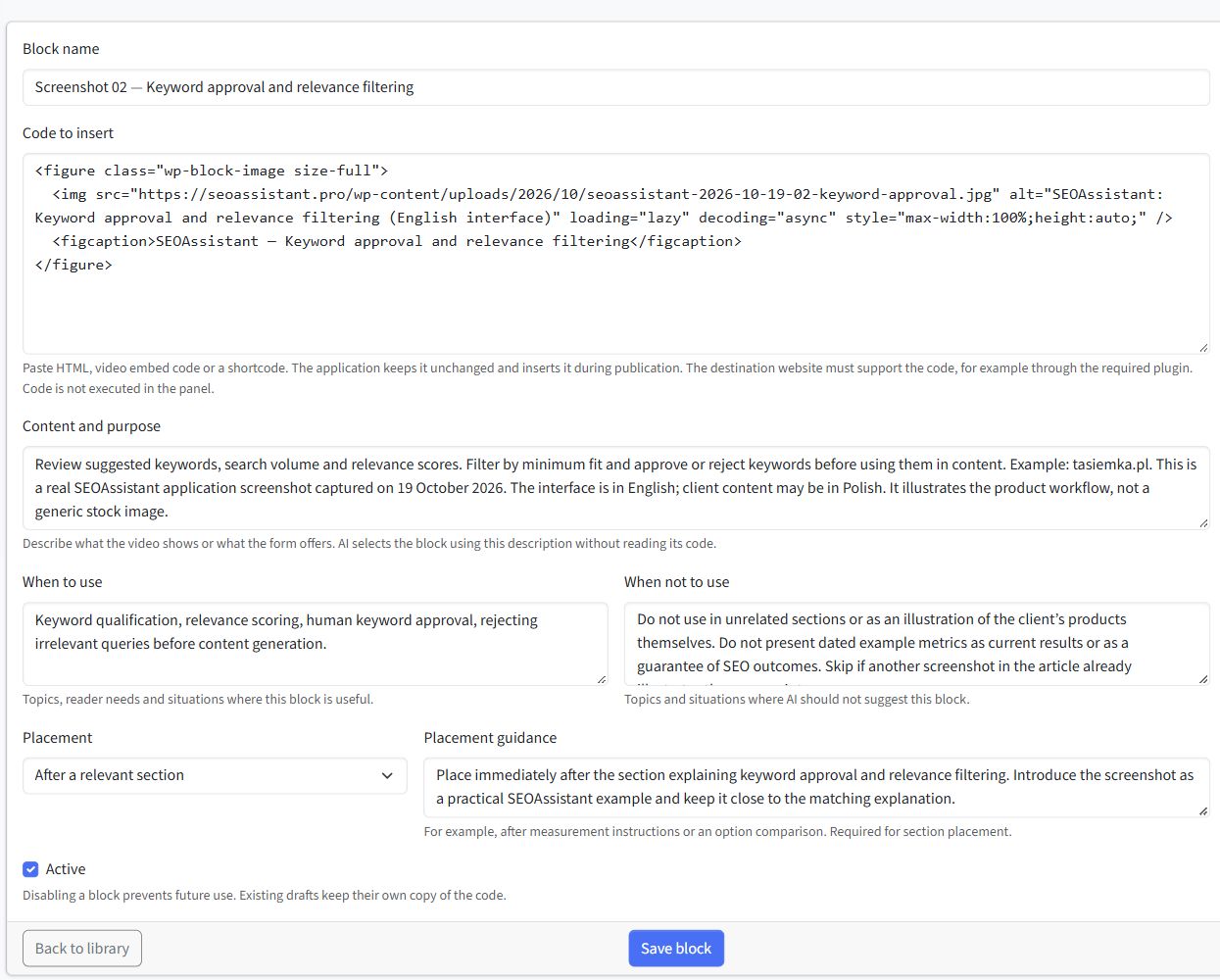
Here is the configuration of an actual block. “Code to insert” stores the illustration and caption, while “Content and purpose”, “When to use” and “When not to use” describe its meaning and limits. “Placement” and “Placement guidance” specify where it should appear. This information helps match the insert to the article’s purpose, rather than relying on a filename alone.
What does AI do, and what does the application do?
SEOAssistant supports selecting blocks for an article plan. During the full material and link selection process, AI receives descriptions of available blocks and the article context, including its title, summary and outline. It is instructed to choose assets that genuinely help the reader. A shared word in the title and block description is not enough.
The current mechanism allows zero to two blocks per article plan. Choosing none is valid when nothing fits. Blocks can also be selected manually in the plan.
During writing, the model receives a description and a marker for each selected block, rather than an instruction to recreate its code. At publication, the application inserts the saved HTML. Writing the surrounding paragraphs is therefore separate from reproducing the prepared asset.
This distinction matters: a block provides an authentic example, but it does not fact-check every sentence around it. Its description needs to be accurate, and the author should still check that the article does not draw conclusions the screenshot cannot support.
Four examples: useful guides that also demonstrate the product
Not every article needs to become a feature tour. A simple sequence is enough: reader’s problem → practical explanation → relevant example → takeaway.
The passages below are editorial examples written for this article, not quotations from four published guides. They demonstrate four possible uses of the library, not four blocks automatically selected for a single article plan.
The following four screenshots were captured on 19 October 2026 using the tasiemka.pl project and are used with the client’s permission. The interface is English; some client content is Polish. Figures reflect the captured examples, not live results or evidence of growth caused by the application.
1. Keyword selection: a popular query is not always a good opportunity
The reader wants to know which keywords make sense for their store. “Choose popular keywords” does not distinguish useful traffic from irrelevant visits.
Before adding a keyword to your plan, ask two questions: what does this person want, and do you have an offer or expertise that meets that need? In SEOAssistant, you can review suggestions alongside search volume and relevance scores, filter them, and accept or reject them. This is the point at which you decide whether a topic deserves work.
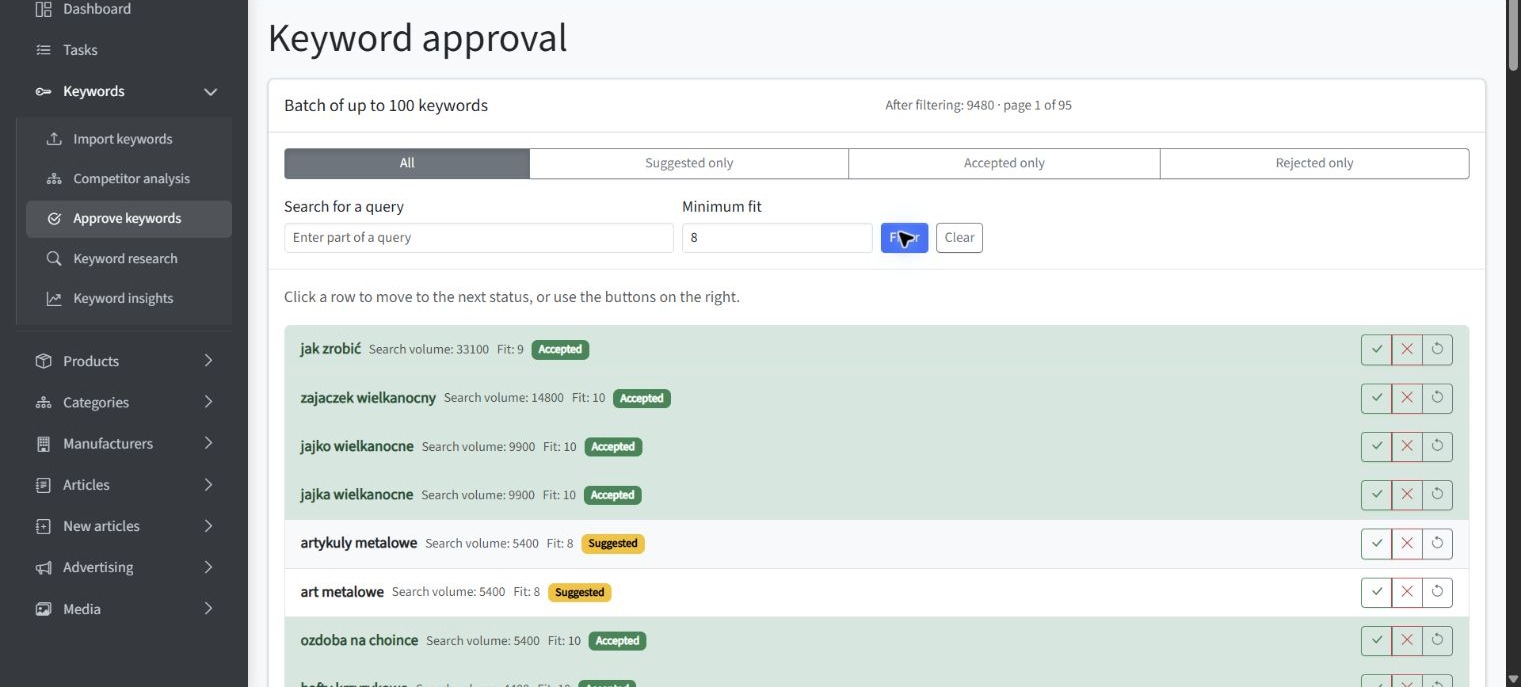
The feature appears exactly where it helps the reader perform the task. The relevance score supports a decision; it is not an infallible prediction of sales.
2. Product descriptions: longer copy is not necessarily better copy
Readers do not need another claim that AI “writes compelling descriptions”. They need a way to assess a proposal before it reaches their store.
Compare the proposal with its source. What has been added: a use case, an explanation of a feature, or a new technical specification? The first two can help a buyer if they accurately describe the product. A specification needs verification. SEOAssistant’s revision view lets you compare the existing description with the proposal and edit it before approval.
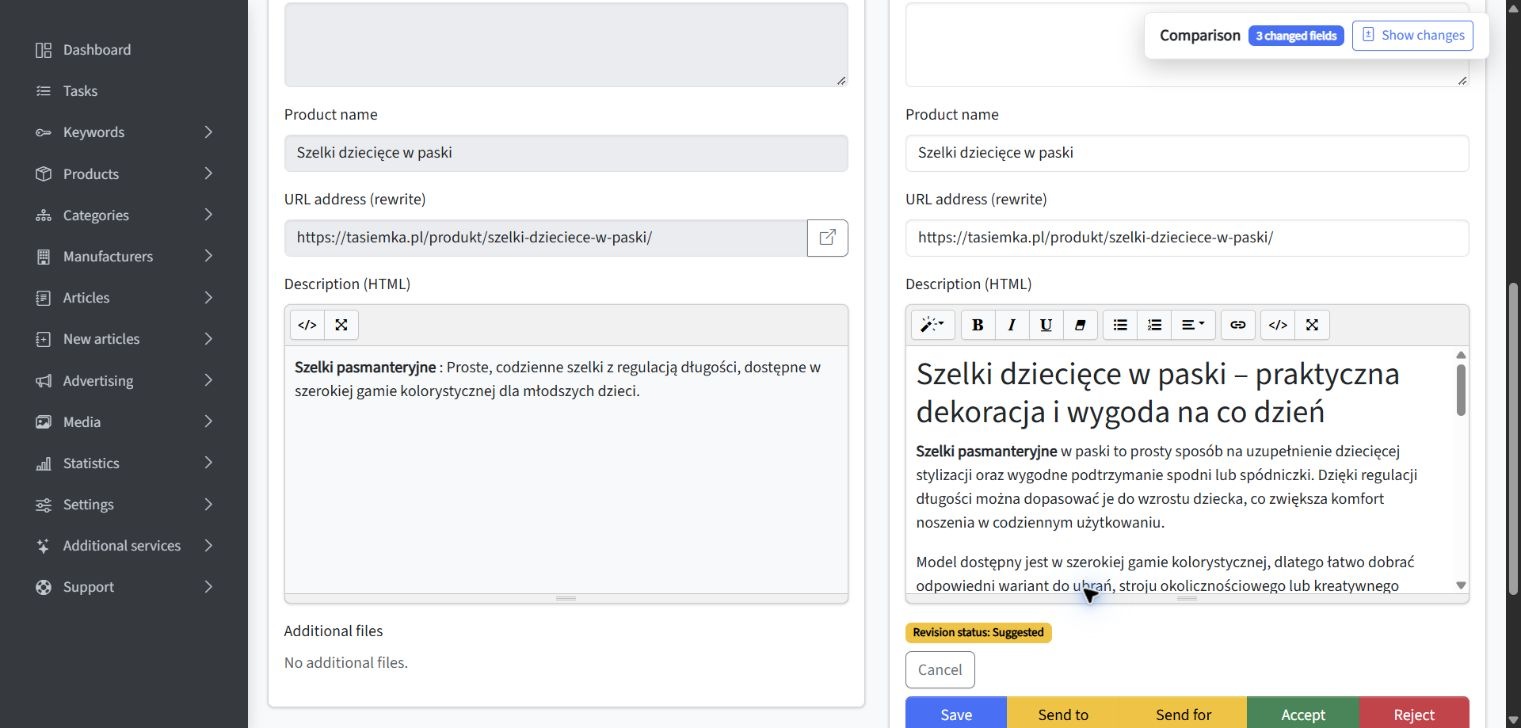
The screenshot makes the example concrete: readers can see the short source and the expanded proposal. The explanation tells them how to assess the difference. We are not treating length alone as proof of quality.
3. Content planning: a topic should lead to a reader’s decision
“Write something about embroidery” is a weak starting point. A question a customer actually needs answered is far more useful.
Decide what readers should understand after reading. In the plan below, the question is whether to choose embroidery floss, crochet thread or yarn for a particular technique and fabric. The title and summary define a decision rather than a generic category overview. In SEOAssistant, you can refine that plan before generating the article.
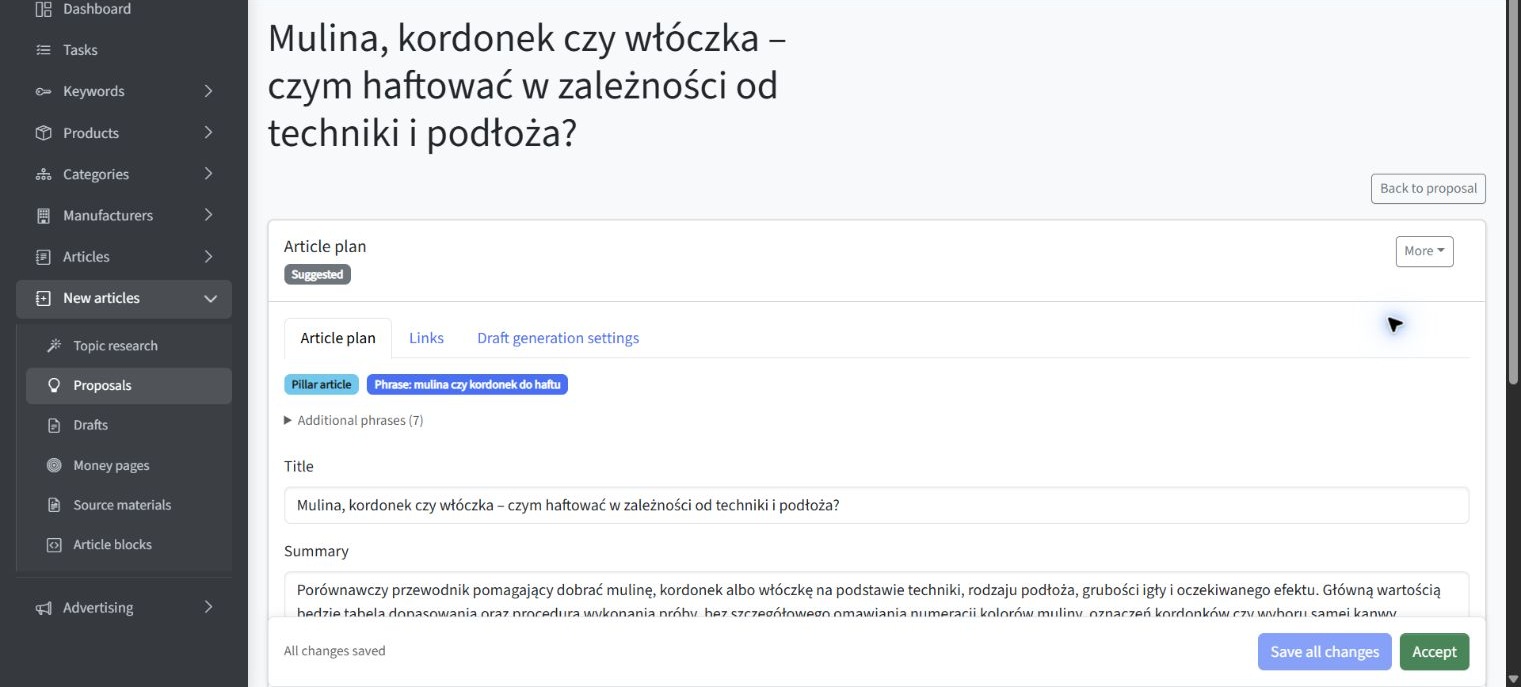
Explaining the feature also teaches readers how to prepare a brief. The plan does not replace expertise about the materials; it organizes the questions the article must answer.
4. Monitoring: show what to watch, rather than promise growth
The reader asks: “I’ve published the content. What should I check now?” That is a natural moment to demonstrate a data workflow, rather than insert a promotional chart without context.
Do not judge content by one position reading. Look at how a query behaves across several days, then consider impressions and a longer period. SEOAssistant’s daily view displays position history based on Google Search Console data. It helps identify queries worth investigating, but does not explain the cause of a change on its own.
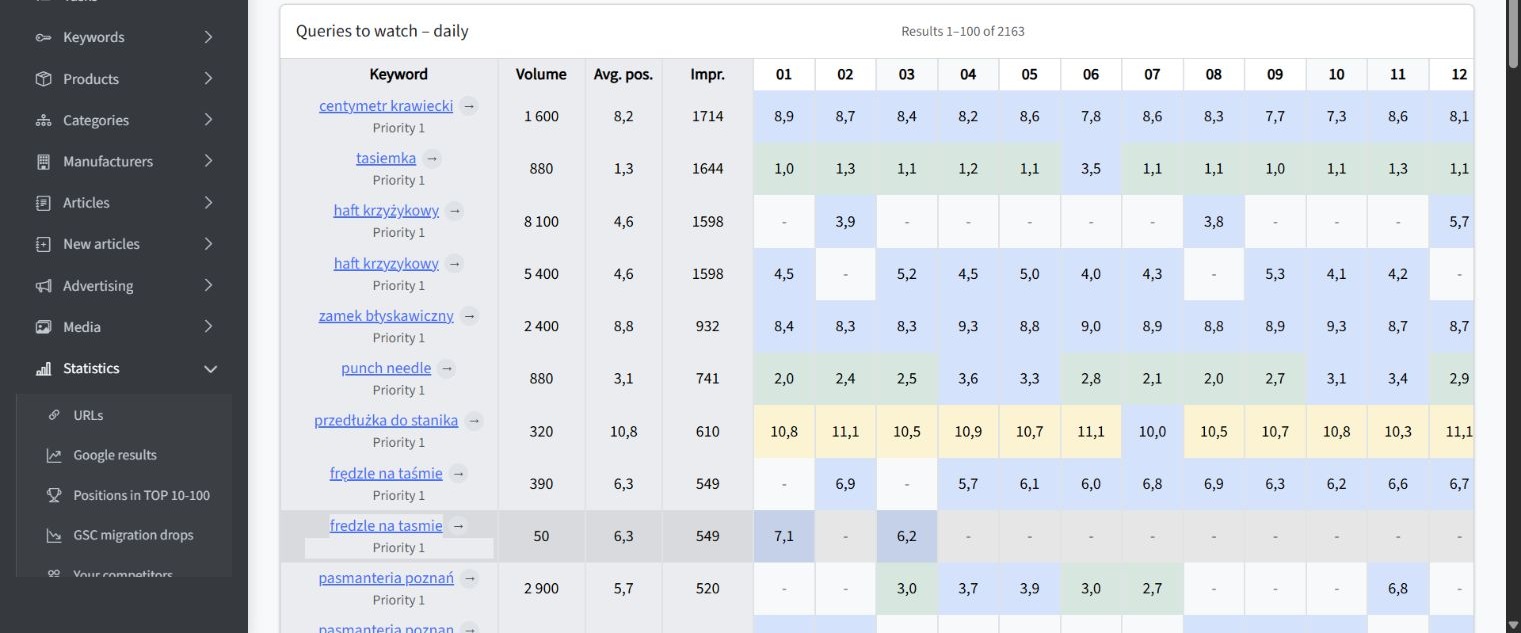
We demonstrate the tool while explaining how to interpret the data. We do not take credit for every green cell or suggest that each fluctuation calls for an immediate rewrite.
Sometimes the best block is no block
While preparing this library, we reviewed 23 existing article proposals that did not yet have drafts, with help from an assistant. We assigned 17 blocks across 11 relevant proposals. The other 12 received none.
For example, we did not add screenshots of our SEO module to Microsoft Clarity guides simply because both topics concern websites. A Search Console data view, on the other hand, could serve a specific purpose in a guide to analyzing search queries.
This was an assistant-supported editorial selection, not the result of running the application’s built-in bulk AI selection. The saved assignments belong to article plans. We are not presenting them as published articles or SEO results.
The principle matters more than the number of screenshots used: readers should get an answer to their question, not a compulsory product tour.
How to use this approach in your own business
- Choose a customer question. Start with a decision, problem or task, not the feature you want to promote.
- Collect your own material. A few photographs, examples, screenshots or expert explanations are enough to begin. Check publication rights and remove unnecessary data.
- Describe its meaning and limits. What does it actually show? What does it not prove? When was it created? Which section would it support?
- Plan before writing. Decide what answer the article will provide and select only the material that helps explain it.
- Ask AI to develop the narrative. Let it turn facts and examples into a guide without inventing undocumented experience.
- Review meaning, not just style. Check claims, the match between text and illustration, and whether images are readable on a phone.
- Revisit the library and published content. When the product, offer or process changes, review older examples too. Updating a library block does not automatically update every published article.
For a store, the material could be a product comparison and an explanation of practical uses. For a service business, it could show how work is carried out. For a software company, it could demonstrate a particular task or decision. The principle stays the same: start with something of your own to show, then write the explanation that makes it useful.
AI can speed up writing. Your material gives people a reason to read
We do not want SEOAssistant merely to produce more plausible paragraphs. We want it to help businesses use what they already have: their offer, expertise, materials and real ways of working.
Well-described blocks make those assets reusable without searching for every file from scratch. That does not mean pasting the same explanation into every article. A screenshot may support different questions, but it needs a clear reason to be in each piece.
Content becomes yours not because AI invents different sentences, but because it has something specific from your business to communicate.